The best label printers streamline packing, shipping, and inventory tasks for small businesses. This guide highlights five reliable 4×6 thermal label printers that work well with popular platforms like eBay, Amazon, Shopify, and USPS. Each option is evaluated by connectivity, label size support, ease of use, and total cost of ownership. Read on to compare features, set-up requirements, and performance data to help you choose the right model for your shipping workflow.
| Product | Brand |
|---|---|
| KNAON Bluetooth Thermal Shipping Label Printer | KNAON |
| NULLTONEX Bluetooth Thermal Shipping Label Printer | NULLTONEX |
| Phomemo D30 Label Maker | Phomemo |
| JADENS Bluetooth Thermal Shipping Label Printer | JADENS |
| Nelko Label Maker P21 | Nelko |
KNAON Bluetooth Thermal Shipping Label Printer
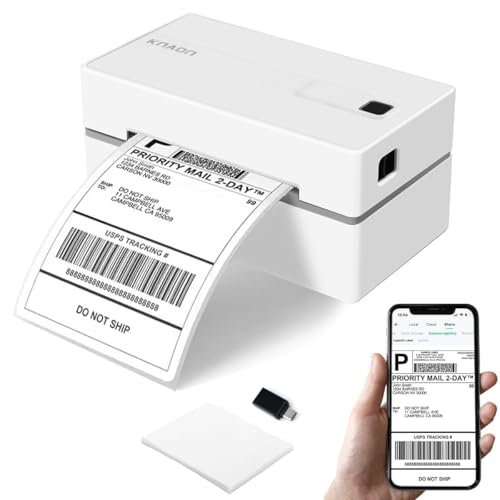
The KNAON device supports wireless printing via Bluetooth, with compatibility noted for iOS and Android through the FlashLabel Pro app. It also offers USB connectivity for macOS, Windows, ChromeOS, and Linux, plus a preloaded USB drive with drivers and tutorials. The printer supports a broad range of templates and fonts (3,000+ templates, 5,000+ icons, 100+ fonts) and is designed to print DIY shipping, barcode, and mailing labels on multiple thermal paper sizes, making it suitable for small businesses that manage varied packaging tasks.
NULLTONEX Bluetooth Thermal Shipping Label Printer

The NULLTONEX model supports multiple label widths from 1.57″ to 4.3″ and handles 4×6, 3×2, and other custom sizes, with 25 sheets of waterproof label paper included. It is compatible with Windows, macOS, iOS, Android, and Chromebook, using USB for most setups. Note that Mac and Chromebook devices may not support Bluetooth printing. This versatility helps with diverse shipping pipelines where different platforms are used across teams or buyers.
Phomemo D30 Label Maker

The Phomemo D30 is a portable Bluetooth label printer designed for home and office use. It supports continuous and fixed-length label tapes, delivers inkless thermal printing, and integrates with apps for extensive design options, including icons, text, tables, QR codes, and more. While it prints in black, users can select from color-patterned tapes for color accents. Its compact build makes it ideal for quick, on-the-go labeling tasks or small-space workbenches.
JADENS Bluetooth Thermal Shipping Label Printer

The JADENS label printer emphasizes high-tech printing with a 203 DPI thermal head and supports labels between 1.57″ and 4.1″ wide. It offers Bluetooth printing for Android and iOS on mobile devices, while a USB connection enables printing on Windows and Mac. The provider notes certain app limitations for PDF files on some devices, and recommended calibration steps after changing label sizes, highlighting the need for careful setup to minimize misalignment.
Nelko Label Maker P21

The Nelko P21 focuses on compact wireless operation with Bluetooth, designed for iOS and Android devices via the Nelko app. It also supports USB printing for Mac and Windows setups. The device emphasizes fast printing speeds with 203 DPI and a rechargeable battery for portability. It prints in monochrome and works with a variety of label tapes; color labeling requires specialized tapes. The guide notes some compatibility caveats with newer Android versions and certain devices, so app updates may be necessary for optimal performance.
Buying Guide
Connectivity and Setup
Choose a model that supports the devices you regularly use, whether it’s Bluetooth for mobile work, USB for desktop reliability, or both. Drivers and apps should be current and easy to install. Consider whether your team uses Windows, macOS, ChromeOS, iOS, or Android, and verify compatibility with the printer’s software ecosystem.
Label Size and Media
Verify supported label widths (commonly 1.57″ to 4.3″ for 4×6 labels) and whether the printer can accommodate common stock such as fanfold and roll labels. If your packaging uses special tapes or waterproof stock, confirm compatibility and any included starter supplies.
Print Quality and Speed
203 DPI is standard for clear shipping labels, with speeds ranging from modest to high. Faster printers reduce bottlenecks on busy days but may come at a premium. Consider a model with reliable auto-calibration and a low jam rate to maintain consistent runs.
Durability and Long-Term Costs
Thermal printers eliminate ink or toner costs, but you should assess drum life, duty cycles, and how many labels you expect to print per day. Higher-end models often offer extended support and driver-free operation, reducing maintenance time and costs.
Software Ecosystem
Templates, fonts, icons, and barcodes can significantly affect labeling efficiency. Some printers pair with robust companion apps offering thousands of templates and templates for barcodes, QR codes, and logos. If your labeling needs include complex designs, favor devices with flexible design tools.
Ecosystem Fit and Multi-Platform Workflows
For small teams working across multiple platforms, a printer that can simultaneously support desktop and mobile workflows minimizes disruptions. Look for models with reliable cross-platform support and consistent firmware updates to prevent compatibility issues as your tech stack evolves.
In choosing among these options, balance initial setup simplicity, ongoing running costs, and how well the device integrates with your current fulfillment and inventory processes. Each model presented here offers distinct advantages—Bluetooth mobility for on-demand labeling, USB robustness for desktop reliability, and a range of template resources to streamline shipping workflows. Your selection should align with your typical shipment volume, label types, and platform preferences.