For households and small offices, choosing a single device that can print, scan, copy, and sometimes fax can simplify workflows and save space. The following selections highlight reliable performance across color and monochrome output, with features like wireless connectivity, duplex printing, and user-friendly interfaces. Each option below emphasizes value, versatility, and ease of use for daily tasks—from drafting reports to digitizing documents. Use this guide to compare models that fit home desks or small workgroups, without sacrificing quality or convenience.
Summary of Selected Products
| Product | Brand | Type | Primary Strength |
|---|---|---|---|
| HP DeskJet 2855e Wireless All-in-One | HP | Inkjet All-in-One | Compact home use; AI-formatted prints |
| HP Color LaserJet Pro MFP 3301sdw | HP | Laser All-in-One | Fast color and reliable business performance |
| Canon PIXMA TS6520 | Canon | Inkjet All-in-One | Versatile home color printing and copying |
| Epson EcoTank ET-4800 | Epson | Cartridge-Free All-in-One | Low running costs with high-capacity tanks |
| Brother MFC-L3720CDW | Brother | Color Laser All-in-One | High-speed business-ready printing |
HP DeskJet 2855e Wireless All-in-One

The HP DeskJet 2855e combines color printing, scanning, and copying in a compact home-friendly chassis. It supports single-band Wi-Fi and includes three months of Instant Ink to help manage running costs. Print speeds reach up to 5.5 pages per minute in color and 7.5 ppm in black, with HP AI features designed to minimize wasted pages by removing extraneous content. A 60-sheet input tray provides basic capacity for everyday tasks such as to-do lists, forms, and recipes. This model is well-suited for light home-office use where space matters.
HP Color LaserJet Pro MFP 3301sdw

Designed for small teams, the HP Color LaserJet Pro MFP 3301sdw delivers professional color documents and reports with dependable print speeds up to 26 ppm in black or color. It emphasizes productivity with features like auto duplex printing and a user-friendly interface. The device is compatible with Original HP Toner Cartridges for reliable results, and it includes an automatic document feeder to streamline scanning and copying of multi-page work. This model targets office environments needing efficient, professional output.
HP DeskJet 2827e Wireless All-in-One

The DeskJet 2827e provides a compact all-in-one solution for home use, combining print, scan and copy capabilities with AI-enhanced formatting to ensure clean pages. A similar footprint to the 2855e, it supports color printing and a 60-sheet input tray. Included features emphasize everyday tasks such as documents and recipes, making it a practical choice for households that prioritize simplicity and dependable performance in a small footprint.
HP LaserJet Pro MFP 3101fdw

The LaserJet Pro MFP 3101fdw targets small offices with robust black-and-white capability, offering multifunction printing, scanning, copying, and fax. It features auto duplex printing and an Auto Document Feeder for efficient workflow, suitable for teams up to seven users. With fast print speeds and reliable wireless connectivity, this model helps maintain productivity in busy office settings while keeping operating costs predictable with toner efficiency.
HP DeskJet 4255e Wireless All-in-One
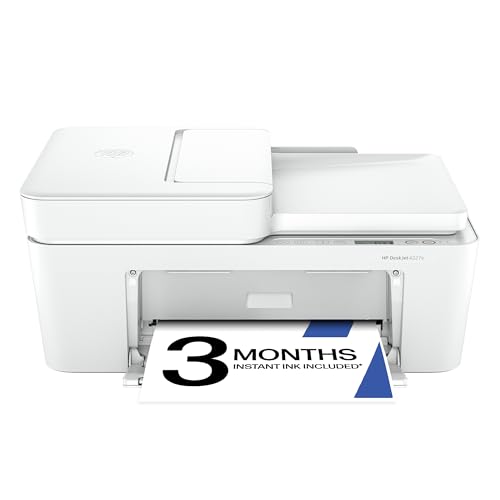
The DeskJet 4255e is designed for home use with all-in-one capabilities, including color printing, copy, scan, and a 60-sheet input tray. It includes a three-month Instant Ink trial to help manage ongoing costs and supports AI-driven formatting for neater prints. While it operates on a 2.4 GHz network, its feature set focuses on everyday tasks, making it a practical pick for households needing a versatile, compact device.
Canon PIXMA TS6520

The Canon PIXMA TS6520 emphasizes affordable versatility with duplex printing and a color LCD display. This home-friendly all-in-one supports scanning and copying, delivering strong color output and crisp text. Its compact footprint suits smaller desks while the OLED-like display and intuitive controls simplify setup and daily use for hybrid workers and families alike.
Epson EcoTank ET-4800

The Epson EcoTank ET-4800 stands out for cartridge-free operation, using high-capacity ink tanks and EcoFit bottles to simplify refilling. It provides all-in-one functionality with scanning, copying, fax, and Ethernet connectivity, making it ideal for home offices aiming to minimize ongoing ink costs and waste. The Micro Piezo printhead and color capabilities ensure clear documents and vibrant visuals across paper types, with an emphasis on long-term efficiency.
Brother MFC-L3720CDW

The Brother MFC-L3720CDW is a color laser all-in-one designed for productive workgroups, offering up to 19 ppm in color and monochrome. It includes a 50-sheet auto document feeder, a 250-sheet adjustable tray, and automatic duplex printing to optimize multi-page tasks. With dual-band wireless, Wi-Fi Direct, and USB connectivity, it supports flexible device access for multiple users and steady office workflows, while maintaining professional, laser-quality output.
Buying Guide
- Print technology and cost per page: Inkjet models (HP DeskJet, Canon PIXMA) excel on color and photos but may cost more per page than laser devices for heavy text printing. EcoTank models from Epson aim to reduce ongoing ink costs with refillable tanks.
- Connectivity: Evaluate Wi-Fi reliability, support for Ethernet or USB, and whether features like Wi-Fi Direct or mobile printing are important for your setup.
- Duplex and ADF: For multi-page documents, duplex printing saves paper, and an ADF speeds up scanning and copying of multi-page files.
- Paper handling: Look at input tray capacity and media support (photo paper, envelopes, legal size). Larger families or small offices may need higher tray capacities.
- Color vs. monochrome: If most tasks are text-heavy, a color laser model may be overkill; monochrome lasers are typically faster and cheaper to operate for office documents.
- Maintenance and running costs: Consider cartridge or bottle cost, replacement intervals, and whether the manufacturer offers cost-saving programs like Instant Ink or high-yield toner options.
- Space and design: For small desks, compact inkjets or all-in-ones with space-saving footprints are advantageous, while multiline printers should still provide a comfortable user interface.
- Future needs: If you expect growth or more frequent color prints, prioritize models with reliable color output, faster speeds, and scalable paper handling.