Choosing a reliable printer and scanner combo means balancing print quality, speed, connectivity, and cost per page. This guide highlights five standout all-in-one machines spanning cartridge-free ecosystems, smart apps, and versatile paper handling. Each pick supports scanning alongside printing, making it easy to digitize documents, photos, and forms from a single device.
| Product | Brand | Key Benefit |
|---|---|---|
| Epson EcoTank ET-2800 | Epson | Cartridge-free printing with economical refill bottles |
| HP DeskJet 4227e | HP | AI-assisted prints with broad wireless features |
| Canon imageCLASS MF273dw | Canon | Monochrome laser with fast output and robust scanning |
| HP OfficeJet 250 | HP | Portable all-in-one with battery option |
| Brother MFC-J1360DW | Brother | Duplex printing and cloud app integration |
The following sections review each product’s strengths, focusing on how well they balance printing speed, scanner capabilities, and overall value for homes and small offices. All sections stay concise and objective, drawing on listed features to inform purchase decisions.
Epson EcoTank ET-2800 All-in-One Supertank Printer

The Epson EcoTank ET-2800 is a budget-friendly all-in-one with cartridge-free printing, designed for home offices and light office use. It uses Micro Piezo Heat-Free Technology to deliver vivid text and refined color documents. With print speeds up to 10 pages per minute, it supports frequent tasks without frequent ink changes. The cartridge-free design uses ink bottles that replace hundreds of cartridges, drastically reducing replacement costs and waste. Scanning and copying are included, making this a straightforward, economical option for everyday documents and interest in occasional photo prints.
HP DeskJet 4227e Wireless All-in-One
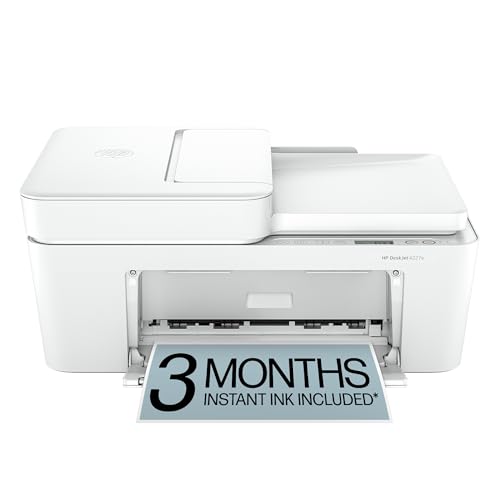
The DeskJet 4227e is a versatile home all-in-one with color printing, copying, and scanning. It offers print speeds suited to everyday tasks and emphasizes precise layout for web pages and emails. HP AI features help remove unwanted content for clean outputs, ensuring pages print neatly without wasted space. A 60‑sheet input tray and auto-document feeding support moderate workloads, while wireless connectivity enables printing from laptops, tablets, or smartphones. This model balances convenience with affordable operation for typical household use.
HP DeskJet 2827e Wireless All-in-One

The DeskJet 2827e is tailored for home use with solid color and black printing speeds and a practical 60-sheet input tray. It emphasizes HP AI-powered page formatting to minimize wasted paper, delivering clean, well-organized documents and emails. It includes scanning and copying functions, pairing well with a typical home office setup. The combination of easy setup and reliable performance makes it a solid option for households that require straightforward document handling and occasional photo printing.
Canon imageCLASS MF273dw

The Canon imageCLASS MF273dw is a monochrome laser multifunction device that merges printing, scanning, and copying with strong performance for busy offices. It can print up to 30 pages per minute and handles wireless connectivity with ease. The device features an auto document feeder for efficient scanning and copying of multi-page documents. Its fast first-page-out and robust reliability make it ideal for heavy document workflows in small offices, while the monochrome output keeps running costs predictable and low.
HP OfficeJet 250 Wireless Mobile Printer

The HP OfficeJet 250 is designed for mobility and compact spaces, offering wireless printing, scanning, and copying on the go. It includes a battery option, enabling printing away from fixed power sources. While its performance focuses on portability rather than peak speeds, it remains a capable all-in-one for travelers, remote workers, or users who frequently print or scan outside the main workspace. The integrated HP app supports quick smartphone-based operation and file management.
Brother Work Smart 1360 MFC-J1360DW

The Brother Work Smart 1360 is a compact, feature-rich all-in-one designed for home and light office use. It supports automatic duplex printing, a 20‑sheet ADF for single-sided multi-page documents, and a 150‑sheet paper tray. The 1.8-inch color display provides straightforward control, while cloud app compatibility enables scanning and printing to popular services like Google Drive and Dropbox. Engineered for productive everyday work, it delivers reliable prints with convenient online storage integration.
Buying Guide
Key considerations when selecting a printer-and-scanner combo include total cost of ownership, ink or toner strategy, print speed, and scanning features. Cartridge-free and high-yield ink systems can dramatically reduce ongoing costs for households with frequent printing. Consider EcoTank or refillable ink designs if you print many pages monthly. For faster text and business documents, a laser or high-speed inkjet options may be preferable, especially when volume is a priority. Scanning quality, color accuracy, and supported file formats influence how well a device fits digitization tasks like archiving, OCR, and workflow integration.
Connectivity options matter: Wi-Fi, Bluetooth, and mobile apps simplify printing from smartphones and tablets. Look for cloud-based scanning, automatic document feeders, and duplex (two-sided) printing for efficiency. Paper handling is a practical factor: check tray capacity, supported paper sizes, and whether the unit supports photo paper or specialty media. If you frequently work remotely or travel, a portable model with a battery option can be advantageous. Finally, warranties and service options differ; choose models with solid coverage and readily available replacement parts and inks.
From the picks above, consider your typical use cases: everyday home documents and photo prints, or more demanding office tasks with faster output and robust scanning. Each model offers a balanced mix of printing versatility and scanning capability, allowing you to digitize documents efficiently while maintaining manageable running costs.