Printable DVD media offers easy, professional labeling for archival videos, photo backups, and data storage. This guide highlights top options that provide inkjet print compatibility, durable storage, and reliable compatibility with common drives. The picks are best for home movie archivists, small studios, and anyone who wants edge-to-edge printable surfaces for clean, legible labels.
Summary table of selected products:
| Product | Format | Capacity | Print Type | Best For |
|---|---|---|---|---|
| Verbatim DVD-R Blank Discs 4.7GB White Inkjet Printable | DVD-R | 4.7GB | Inkjet Hub Printable | Video backups, bulk projects |
| Verbatim DVD+R 4.7GB White Inkjet Printable | DVD+R | 4.7GB | Inkjet Printable | Photo/video labeling with archival potential |
| PlexDisc DVD-R 4.7GB White Inkjet Hub Printable | DVD-R | 4.7GB | Inkjet Hub Printable | Bulk DVD labeling and distribution |
| PlexDisc TY Series DVD-R 16X 4.7GB White Inkjet Hub Printable | DVD-R | 4.7GB | Inkjet Hub Printable | Professional labeling with durable surface |
| Smart Buy 50 Pack DVD+r DL 8.5GB 8X Printable | DVD+R DL | 8.5GB | Inkjet Printable | Double-layer storage for larger projects |
Verbatim DVD-R Blank Discs 4.7GB White Inkjet Printable

Format: DVD-R, Capacity: 4.7GB. Print surface: White inkjet hub printable. Technology: High-speed Super AZO dye. This disc is ideal for archival-quality back-ups and bulk labeling with edge-to-edge inkjet printing. Best for buyers who need reliable general-purpose blank discs with a professional label finish.
Who it’s best for: Home archivists and small offices needing bulk, printable DVD-R media with durable ink absorption. Limitations: Ink compatibility depends on printer model and ink type; ensure your printer supports hub-printable discs for full coverage.
Verbatim DVD+R 4.7GB White Inkjet Printable

Format: DVD+R, Capacity: 4.7GB. Print surface: White inkjet printable hub. Features include archival-grade surfaces and high-resolution printing compatibility with printers up to 5,760 DPI. Best for projects that require vivid, long-lasting labels on a slightly different DVD format than DVD-R.
Who it’s best for: Users who prefer DVD+R format for slightly improved write compatibility and archival labeling. Limitations: Availability and compatibility may vary by disc drive and printer brand.
PlexDisc DVD-R 4.7GB White Inkjet Hub Printable

Format: DVD-R, Capacity: 4.7GB. Print surface: White inkjet hub printable, edge-to-edge printing supported. Comes in a 100-pack shrink wrap with wheel caps to reduce warping during transport. Best for bulk label-ready discs and professional-looking distribution gifts or archives.
Who it’s best for: Bulk projects and small studios needing reliable, printable discs with durable packaging. Limitations: Packaging is shrink-wrapped; container-free versions may differ in protection during transit.
PlexDisc DVD-R 4.7GB White Inkjet Hub Printable (Cake Box)

Format: DVD-R, Capacity: 4.7GB. Print surface: White inkjet hub printable, designed for full-surface labeling. Comes in a 100-pack with a cake box packaging solution for easy storage. Best for long-running labeling projects with professional edge-to-edge print results.
Who it’s best for: Organizations needing a ready-to-use, long-term solution with stable packaging. Limitations: Cake box packaging may be bulkier for tight storage spaces.
PlexDisc TY Series DVD-R 16X White Inkjet Hub Printable
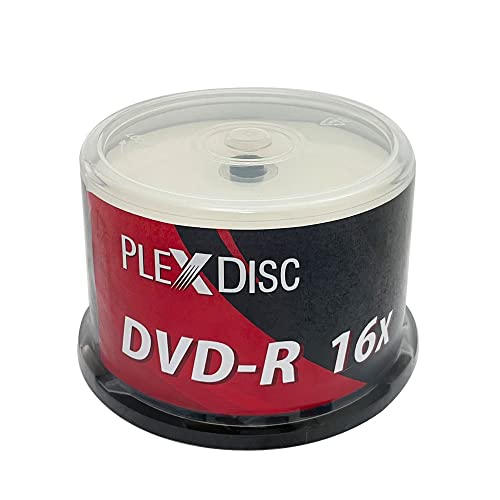
Format: DVD-R, Capacity: 4.7GB. Print surface: White inkjet hub printable with edge-to-edge printing. Pack: 50 discs with a reusable spindle in a Frustration-Free packaging. Best for professionals needing high-quality prints and organized storage with a reusable container.
Who it’s best for: Professional creators and archivists who value packaging quality and long-term storage. Limitations: 50-disc count may require frequent reorders for large-scale projects.
Smart Buy 50 Pack DVD+R DL 8.5GB Printable

Format: DVD+R Double Layer (DL), Capacity: 8.5GB per disc. Print surface: White inkjet printable. Features: 8X write speed, widely compatible with DVD writers, players, and drives. Best for large data projects needing more capacity per disc and efficient backups.
Who it’s best for: Users with large media libraries or backups that require more space per disc. Limitations: DL discs can be slightly more fragile and require precise burning to avoid compatibility issues on older players.
Buying Guide: Printable DVD Media Essentials
What format should I choose?
DVD-R and DVD+R are the two most common formats. DVD-R is widely compatible with most players, while DVD+R can offer slightly better error management on some drives. For archival labeling, both formats with inkjet hub-printable surfaces deliver durable, professional labels.
Is hub printing better than full-surface printing?
Hub printing prints on the central area and reduces ink usage, while full-surface printing covers the entire surface. Full-surface is ideal for bold, graphic labels, but hub printing still yields crisp results and tends to be more printer-friendly on some models.
What about double-layer discs?
DVD+R DL discs provide higher capacity (8.5GB) per disc, great for large video files or backups. They require compatible burners and players and can be slightly more expensive per disc. Choose DL when you need more storage in fewer discs.
How does packaging affect protection during shipping?
Packaging types vary from shrink-wrapped packs to reusable spindles and cake boxes. Reusable spindles help with long-term storage and dust control, while cake-box packaging can be convenient but bulkier. Consider your storage space and transport conditions when choosing packaging.
What should I check before buying?
- Printer compatibility with inkjet disc printing (edge-to-edge vs. hub printing).
- Disc format compatibility with your drives and players.
- Storage capacity per disc and the total amount required for your project.
- Packaging and durability during shipping and storage.
- Availability of archival-grade surfaces and ink-absorption quality on your printer model.
FAQ
- What is the difference between DVD-R and DVD+R for printable media?
DVD-R is widely compatible; DVD+R can offer better write management on some drives. For printable labeling, both formats work well with inkjet printers if hub-printable surfaces are present. - Can I use any inkjet printer to print on printable DVDs?
Most consumer inkjet printers support edge-to-edge or hub printing on printable discs. Check your printer’s media type compatibility and whether it supports printable discs in the tray settings. - Are DL (Double Layer) discs worth the extra cost?
If you need more than 4.7GB per disc, DL discs save space and reduce the number of discs. They may cost more and require compatible burning hardware and playback devices. - How should I store printable discs to extend label quality?
Store in a cool, dry place and avoid direct sunlight. Use spindle boxes or cases that protect from dust and scratches to preserve ink longevity on the label. - What is edge-to-edge printing versus hub printing?
Edge-to-edge printing covers nearly the entire disc surface, enabling bold designs. Hub printing prints primarily in the central area, using less ink and reducing potential printer errors on some devices. - Are these discs archival-grade?
Many printable discs advertise long archival life, but actual longevity also depends on storage conditions, printing ink, and disc handling. Look for discs with durable dye technology and compatible archival claims from the brand.