Powerline adapters use your home’s electrical wiring to extend a wired network to rooms where Wi‑Fi is weak or where running Ethernet cables isn’t practical. Below are five top TP-Link and NETGEAR options, plus a Netgear model, selected for reliability, range, and compatibility with modern home networks. Each entry includes a quick spec read and practical considerations to help compare setups. The list emphasizes AV2 and AV1x standards, passthrough outlets, and dual‑port or Wi‑Fi extender capabilities for flexible coverage.
| Product | Type | Key Benefit | Ideal For |
|---|---|---|---|
| TP-Link TL-PA9020P KIT | AV2000, Passthrough | 2×2 MIMO, two Gigabit ports | Multi‑story homes needing strong wired backhaul |
| TP-Link TL-PA7017 KIT | AV1000, Passthrough | Compact, easy plug‑and‑play | Small to medium homes needing simple expansion |
| TP-Link TL-PA4010 KIT | AV600 | Basic, affordable wired extension | Budget upgrade for streaming and light gaming |
| NETGEAR PLP2000-100PAS | AV2000, Passthrough | Two GbE ports, strong performance | High‑bandwidth needs in large homes |
| TP-Link TL-WPA7817 KIT | AV1000 + Wi‑Fi | Powerline and wireless mesh in one | Wi‑Fi dead zones with wired fallback |
TP-Link AV2000 Powerline Kit TL-PA9020P

TP-Link’s AV2000 TL-PA9020P KIT delivers high‑speed wired connectivity over existing electrical wiring, designed for large homes with thick walls and multiple levels. It uses HomePlug AV2 technology to extend a wired backbone up to 750 feet, depending on wiring quality and circuit layout. The kit includes two adapters, with one passing through power to avoid losing an outlet in use. A notable caveat is that performance tops out at your internet plan’s limit, and actual speeds may vary with electrical conditions and circuit sharing.
Key features include dual Gigabit Ethernet ports for devices like PCs, game consoles, or a network‑attached storage, plus a plug‑and‑play setup that minimizes configuration steps. The device notes that adapters should be on the same electrical circuit and that surge protectors can disrupt connectivity. For multi‑story homes with a central router, this kit can effectively eliminate weak zones by providing a stable wired connection to distant rooms or to streaming devices that demand low latency.
TP-Link AV1000 Powerline Kit TL-PA7017 KIT

This AV1000 kit emphasizes a compact, budget‑friendly approach to expanding a home network. It supports AV1000 speeds over existing electrical wiring and provides two Ethernet ports, making it suitable for linking a smart TV, gaming console, or a desktop PC to the router without additional cabling. The “pair and play” setup aims to simplify installation, and its passthrough option helps to preserve a wall outlet for other devices. It is broadly compatible with TP‑Link powerline adapters and works well in multi‑story homes where wired lines would otherwise be challenging to run.
TP-Link AV600 Powerline Kit TL-PA4010 KIT

The TL‑PA4010 KIT targets simpler setups with AV600 speeds, a basic two‑unit configuration, and plug‑and‑play ease. This kit is ideal for extending wired connectivity to areas where a streaming device or a small office needs a reliable connection. It offers a low power footprint and straightforward performance suitable for HD video streaming and light online gaming. The compact form factor makes it easy to position around the home, though it may be less future‑proof for demanding 4K streaming or heavy‑load gaming compared to AV1000 or AV2000 models.
NETGEAR Powerline Adapter Kit PLP2000
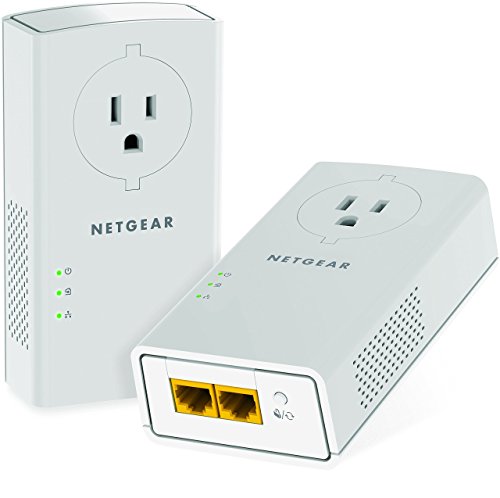
Netgear’s PLP2000‑100PAS is designed for high‑bandwidth needs with AV2000 speeds, dual Gigabit Ethernet ports, and passthrough outlets to keep power sockets available. It leverages Powerline technology to extend your existing internet service across your home’s electrical wiring while maintaining strong throughput for streaming, gaming, and smart TVs. It emphasizes that this is not a Wi‑Fi device, so if you need wireless access in addition to wired ports, pairing with a separate Wi‑Fi extender or router may be necessary. Proper placement and consistent circuit conditions will influence performance, especially in larger homes with multiple electrical circuits.
TP-Link AV1000 Passthrough Kit TL-PA7017P KIT

The TL‑PA7017P KIT blends AV1000 data rates with passthrough outlets and noise filtering. It aims to minimize interference from household devices while extending network reach to far corners of the home. This kit is designed to be added alongside other Powerline devices and is compatible with TP‑Link’s AV2 ecosystem, which helps ensure broader interoperability for mixed device setups. Consider this option when you want to preserve every wall outlet for other devices and still require dependable wired performance for 1–2 rooms or a media center.
Buying Guide: Key Considerations For Powerline Adapters
When selecting a powerline kit, several factors determine real‑world performance and suitability for your home environment:
- Powerline Standard: AV2 generally delivers better range and reliability than AV1 for most homes, especially with multi‑story layouts. Check for devices that explicitly mention AV2 compatibility and HomePlug AV2 support.
- Speeds And Throughput: AV600, AV1000, and AV2000 denote theoretical maximums. Real speeds depend on circuit length, wiring quality, and interference from appliances. Aim for AV1000 or AV2000 if you plan 4K streaming, gaming, or large file transfers.
- Outlets: Passthrough outlets protect wall sockets for use by other devices. If you need to place the adapter near a power strip, consider how the outlet configuration may affect performance.
- Number Of Ports: Dual Ethernet ports are beneficial for connecting multiple devices directly. Some models combine wired backhaul with built‑in Wi‑Fi extenders for broader coverage.
- Router Compatibility: Powerline adapters extend the existing network; they do not replace a router. Pairing with a strong router and, if needed, a Wi‑Fi extender can optimize coverage in large homes.
- Electrical Circuit Considerations: Adapters work best on the same electrical circuit. They may underperform if the circuit is split across different breakers or if surge protectors are in the path.
- Placement Strategy: Place adapters away from high‑interference devices (microwaves, dimmers) and ensure direct outlet connection for best results. Avoid placing adapters behind furniture or inside power strips when possible.
Comparison At A Glance
- Best For High Bandwidth: AV2000 options (TL-PA9020P, PLP2000) provide the strongest wired throughput, suitable for large homes or media centers.
- Best Value: AV1000 kits (TL-PA7017, TL-WPA7817) strike a balance between cost and performance, appropriate for most mid‑sized homes.
- Best For Wi‑Fi Extension: Models with built‑in extenders (TL-WPA7817) offer combined wired and wireless coverage, useful for eliminating dead zones.
- Compact And Simple: AV600 kits provide straightforward setup and adequate performance for standard HD streaming and light gaming in smaller spaces.
Powerline adapters are a practical option when wiring is impractical but a robust, wired connection is needed. The listed models span a range of speeds, outlets, and wireless capabilities, enabling a flexible upgrade path for different home layouts and budgets. Users should assess wiring quality, circuit configuration, and coverage needs to select the most suitable kit.