When you need to duplicate a single HDMI source across two or more displays, a powered HDMI splitter is essential. This guide highlights five reliable options that support up to 4K and preserve signal integrity. All models listed are designed to mirror one input to multiple outputs, ideal for presentations, retail displays, or home entertainment setups where extending the screen isn’t required. Below you’ll find quick product notes, specs, and a practical buying guide to help you choose the right powered splitter for your needs.
| Product | ||||
|---|---|---|---|---|
| MT-VIKI SP102 1×2 | 4K@30Hz | 2 | Powered | Mirror only, not extend |
| MT-VI K I 1×4 | 4K@30Hz | 4 | Powered | Mirror only, supports 4K |
| OREI HD-102 | 4K@30Hz | 2 | Powered | Mirror only, HDCP 1.4 |
| J-Tech Digital JTD-MINI-1X2SP | 4K@60Hz | 2 | Powered | Supports 4:2:0; mirror only |
| OREI UHDS-104 | 4K@60Hz | 4 | Powered | EdID management, mirror only |
MT-VIKI SP102 4K HDMI Splitter 1 In 2 Out

The MT-VIKI SP102 is a powered HDMI splitter that duplicates one HDMI input to two TVs or monitors. It supports up to 4K at 30 Hz and is compatible with HDMI 1.4/1.3/1.2 and HDCP 1.4. It is designed for mirroring content to two displays and does not extend the desktop. Users should ensure both output displays and HDMI cables support the chosen resolution to achieve 4K quality. A power adapter is included for reliable performance.
MT-ViKI 1×4 HDMI Splitter with AC Power

This powered 1 in 4 out HDMI splitter duplicates a single HDMI source to four displays. It supports 4K x 2K at 30 Hz and Full HD 1080p, plus 3D and rich color depth. The device is plug-and-play with no software required. For 4K output, both input and output devices must support 4K; HDCP 1.4 compatibility is noted, with a suggestion to upgrade to an 8K splitter if you require HDCP 2.2 on compatible devices.
OREI HDMI Splitter 1 In 2 Out – HD-102

The OREI HD-102 is a 1×2 HDMI duplicator designed for mirror displays. It supports up to 4K/30 Hz and 1080p, with HDCP 1.4 compatibility. The package includes a dual voltage power supply and a user manual. It is suitable for devices like Blu-ray players, streaming sticks, and game consoles. The product emphasizes mirror capability rather than extending the desktop across multiple displays.
J-Tech Digital 1×2 4K Splitter

The J-Tech Digital 1×2 splitter distributes one HDMI source to two displays simultaneously with up to 4K@60Hz support. It handles 4:2:0 chroma subsampling and a broad range of audio formats, including Dolby and DTS variants. It is a straightforward, plug-and-play solution that requires a compatible HDMI source and displays. The device is intended for mirror outputs rather than extended desktops.
OREI UltraHD 4K 1×4 HDMI Splitter

The UHDS-104 is a four-output HDMI splitter that duplicates one HDMI input to four outputs at up to 4K/60 Hz. It includes EDID management and supports a wide audio range, including LPCM, Dolby formats, and DTS variants. HDCP 2.0 compatibility depends on the input and output devices, and a dual-voltage power supply is included. Ideal for sending identical content to multiple displays in retail or home theater contexts.
Wonlyus HDMI Splitter 1 In 2 Out
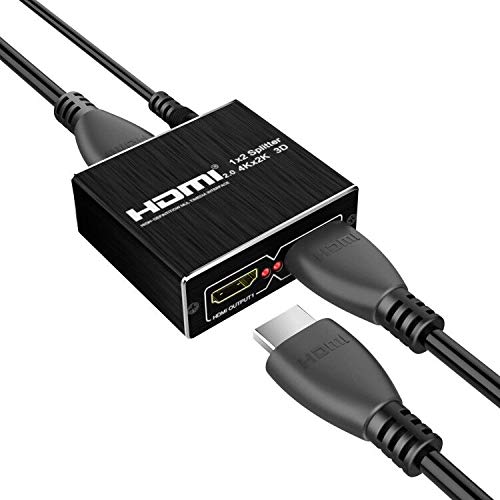
The Wonlyus 1×2 HDMI splitter distributes one input signal to two identical outputs with support for 4K resolution and 3D content. It highlights broad compatibility with standard HDMI devices and notes 4K 60 Hz and various color depth levels. It is designed for mirror output, not extending desktops, and is suitable for home entertainment setups requiring duplicated displays.
Buying Guide: Key Considerations For Powered HDMI Splitters
Purpose and compatibility: Confirm that the splitter is designed for mirroring (not extending) and that both input sources and displays support the desired resolution. For 4K setups, ensure cables and devices are rated for 4K/60 Hz if required.
HDMI version and HDCP: Check HDCP compatibility (1.4 vs. 2.2) and HDMI versions to match your source devices. Some devices may require HDCP 2.2 compatibility for 4K content on newer displays.
Number of outputs: Choose a splitter that matches the number of displays you intend to drive. Powered units generally offer stronger signal integrity over longer cable runs.
Power requirements: Powered splitters include external adapters to stabilize the signal, particularly when driving multiple displays or long HDMI cables. Verify included power supplies and cable lengths.
EDID management: Some models offer EDID control to ensure displays negotiate appropriate resolutions. This can help avoid handshake issues with mixed display types.
Physical durability and cooling: Heavier, metal housings tend to dissipate heat better during prolonged use. Consider enclosure quality if the splitter will run for extended periods.
Remote and ease of use: If you switch between devices often, an improved user experience with a simple switch or remote can be beneficial, though most splitters focus on plug-and-play, no-fuss operation.
Usage scenarios: For home theaters, conference rooms, or storefronts, assess whether the mirrors will be used primarily for passive viewing or for synchronized multi-displays to support a single source across several screens.