The bar environment demands fast service, reliable hardware, and flexible payment options. This guide highlights top POS systems that balance speed, durability, and ease of use for bartenders and managers. Each option supports bar-specific needs such as quick ringups, inventory tracking, secure cash handling, and seamless receipt printing. Explore five carefully chosen products to help you choose a system that fits your bar’s size, traffic, and workflow requirements.
| Product | Brand | Key Benefit |
|---|---|---|
| All-in-One SmartPOS NX Professional Cash Register | PETROSOFT | Comprehensive, subscription-free functionality |
| ASSUR POS System, 15” Touch Screen | ASSUR | High-resolution display with Windows OS option |
| Liquor Store Point of Sale System | The Perfect POS | Turnkey bundle with complete hardware and software |
| NewHail 15.6″ Touchscreen Monitor | NewHail | Flexible integration with existing POS hosts |
| NewHail 17″ POS Touch Screen Monitor | NewHail | Robust, wide compatibility for busy bars |
All-in-One SmartPOS NX Professional Cash Register

The PETROSOFT SmartPOS NX is a professional, all-in-one POS system designed for small businesses, including bars. It features a 15.6″ cashier touchscreen, a customer-facing VFD display, a cash drawer, a wireless barcode scanner, and a thermal receipt printer to support rapid checkout. The system emphasizes a robust, professional setup with no hidden fees or forced subscriptions, enabling a predictable operating cost. It also highlights broad integration, offering more than 50 card processor integrations to fit various payment ecosystems without extra hardware investments.
Key considerations for bars include fast ticket processing, reliable receipt printing, and flexible payment options. This model’s all-in-one format reduces clutter behind the bar and simplifies maintenance. With a wide processor integration portfolio, managers can select preferred card processors and forecourts, streamlining reconciliation and banking. The device’s comprehensive feature set is aimed at high-traffic venues where speed and reliability matter most.
ASSUR POS System With 15” Touch Screen
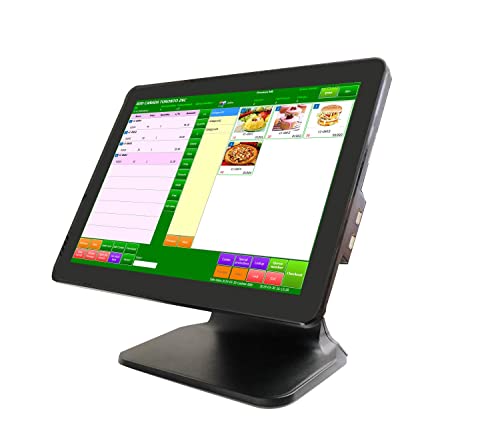
The ASSUR POS System combines a 15” touchscreen with Windows 10 Pro and an upgraded CPU (Intel Celeron J6412) to deliver solid performance for bar operations. It includes 4GB RAM and 128GB SSD, plus built-in WiFi and robust display quality. The system is designed for compatibility with Linux and Windows-based POS software as well as various receipt printers and cash drawers. This flexibility helps bars select software that aligns with their inventory, sales reporting, and customer management needs while maintaining a reliable hardware baseline.
In a bar setting, reliability and compatibility matter. The ASSUR unit’s emphasis on a high-resolution display ensures clear order entry and visibility for staff, while Windows 10 Pro support enables a wide range of software options. The configuration supports long service life in busy environments where frequent use is expected and quick upgrades may be needed to keep up with software changes.
Liquor Store Point of Sale System

This liquor-focused POS kit from The Perfect POS is a turnkey solution designed for liquor stores and bars. It bundles a 15″ Windows 10 Pro touchscreen PC, a thermal receipt printer, a USB barcode scanner, a 16″ cash drawer, a USB keyboard, a USB card reader, and an accompanying payment pinpad. The package includes 30 days of initial remote setup and training, plus ongoing remote care support, warranty coverage, and software training. The bundled hardware and software provide a one-stop solution for inventory tracking, sales reporting, and secure payment processing in busy bar environments.
For bar managers, the value lies in an integrated set of tools that simplify daily operations—from stock control and price changes to end-of-day settlements. The inclusion of a dedicated payment pinpad can help streamline card-present transactions. While the bundle is designed for versatility across retail and hospitality, bars should evaluate software compatibility and ongoing service terms to ensure it fits with current workflows and reporting needs.
NewHail 15.6″ Touchscreen POS Monitor

The NewHail 15.6″ touchscreen POS monitor is designed to complement an existing POS host. It does not include an operating system, which offers flexibility for bartops that want to pair the display with their preferred computer or mini PC. The monitor supports Windows OS versions (7/10/11/XP) and other operating systems, with USB touch input and HDMI/VGA display outputs. Built on a heavy-duty metal stand, it emphasizes stability for high-traffic bar environments and aims to reduce display wobble during fast-paced service.
Buyers should consider the compatibility of their POS software with this monitor and the need for a separate computer. The wide OS support and durable construction make it a practical upgrade for bars seeking larger or second-order displays for staff or customers, without committing to a full system rebuild.
NewHail 17-Inch POS Touch Screen Monitor

This 17-inch NewHail monitor offers a larger display with a 1280×1024 capacitive touchscreen and HDMI/VGA inputs. Its robust metal stand is designed for heavy use in bars, kitchens, or back-of-house areas where staff require quick, accurate touch input. The monitor supports up to 10 touch points and is compatible with USB touch, HDMI, and VGA connections. The unit does not include a built-in operating system, allowing bars to pair it with their existing host computer or POS system and customize the setup to their workflow.
Key considerations for large displays include readability from a distance, mounting options (VESA compatibility), and integration with the bar’s software. The 17″ model balances screen real estate with desk/behind-bar space constraints, making it suitable for cashier stations or kitchen order screens adjunct to the main POS module.
Buying Guide: Key Purchase Considerations For Bar POS Systems
- Hardware integration and footprint: Bars often need compact, clutter-free setups. All-in-one solutions reduce cables, while separate monitors allow flexible station layouts behind the bar.
- Operating system and software compatibility: Ensure POS software supports Windows or Linux options you use, plus easy upgrades and reliable drivers for peripherals.
- Durability and reliability: Look for rugged enclosures, metal stands, and spill/dust resistance to withstand busy bar environments.
- Payment processing options: A system with broad processor integrations offers flexibility in choosing card processors and forecourts, reducing hardware constraints.
- Inventory and reporting features: Bars benefit from real-time inventory updates, drink recipes, and sales analytics to optimize stock and promotions.
- Receipt printing and cash handling: A reliable thermal printer, secure cash drawer, and easy-to-use interfaces speed up service and improve accountability.
- User experience: Quick-keys, intuitive layouts, and staff training requirements influence speed of service and staff adoption.
- Support and warranties: Consider remote setup, training options, and the availability of timely support to minimize downtime.
- Future scalability: Assess whether the system can grow with your bar, including loyalty programs, multi-location management, and integration with POS hardware.
- Cost structure: Understand pricing models, including hardware costs, software licenses, and any ongoing subscription or service fees.
Across these options, operators should compare total cost of ownership, ease of maintenance, and fit with existing workflows. For smaller bars, an all-in-one solution with built-in peripherals may reduce setup complexity, while larger venues may prioritize flexible displays and multiple peripheral integrations to support busy service windows. Always verify delivery timelines, warranty terms, and software support when finalizing a purchase.