The best Mac-friendly POS systems combine reliable receipt printing, easy scanning, and solid software compatibility. Below is a curated set of Mac-compatible devices and peripherals that work well in restaurant, retail, and small business environments. Each product is chosen for compatibility with macOS and common POS workflows, without including prices or unrelated services.
| Product | Brand | Category |
|---|---|---|
| RP850 Receipt Printer | Rongta | 80mm Thermal Receipt Printer |
| RP332 Receipt Printer | Rongta | 80mm Direct Thermal Printer |
| Volcora 80mm Printer | Volcora | Thermal Receipt Printer (USB/Ethernet) |
| MUNBYN 80mm Printer | MUNBYN | USB Thermal Receipt Printer |
| ASSUR POS System | ASSUR | All-in-One POS Hardware |
These devices cover essential POS roles: fast receipt printing, reliable cash-drawer triggering, barcode scanning, and a robust hardware foundation for macOS-based POS software. The list emphasizes USB/Ethernet connectivity, ESC/POS or similar command support, and straightforward driver and setup options to minimize macOS integration friction.
Rongta RP850 Receipt Printer

The Rongta RP850 is a compact 80mm thermal receipt printer designed for Windows, Mac, and Linux environments. It offers USB, serial, and Ethernet interfaces, along with an ESC/POS command set to drive compatibility with common macOS POS software. Notable is the absence of Wi-Fi or Bluetooth in some configurations, which helps maintain stable connections in busy checkout lines. The device supports a sound and light indicator with a configurable “voiceless” mode. It can print receipts and symbols and can drive a connected cash drawer. When used with macOS-based POS apps, ensure the proper driver package and TCP/IP setup is applied for reliable operation.
Key considerations for Mac users:
– Ensure driver availability for macOS and hardware TCP/IP setup if using Ethernet.
– Confirm compatibility with your POS software’s ESC/POS commands.
– Plan for sound settings to meet quiet store requirements in customer-facing environments.
Rongta RP332 Direct Thermal Printer

The Rongta RP332 is another 80mm direct thermal receipt printer with USB, serial, and Ethernet options. It supports Windows, Mac, and Linux, and is designed to handle cash drawer integration and multi-platform deployments. The included USB disk offers user guides and drivers to facilitate setup on macOS, with a focus on ESC/POS/OPOS compatibility. Like the RP850, it provides a configurable sound option and a print workflow suitable for busy retail or restaurant counters. For Mac setups, ensure the correct driver version and network configuration if using Ethernet or TCP/IP printing.
Mac users should verify:
– Availability of macOS drivers and easy driver installation flow.
– Compatibility with your POS software’s printer commands.
– The ability to coach staff through the printer tool’s Voiceless setting if needed.
Volcora 80mm Printer With USB/Ethernet

Volcora’s 80mm receipt printer offers USB and Ethernet interfaces, designed for Windows, Mac OS, Linux, and general POS ecosystems. It supports a high-speed 260mm/s print rate and an automatic cutter rated for up to 1.5 million cuts. The device uses direct thermal printing (no ink ribbons) and includes RJ11 cash-drawer connectivity. The Ethernet variant enables broader networked POS setups and can be used with macOS-based POS software that accepts ESC/POS commands. However, check that your chosen POS software does not rely on unsupported integrations like certain delivery platforms.
Consider these when selecting for Mac:
– Confirm macOS driver and SDK support for custom apps.
– Assess whether Ethernet is required for your network layout or if USB suffices.
– Plan for maintenance of the auto-cutter in high-volume environments.
MUNBYN 80mm USB Thermal Printer

The MUNBYN 80mm USB Thermal Receipt Printer emphasizes USB connectivity with an easy plug-and-play setup, direct thermal printing, and an auto cutter. It is positioned for various sectors including retail and hospitality and is designed to be wall-mounted for space-saving layouts. It does not support Ethernet or WLAN in standard configurations, which can simplify setup on macOS if your POS system uses direct USB connections. The printer supports ESC/POS commands and features over-temperature protection to extend print head life.
Mac-focused notes:
– Ensure USB is the only interface required by your POS app to avoid driver conflicts.
– Verify ESC/POS compatibility with your software’s receipt templates.
– Consider wall-mount usage to optimize counter space on busy Mac-based kiosks.
ASSUR POS System
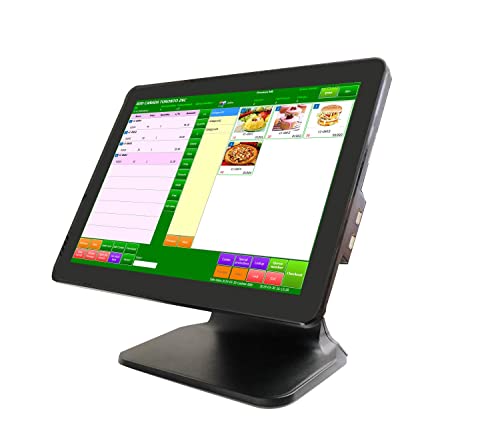
ASSUR provides an all-in-one POS hardware option featuring a 15-inch touch screen, an Intel Celeron J6412 CPU, 4GB RAM, and a 128GB SSD, running Windows 10 Pro. While this is a complete POS solution, macOS support is indirect. The system is designed to host POS software and connects with compatible receipt printers and cash drawers. It ships with a Windows environment but can be paired with macOS workflows via virtualization or remote access for unified retail operations. When evaluating for Mac-only environments, plan for virtualization software or cross-platform POS software compatibility.
Mac-oriented considerations:
– Confirm that your POS software can run on Windows hardware via virtualization, Boot Camp, or cross-platform apps.
– Check for compatibility with common receipt printers and cash drawers used in your store.
– Evaluate network stability and security in a Mac-centric office or store.
Buying Guide: Key Purchase Considerations For Mac POS Setups
To select the best Mac-compatible POS hardware, consider the following perspectives and criteria:
- Mac compatibility and drivers: Verify macOS driver availability, updates, and the ease of setup. Look for devices with ESC/POS or OPOS support and documented macOS instructions.
- Connection methods: USB is simple and reliable for single-station setups; Ethernet serves larger layouts or multi-station configurations. Consider whether Wi-Fi or Bluetooth is required by your environment; note that several models do not support wireless printing.
- Printing speed and durability: High-speed printers (260mm/s) minimize line times. Auto cutters should withstand high-volume operation, and print heads should include protection features to extend longevity.
- Cash drawer integration: Ensure the printer can trigger the cash drawer via RJ11 or similar interfaces and that your POS software supports this workflow on macOS.
- Software compatibility: Check if your preferred macOS POS app supports your hardware’s command set (ESC/POS, OPOS, or vendor-specific protocols) and whether SDKs are available for custom integrations.
- Physical footprint and placement: Wall-mounted printers and compact counters save space. Consider the layout of your store or restaurant to determine the ideal form factor and mounting options.
- Support and updates: Favor brands with clear documentation, active support channels, and regular firmware or driver updates to ensure macOS compatibility with evolving POS software.
- Security and reliability: For hospitality environments, prioritize devices with stable network options and predictable behavior under load. Avoid devices that rely on unstable wireless connections if your network is not robust.
- Cost of ownership: Beyond the purchase price, factor in the cost of consumables (paper rolls), potential extra cables, and software licenses required for Mac-based POS deployments.
In practice, a Mac-based POS setup often combines a reliable 80mm receipt printer with a compatible scanner and a robust POS workstation. The selection shown here offers options across USB and Ethernet connections, clear command compatibility, and devices designed for quick deployment in small to mid-size retail or hospitality environments. Always validate your chosen combination with a short pilot in your store to confirm stability before full deployment.