When you need reliable cooling on the move, a portable laptop cooler is essential. This guide highlights five compact, USB-powered pads designed for 12″–17.3″ laptops, focusing on quiet operation, adjustable angles, and sturdy surfaces. Ideal buyers include students, travelers, remote workers, and gamers who need active cooling without extra bulk. The following table summarizes the standout options chosen for this comparison.
| Product | Brand | Key Benefit | Best For |
|---|---|---|---|
| HV-F2056 15.6″-17″ Laptop Cooler | havit | Slim, ergonomic stand with 3 fans | On-the-go professionals needing portability |
| Kootek 5-Fan Laptop Cooling Pad | Kootek | High cooling power with 5 fans | Power users and gaming laptops |
| Targus 17 Inch Dual Fan Chill Mat | Targus | Dual fans on soft neoprene cushion | Comfortable lap use |
| SHUWEI Portable Laptop Cooling Stand | SHUWEI | 3 speeds, foldable aluminum design | Travel-friendly with solid build |
| KLIM Tempest Laptop Cooler | KLIM | 4000 RPM vacuum-style cooling and auto/manual modes | Maximum cooling for intensive tasks |
Havit HV-F2056 15.6″-17″ Laptop Cooler

The Havit HV-F2056 is a slim, USB-powered cooling pad designed for 15.6″ to 17″ laptops. It uses three fans arranged to deliver steady airflow across the laptop’s underside. The pad also doubles as an ergonomic stand with two adjustable height settings, improving typing posture and screen viewing angles. Its metal mesh surface ensures a stable platform for carrying and use on laps or desks. Best for commuters who want a lightweight, unobtrusive cooler that also improves typing comfort during extended sessions. A potential limitation is that the three fans may be less intense on very demanding gaming rigs or highly heat-charging workloads compared to multi-fan setups.
- Ultra-Portable: Slim, portable, lightweight design for travel.
- Ergonomic Comfort: Adjustable height stand for better posture.
- Stable Surface: Metal mesh provides a solid laptop resting area.
Kootek 5-Fan Laptop Cooling Pad

The Kootek cooling pad features five built-in fans, including a large 4.72-inch fan and several smaller 2.76-inch fans, to maximize cooling performance. Two on/off switches let you tailor airflow, ranging from one fan to all five, while a built-in dual USB hub adds peripheral connectivity. Best for power users who need robust cooling without sacrificing USB ports. Note that the USB cable is USB-to-USB; users with Type-C laptops may need an adapter to connect C devices.
- Whisper-Quiet Operation: Quiet fans minimize distractions.
- Enhanced Cooling: Multiple fans deliver strong airflow.
- Dual USB Hub: Extra ports for peripherals.
Targus 17″ Dual Fan Chill Mat

The Targus Chill Mat provides dual cooling fans powered by USB-A, aligning with its ergonomic, soft neoprene surface for lap use. The adjustable tilt promotes comfortable typing angles and reduces strain during long sessions. This option is best for laptop users who want a gentle, comfortable resting surface with balanced cooling. A limitation is that dual fans may be less aggressive on hotter laptops compared to multi-fan designs.
- Keep Cool While Working: Ergonomic surface promotes comfort.
- Double the Cooling Power: USB-A powered dual fans.
- Comfort While Working: Neoprene bottom for cushion and stability.
SHUWEI Portable Laptop Cooling Stand
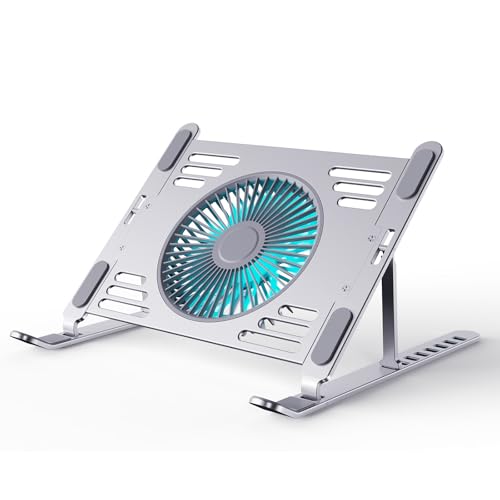
The SHUWEI cooling stand combines portability with a foldable aluminum frame and three-speed fan operation (up to 79 CFM). The stand elevates screens to eye level, reducing neck and shoulder strain, and folds flat for transport. This option is well-suited for students and remote workers who need a compact, rigid stand with reliable cooling. A small caveat is that the overall cooling power may be less intense than larger, multi-fan pads when used with power-hungry gaming laptops.
- 2-in-1 Design: Desktop cooling and ergonomic stand.
- Three Speeds: Adjustable to balance noise and cooling.
- Ultra-Portable: Foldable and lightweight for travel.
KLIM Tempest Laptop Cooler

The KLIM Tempest stands out with a high-powered 4000 RPM motor and a vacuum-style design to push large volumes of air through your laptop. It offers temperature detection and both automatic and manual modes, enabling dynamic cooling based on laptop heat. This option is best for users who frequently run hot applications and require rapid cooling with adjustable modes. A potential limitation is the need for setup awareness to optimize fit with some laptops that have unusual exhaust placements.
- Maximum Cooling: 4000 RPM motor for rapid airflow.
- Temperature Sensing: Automatic mode for hands-off cooling.
- Compatibility Aids: Accessories included for better laptop fit.
Buying Guide
What should I look for in a portable laptop cooler?
Key factors include size compatibility with your laptop, the number and size of fans, noise level, and whether it doubles as an ergonomic stand. If you travel often, prioritize slim form factors and foldable designs. For gaming or demanding workloads, a multi-fan pad with a noise-conscious fan array is typically better.
How important is fan count vs. airflow efficiency?
More fans can increase airflow, but efficiency depends on fan placement, noise levels, and how well the surface channels air to the laptop base. Some pads with fewer but strategically placed fans can deliver comparable cooling while remaining quieter.
What about USB connectivity and compatibility?
Many coolers offer USB hubs or rely on standard USB connections. If you use devices with USB-C, consider adapters or models with multiple USB ports. Check whether the device includes Type C compatibility or adapters if needed.
Should I prioritize portability over raw cooling power?
Yes for frequent travelers or students who commute. If you primarily work at a desk with access to power and space, you can prioritize higher cooling capacity, larger pads, or more robust stands.
What are common limitations to expect?
Some pads may have limited cooling strength on high-end gaming laptops, require adapters for certain USB-C connections, or have surface materials that affect heat dissipation depending on laptop thickness.
How should I maintain a portable cooler?
Regularly clean dust from grills and fans, inspect USB cables for wear, and store the unit in a protective sleeve to maintain airflow paths and structural integrity during travel.
Frequently Asked Questions
- Q: Are portable laptop coolers good for gaming laptops? A: They can help, especially multi-fan or high-capacity models, but ensure sufficient airflow and fit to avoid blocking exhausts.
- Q: Do these coolers require external power? A: Most are USB-powered, drawing power from the laptop or a USB hub.
- Q: Can a cooler improve performance? A: By reducing throttling due to heat, it can help maintain sustained performance in some workloads.
- Q: Will a cooler increase laptop battery use? A: Yes, since it draws power via USB, it can slightly reduce battery life during use.
- Q: Is a thicker laptop harder to fit on a cooler? A: Some models have height-adjustment or inclined surfaces; verify fits for thicker laptops.
- Q: How loud is a typical portable cooler? A: Noise levels vary; models with high fan counts may produce more sound, but many offer quiet operation at lower speeds.