Looking for a compact, inkless mobile printer that travels well and plugs into phones or laptops? This guide highlights five top portable Bluetooth printers, focusing on inkless thermal printing, size, and ease of use for travel, work, or school. Each option comes with paper rolls, cases, or accessories to help you print on the move without the mess of ink cartridges.
Overview of selected products:
- Gloryang Inkless Portable Printer – Travel-ready compact design with bundled paper and case.
- TATTMUSE Portable Printers Wireless – Lightweight, Bluetooth, supports multiple paper sizes.
- Aixiqee Portable Printers Wireless – Ultra-portable, multi-size thermal paper compatibility.
- Canon PIXMA TR160 – A traditional mobile option with color printing on the go.
- TATTMUSE A285M Inkless Portable Printer – Case-included, four rolls of thermal paper.
Gloryang Inkless Portable Printer for Travel

The Gloryang mobile printer uses inkless thermal technology, eliminating how-to of ink, toner, and ribbons. The kit includes a printer, three rolls of thermal paper, a carrying case, a charging cable, an instruction manual, and a guide card. It’s designed for on-the-go needs such as travel, contracts, and office documents. It supports printing on thermal paper and offers two loading methods for 2 to 8.5 inch formats. The device is compact, weighing about 1.75 pounds, and measures roughly 1.7 inches by 10.4 inches by 2.9 inches.
Key considerations include the need to use Gloryang thermal paper only, as inkjet paper will not work. The integrated design saves space with a built-in paper bin, aiding tidiness whether you are traveling or working remotely. This option emphasizes affordability through inkless technology and bundled consumables.
TATTMUSE Portable Printers Wireless for Travel – A285M

Weighing about 1.5 pounds, this compact printer is designed for travel. It supports 8.5″ x 11″ US Letter and A4 thermal paper. It connects via Bluetooth to phones and tablets, with USB-C for laptops when drivers are installed. The inkless thermal technology enables cost-efficient prints without ink or ribbons, in black and white only. A carrying case and four rolls of paper are included for ready-to-print adventures on the road or at a job site.
Pros include strong portability, broad paper-size compatibility, and flexible connection options. A potential con is the restriction to thermal paper and monochrome output, which may limit photo-quality needs. This model is well-suited for receipts, contracts, and basic documents while traveling.
Aixiqee Portable Printers Wireless – Multi-Size Support

The Aixiqee printer emphasizes ultra-portable design at around 2 pounds and a palm-sized footprint. It supports multiple paper sizes including US Letter, Legal, A4, A5, and narrow-width rolls. The device uses thermal inkless technology for cost-effective, low-maintenance printing in black and white. A compact form makes it easy to carry in a bag or backpack for on-the-go printing of documents, receipts, or simple graphics.
Considerations include ensuring you use compatible thermal paper and understanding the device prints in black and white only. The model is attractive for users who frequently print varying paper sizes and prioritize a light, pocket-friendly form factor.
Canon PIXMA TR160 Wireless Portable Printer

The Canon PIXMA TR160 is a lightweight option designed for portability with a 50-sheet paper tray and a small display. It offers high-quality printing on the go with a 5-Color Hybrid Ink System that supports sharp black text and vibrant color images. Connectivity includes Canon’s mobile printing apps and compatibility with Apple AirPrint and Mopria, enabling easy wireless printing from compatible devices or cloud services. This model is suited for those who need color printing and a familiar Canon user experience while traveling.
Trade-offs include the need to manage ink supplies for color work and the slightly larger footprint compared to fully inkless models. This option bridges portability with traditional color printing capability for users who require more than monochrome prints.
TATTMUSE Portable Printer – Inkless Travel Companion
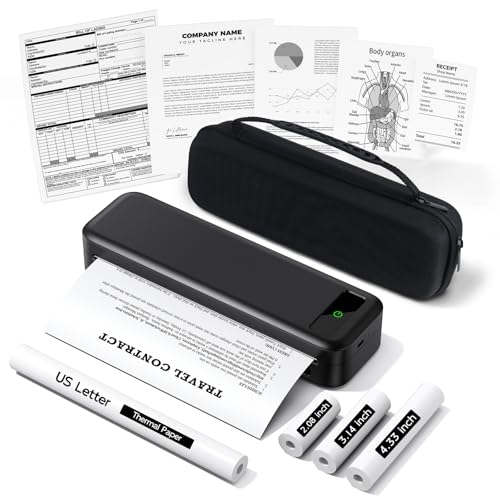
This TATTMUSE model brings a compact, case-included travel kit with four rolls of thermal paper. It is designed for portability and continuous use on the road, in vehicles, or at job sites. The printer uses thermal technology for inkless operation and offers both Bluetooth connectivity and USB-C for computers (with drivers). It targets on-the-go document printing, receipts, and notes, with emphasis on a space-saving profile and easy setup.
Key considerations include the need to select compatible thermal paper and the absence of color printing. The bundled case and extra rolls add value for frequent travelers who prioritize readiness and quick, mess-free prints.
Phomemo Portable Printers Wireless for Travel

The Phomemo portable printer is a wireless thermal printer designed for travel scenarios. It uses Bluetooth wiring through the Phomemo app to print from compatible devices. The compact, 1.5-pound form factor and thin profile enable easy storage in bags for on-site printing in various settings, including office, car, or classroom. It uses inkless thermal paper, reducing maintenance and costs over time. A carry case and supporting accessories help keep prints organized while on the move.
Strengths include straightforward wireless setup and a lightweight, travel-friendly design. Potential limitations include reliance on thermal paper only and monochrome output, which may limit photo printing or colored graphics.
Buying Guide: Key Purchase Considerations
- Printing technology: Inkless thermal printers avoid ink, toner, and ribbons, reducing ongoing costs but often limited to black-and-white output and specialized thermal paper. Consider if you need color printing or only monochrome documents.
- Portability: Look at weight, dimensions, and battery life. Some models include carrying cases and multiple paper rolls, which can be helpful for frequent travelers or field work.
- Paper compatibility: Check which paper sizes are supported (Letter, Legal, A4, etc.) and whether the device uses standard or proprietary thermal paper. Compatibility affects output flexibility and cost per page.
- Connectivity: Bluetooth is common, with some models offering USB-C for laptops. Ensure your devices are compatible and that drivers are available if needed.
- Printing capacity and speed: Consider how many pages you need per charge and how quickly you must print documents, receipts, or contracts. Built-in paper bins can help with space management.
- Durability and battery: For travel, a robust design and long-lasting battery are important. Some kits include a carrying case and extra paper, which adds value for on-the-go use.
- Software and app support: Evaluate the quality of the companion apps, ease of pairing, and any cloud or device compatibility features (AirPrint, Mopria, etc.).
- Budget and total cost of ownership: While inkless printers reduce ongoing costs, examine the price of paper and any required consumables to understand long-term affordability.
- Use cases: Identify whether your priorities are receipts, documents, contracts, or light graphics. Some printers are optimized for simple text and black-and-white prints, while others offer broader usability for office tasks.