If you’re looking to upgrade your video background, a pop-up green screen offers a simple, portable solution for chroma keying in streams, meetings, or photography. This guide highlights five top options suited for different needs—so you can choose the best fit for your setup, space, and budget. Whether you’re a streamer, a remote worker, or a content creator, these screens are selected for ease of use, stability, and compatible features.
Summary of selected products:
- RAUBAY Large Collapsible Green Screen Backdrop (78.7″ W x 82.7″ H) – best for two-person setups and studio-like backgrounds.
- NEEWER 5x7ft Chromakey Backdrop – best for versatile, foldable, reusable backgrounds with a sturdy stand.
- Cosmos 1 Pc Green Screen Backdrop, 43″ Round – best for compact spaces or small projects.
- RAUBAY Easy Set Up 59.8 x 82.7in – best for streamlined pop-up chroma key with pneumatic lock.
- EMART Green Screen Backdrop Kit with Reverse Folding Base – best for portable, stable studio setups on the go.
RAUBAY Large Collapsible Green Screen Backdrop

Reference features: Larger size (78.7″ W x 82.7″ H); wrinkle-resistant composite polyester fabric; sustainable manufacture; quick setup with leg placement and height adjustment.
Best for: Two-person streams or video calls needing a generous, uniform green screen surface for clean chroma keying.
Why selected: The large, wrinkle-resistant panel reduces background issues, making it a solid choice for interview-style or dual-host content.
Limitation: The footprint is sizable; requires more space for optimal use.
NEEWER 5x7ft Chromakey Backdrop
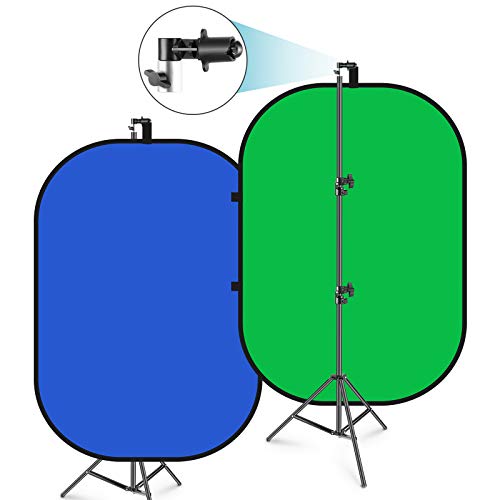
Reference features: 150 x 200 cm background panel; included stand up to 201 cm; foldable pop-up with integrated steel frame; carry bag included.
Best for: Users who want a versatile, portable backdrop that’s easy to transport and set up for photos, streaming, or video calls.
Why selected: The foldable design and included stand provide a balanced, stable system without needing extensive assembly.
Caution: The carry bag is for the backdrop only and cannot hold light stands or other accessories.
Cosmos 43″ Round Green Screen Backdrop

Reference features: 43″ diameter round greenscreen; lightweight and portable; ideal for chair-based setups or smaller projects; supports chroma keying in post-processing.
Best for: Small spaces or single-person shoots where a circular backdrop is adequate for coverage.
Why selected: Compact footprint makes it a good travel-friendly option or quick setup for desk-based streaming.
Caution: Size may be limiting for larger subjects or full-body chroma key work; may require alternative lighting due to circular shape.
RAUBAY Easy Set Up Green Screen, 59.8 x 82.7in

Reference features: Pro-level green screen; wrinkle-resistant fabric; pneumatic X-frame enables quick height locking; easy setup in seconds.
Best for: Streamers and remote workers who want a stable, simple setup with a tall backdrop for full-body chroma keying.
Why selected: The pneumatic lock and tall height help maintain a smooth green field with minimal setup time.
Caution: Ensure the space can accommodate the wide width and stable stand to prevent tipping in active environments.
EMART Green Screen Backdrop Kit With Reverse Folding Base

Reference features: Reverse folding stand; carry bag; adjustable height from 121 cm to 200 cm; versatile crossbar design for stability; lightweight and portable.
Best for: On-the-go content creators and home studios needing a compact yet stable chroma key setup.
Why selected: The reverse folding design simplifies storage and quick assembly while maintaining a sturdy frame.
Caution: The crossbar system is multi-piece; ensure correct assembly to maximize stability and screen tension.
EMART Upgrade Green Screen, 58x74in

Reference features: 58×74 inch collapsible chroma key panel; portable and retractable; wrinkle-resistant; designed for streaming, photography, and TikTok.
Best for: Users who want a mid-size, easy-to-transport green screen for casual streaming and video calls.
Why selected: The combination of compact size and ease of use makes it a practical choice for space-constrained rooms.
Caution: May not provide full-body coverage in taller setups; consider pairing with a taller backdrop if needed.
Buying Guide: Key Considerations For Your Pop Up Green Screen
- Size matters: Choose a backdrop that fits your shooting space and subject. Larger screens reduce risk of edges showing and support full-body chroma keying, while smaller sizes save space.
- Material and wrinkle resistance: Look for wrinkle-free fabrics and durable frames. Wrinkles can cause uneven keying and shadows that are hard to fix in post-production.
- Portability vs stability: If you travel or shoot in multiple rooms, a foldable, lightweight setup with a carry bag is ideal. For a fixed studio, a sturdier stand may be worth the extra weight.
- Setup time: Pneumatic locks, quick-fold mechanisms, and simple height adjustments save production time and reduce setup errors.
- Light compatibility: Ensure your lighting layout evenly illuminates the green screen to avoid hotspots or transparency. Consider softboxes or ring lights to minimize glare.
- Double-sided or color options: Some models offer blue/green dual surfaces or alternate colors to match different workflows and cameras.
- Included accessories: Check whether stands, clamps, or carry bags come with the backdrop, as these affect total value and convenience.
- Space and background coverage: Ensure the backdrop’s width and height align with your camera view and the space behind you to avoid visible edges or camera cropping.
Frequently Asked Questions
- What size green screen is best for streaming alone at a desk?
Choose a smaller, portable backdrop (around 43–58 inches wide) that fits comfortably behind your chair and desk setup. - Are circular backdrops effective for chroma keying?
Circular backs are compact but may limit subject coverage; they work best for close-up shots or small projects. - Do I need a stand or can I use a wall-mounted backdrop?
Stands provide portability and flexibility. Wall-mounted setups save floor space but reduce mobility. - How important is wrinkle resistance for chroma keying?
Very important. Wrinkles disrupt even lighting and create edge artifacts in post-processing. - Should I buy a double-sided backdrop?
Double-sided options can offer quick background changes, useful for varied content without changing gear. - Can these backdrops be used for video calls like Zoom or Teams?
Yes. They’re designed to improve background replacement and privacy during video conferences.