Discover compact, inkless printing that fits in your pocket. This guide highlights top pocket thermal printers designed for quick labels, photos, study notes, and creative projects. Each pick connects via Bluetooth, works with iOS and Android, and offers a mess-free printing experience. Read on to compare features, paper options, and app capabilities to find the right compact printer for your daily routines.
| Product | Brand | Paper Type | Connectivity | Best For |
|---|---|---|---|---|
| XenGro Mini Sticker Printer AHM2 | XenGro | Sticker & Thermal Paper | Bluetooth | Kids DIY, Journals |
| Memoking T02 Sticker Printer | Memoking | Printpods / Sticker Paper | Bluetooth | School Notes, Diagrams |
| vretti TP6S Sticker Printer | vretti | Thermal Paper 58x30mm | Bluetooth | Photos & Notes |
| cudinham Print Pods Mini Printer | cudinham | Rolls of Thermal Paper | Bluetooth | Notes, DIY Labels |
| Phomemo M02 Sticker Printer | Phomemo | Thermal Paper | Bluetooth | Photos, Study Aids |
XenGro Mini Sticker Printer AHM2

The XenGro AHM2 is a compact, inkless thermal printer designed for versatile everyday use. It prints sharp black-and-white images on self-adhesive sticker paper and standard thermal paper, with no ink or preheating required. Comes preloaded with one white roll and three bonus rolls, plus a built-in tear line feature for clean, straight cuts. The device pairs quickly with iOS and Android devices via Bluetooth and uses the FunnyPrint app to access templates, OCR, text tools, and stickers for quick labeling, journaling, and note-taking.
Memoking T02 Sticker Printer

The Memoking T02 offers portable, inkless printing focused on study notes, diagrams, and classroom activities. It uses a Phomemo app for wireless Bluetooth connection and supports iOS and Android. While it does not print via a computer, it excels as a pocket-sized tool for organizing notes, creating labeled study materials, and decorating journals. It is often highlighted as a practical gift for students and educators seeking a quick, label-ready solution for on-the-go projects.
vretti TP6S Sticker Printer

The vretti TP6S is a compact, Bluetooth-enabled printer using thermal paper with a 1.89-inch (48 mm) printing width. It supports a wide range of applications—from photos and study graphics to notes and labels—making it a flexible option for both kids and adults. The device emphasizes green printing and cost savings by eliminating ink or toner, and it pairs with the xLife-Pro app for Android and iOS to manage templates, fonts, and stickers for customized projects.
cudinham Print Pods Mini Printer

The cudinham Print Pods Mini Printer bundles with 10 rolls of thermal printing paper (5 adhesive, 5 thermal). It uses a Tiny Print app to connect via Bluetooth for easy one-click printing. The printer emphasizes long battery life, a 200 DPI resolution for clearer images, and flexibility in cutting or shaping prints. It is positioned as a versatile tool for notes, DIY labels, and small creative projects, with compatibility across iOS and Android platforms.
Phomemo M02 Sticker Printer
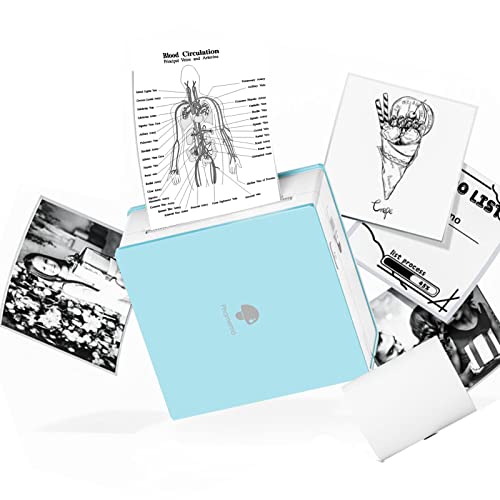
The Phomemo M02 is a compact, wireless inkless printer that uses Bluetooth 4.0 to connect with latest Android and iOS devices. It supports a dedicated app offering a library of fonts and templates, enabling users to print photos, text, or patterns quickly. Its emphasis on portability makes it a popular choice for home, school, and office needs, with a focus on creating printable visual aids and stickers without the mess of ink and toner.
Buying Guide: Key Purchase Considerations
- Paper compatibility: Look for printers that support both self-adhesive sticker paper and plain thermal paper to maximize use cases, including labels, photos, and notes.
- Printing resolution and size: A higher DPI (often around 200–300 DPI) yields sharper images. Consider width options (ranging from about 1.89 inches to 2 inches) based on your typical projects.
- App ecosystem: A robust companion app with templates, OCR, and editing tools adds value. Confirm compatibility with iOS and Android, and check if in-app purchases are required for premium features.
- Bluetooth simplicity: Quick pairing and reliable connections reduce setup friction. Check for one-tap printing workflows and clear instructions for initial setup.
- Battery life: For on-the-go use, a long-lasting built-in battery is important. Look for models with at least a few hours of continuous use or programmable sleep modes to conserve power.
- Print quality and color: Most pocket printers are black-and-white; color options are limited. If color is critical, verify whether color-printing accessories or separate color inks are supported (rare in this category).
- Build and paper loading: A compact, sturdy chassis with easy paper loading reduces maintenance. Check whether the device ships with multiple paper rolls and if future rolls are readily available.
- Safety and eye comfort: For students and kids, high-contrast prints and a low glare design help reduce eye strain during study sessions and journaling.
- Price vs. value: Compare each model’s bundled rolls and app features. A lower upfront price might be offset by higher cost per roll or fewer included supplies.
In choosing the right pocket thermal printer, consider your typical use cases: if you mainly label study notes and create quick diagrams, a light, app-rich model with multiple roll options is ideal. If your aim is journaling and photo notes, prioritize a model with good paper compatibility and a friendly storytelling template library. All five options in this guide provide inkless printing, Bluetooth connectivity, and compact form factors suitable for travel, classrooms, and at-home projects.