The best phones for Skype and Skype for Business are plug-and-play devices that deliver clear audio, easy USB or USB-C connections, and native Teams/Skype compatibility. This guide helps buyers choose models that fit hot-desking, home offices, or shared workspaces. It covers devices designed specifically for Skype or Teams, plus versatile options for multi-platform use. Below is a quick summary table of five strong choices to compare at a glance.
| Product | Best For | Connectivity | |
|---|---|---|---|
| Yealink MP45 | Teams and Skype for Business users in shared desks | USB-A/C (PC powered) | Not SIP/VoIP; dedicated Teams/Skype device |
| Polycom VVX 411 Skype for Business Edition (Renewed) | Primary desk phone for Skype for Business heritage users | Desk phone with SIP capability (renewed) | Good HD audio; color display, multiple lines/keys |
| Yealink MP45 (Cost-Effective Variant) | Budget-conscious Teams/Skype users | USB-A/C (PC powered) | Not SIP/VoIP; easy plug-and-play |
| Polycom RealPresence Trio 8500 (Renewed) | Conference-focused Skype for Business use | VoIP-ready conference device | Clear HD audio for group calls |
| USB Telephone Handset (Digitus) | USB-only PC or laptop calls | USB PnP | Simple, no external power required |
Yealink MP45 Microsoft Teams Certified USB Desk Phone

Best for dedicated Skype for Business and Microsoft Teams environments where a desk phone is needed without SIP/VoIP complexity. This model connects via USB to a PC for automatic recognition and works as a Teams/Skype device with plug-and-play simplicity. The full-duplex speaker and Optima HD Voice technology provide clear conversations. It’s ideal for hot-desking or shared workspaces where quick setup matters and external power is not required.
Who it’s best for: teams and offices that rely on Skype for Business or Microsoft Teams on a PC, with a need for immediate setup and clear audio. Caution: not compatible with SIP-based VoIP systems, so it won’t register on traditional SIP setups.
Polycom VVX 411 Skype for Business Edition (Renewed)

Best for users seeking a familiar desk phone layout with Skype for Business capabilities and a color display. The 3.5” TFT screen supports multiple lines and keys, offering robust HD audio paths. This renewed option provides a balance of cost efficiency and reliable executive calling features for steady daily use in business settings.
Who it’s best for: professionals who need a traditional desk phone experience with Skype for Business support. Caution: Renewed devices may vary in packaging and come with a minimum 90-day warranty, depending on seller policies.
Yealink MP45 Microsoft Teams Certified USB Desk Phone (Cost-Effective)

Best for budget-minded buyers who still require Teams and Skype compatibility with a USB-Powered setup. The MP45 variant supports USB-A/USB-C connections to a computer for automatic configuration. It demands Microsoft Teams/Skype for Business use in non-SIP environments and favors lightweight deployments such as shared workstations or classrooms.
Who it’s best for: offices prioritizing straightforward USB deployment and Microsoft collaboration apps. Caution: does not support SIP accounts or traditional VoIP registrations.
Polycom RealPresence Trio 8500 Skype for Business (Renewed)
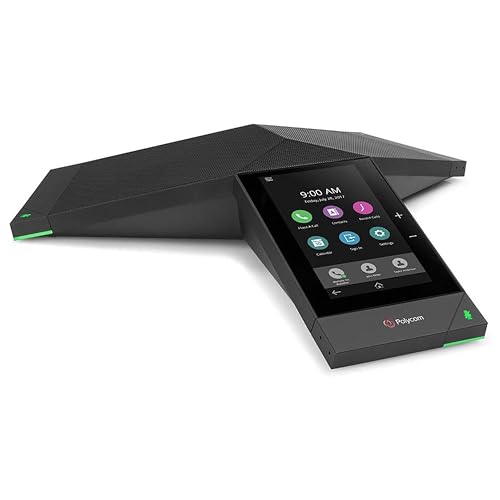
Best for conference-focused Skype for Business use where group discussions require high-quality audio. The RealPresence Trio 8500 delivers robust voice clarity for meetings and large calls. It is a renewal option with the flexibility to fit mid-sized rooms or shared conference spaces.
Who it’s best for: meeting rooms and conference setups that rely on Skype for Business or UC platforms. Caution: as a conference device, it is not a desktop phone replacement for individual calls.
USB Telephone Handset (Digitus)

Best for direct PC calls without a full desk phone. A simple USB PnP handset provides easy integration with softphones on a computer. It’s a lightweight option when a traditional phone interface is unnecessary, and no external power is required.
Who it’s best for: individuals seeking a basic USB handset for Skype or PC-based calling. Caution: lacks dedicated Skype/Teams features and is not a full desk phone replacement.
VTech CD1113 Corded Phone for Home Office

Best for home office setups that require simple call handling, caller ID, and call waiting. While not a Skype-specific device, it offers essential features such as speed dial and caller ID that can complement computer-based Skype use in a mixed environment.
Who it’s best for: home offices needing a straightforward landline-style device in addition to PC-based conferencing. Caution: not designed for Skype/Teams direct integration.
VTech CS6719-2 2-Handset Cordless Phone
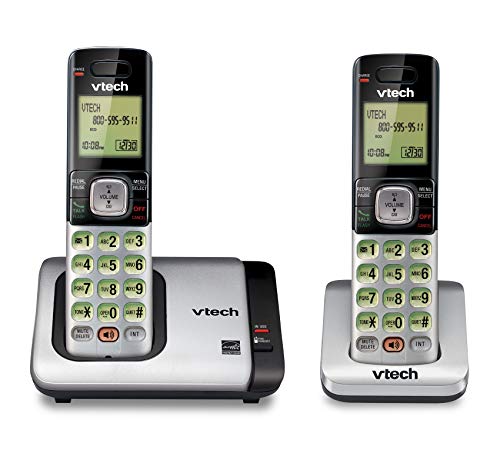
Best for households or small offices needing extra handsets with cordless convenience. Features include a full-duplex speakerphone, caller ID/call waiting, and backlit keypad for easier use in dim light. This is not a Skype/Teams device but supports general phone communications alongside computer-based calls.
Who it’s best for: spaces that require flexible, cordless calling with simple call features. Caution: does not provide direct Skype/Teams integration.
Yealink WH62 Mono UC DECT Wireless Headset

Best for users who need mobility around the office while staying on Skype or Teams calls. This DECT headset offers long-range wireless accessibility, solid microphone noise reduction, and compatibility with UC platforms. It pairs with IP phones and computers for flexible multi-device use.
Who it’s best for: remote workers or office staff who require a reliable headset for extended Skype/Teams conversations. Caution: wireless performance can vary by environment and base station setup.
Buying Guide: Key Purchase Considerations For Skype-Ready Phones
- System compatibility: Confirm whether the device supports Skype for Business or Microsoft Teams, and whether SIP/VoIP is required or unsupported. Some models are designed specifically for Teams/Skype and exclude SIP registration.
- Connection method: Decide between USB-A/C powered desk phones and USB-only devices. USB-powered options reduce cabling and power adapters but depend on PC capabilities.
- Intended use: Choose desktop phones for personal calls, conference devices for meeting rooms, or simple USB handsets for PC-based calls.
- Audio quality: Look for full-duplex speakerphones, noise reduction, Acoustic Echo Cancellation (AEC), and high-fidelity codecs to ensure clear conversations.
- Display and keys: A color display and multiple lines/keys help with quick call handling, speed dials, and contact access in busy environments.
- Future-proofing: Consider whether you need ongoing updates, compatibility with UC platforms, and the ability to switch between Teams/Skype and other services.
- Security and administration: For enterprise deployments, check device management options and ease of provisioning in large-scale setups.
Frequently Asked Questions
- What is the main difference between a Skype-for-Business phone and a general USB desk phone?
– Skype-for-Business or Teams-certified phones are configured to integrate with those platforms, offering native call controls and contacts, while general USB desk phones may rely on PC-based soft clients. - Can I use a non-SIP phone with Skype?
– Some devices are designed specifically for Teams/Skype and do not register with SIP-based VoIP systems. Check compatibility before purchase. - Do these phones require external power?
– Many USB-powered models draw power from the connected computer. Some traditional desk phones may require an external power adapter. - Is a renewed or refurbished unit a good option?
– Renewed devices can offer cost savings but may have limited warranties or packaging differences. Verify seller terms before buying. - Are headsets necessary for Skype calls?
– Headsets improve privacy and audio quality, especially in busy offices. Wireless or wired headsets with UC certification pair well with Skype/Teams. - What should I consider for hot-desking environments?
– Look for plug-and-play USB devices with fast auto-detect features, and consider shared-use devices that don’t require extensive configuration.