Looking for a PCIe M.2 RAID card to expand storage and boost throughput? This guide highlights five top options across PCIe 3.0, 4.0, and 5.0 generations. Each card supports multiple NVMe drives, enabling raid-like performance and expanded cache or boot storage. Ideal buyers include content creators needing large, fast scratch space, workstation builders seeking multi-drive performance, and gamers or editors upgrading existing desktops or workstations.
Summary table of selected products:
| Product | Best For |
|---|---|
| ASUS Hyper M.2 x16 Gen5 Card | Highest bandwidth, ideal for PCIe 5.0/4.0 systems with four NVMe drives |
| ASUS Hyper M.2 X16 PCIe 3.0 X4 Expansion Card V2 | Intel VROC and Ryzen Threadripper setups with 128 Gbps |
| SABRENT M.2 NVMe to PCIe X16 Adapter Card Gen5 | Single-drive operation with Gen5 speed in a full-length slot |
| ASUS Hyper M.2 X16 PCIe 4.0 X4 Expansion Card | PCIe 4.0 bandwidth for four NVMe drives on AMD/Intel systems |
| PCIE-PEX8747M8 4-Port NVMe M.2 Card | On-card bifurcation and 64 Gb/s aggregated bandwidth for four NVMe drives |
ASUS Hyper M.2 x16 Gen5 Card

Reference features: Adapted server-grade PCB supports up to four PCIe 5.0/4.0 M.2 drives, up to 512 Gbps bandwidth, 1 x 6-pin PCIe power connector, two-phase power up to 14-watt output, large heatsink with thermal pads, active fan for cooler temperatures, and added fan control via motherboard header.
Best for: Builders with PCIe 5.0/4.0 platforms needing four NVMe drives with robust cooling for sustained performance. Suitable for users who require high throughput and reliable thermals in workstations or enthusiast builds.
Limitation: Requires adequate space and airflow; high-performance cooling is recommended to avoid thermal throttling on sustained transfers.
ASUS Hyper M.2 X16 PCIe 3.0 X4 Expansion Card V2
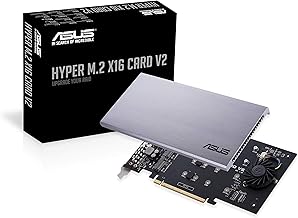
Reference features: Intel VROC ready and NVMe RAID support on AMD Ryzen Threadripper; two-phase power solution up to 14W; supports four NVMe M.2 drives with Intel VROC for transfer speeds up to 128 Gbps.
Best for: Systems using Intel VROC or Ryzen Threadripper platforms that need a reliable, RAID-capable expansion card, especially when maximizing multi-drive throughput is a priority.
Limitation: Gen3 hardware and older PCIe lanes mean lower maximum throughput compared with newer generations; verify motherboard and slot compatibility for desired speeds.
ASUS Hyper M.2 X16 PCIe 4.0 X4 Expansion Card

Reference features: Supports four NVMe M.2 drives (2242/2260/2280/22110) up to 256 Gbps total bandwidth; PCIe 4.0 x16 interface with server-grade PCB; compatible with PCIe x8 and x16 slots; supports 14W power consumption SSDs for next-gen drives.
Best for: Users with PCIe 4.0-capable motherboards who need 4-drive NVMe expansion with strong bandwidth for creative workflows or data-heavy workloads.
Limitation: Requires motherboard and chassis clearance; ensure there is space around the slot for the card and any cooling solution.
PCIE-PEX8747M8 4-Port NVMe M.2 Card

Reference features: PCIE Gen 3.0 x8 upstream with 4-Port NVMe M.2 expansion; on-card PCIE bifurcation; 64 Gb/s total bandwidth; supports 2230–22110 M.2 form factors; RAID function: no hardware RAID, software RAID supported; works with data storage and UEFI boot from NVMe M.2 drives.
Best for: Desktop PCs or NAS systems needing a robust 4-drive NVMe expansion with on-card bifurcation and a broad range of M.2 sizes, especially when hardware RAID is not required.
Limitation: No hardware RAID; performance depends on software RAID or host controller capabilities; ensure your OS and drivers align with software RAID needs.
Buying Guide
What to consider when choosing a PCIe M.2 RAID card:
- Slot generation and bandwidth: Match PCIe generation (3.0, 4.0, or 5.0) to your motherboard to achieve the intended throughput. Higher generations offer greater raw bandwidth, but only if your motherboard and drives support them.
- Drive support and form factors: Confirm drive form factors (2230, 2242, 2260, 2280, 22110) and M-key support. Some cards support four drives, others may be limited to two or one. Also check whether SATA M.2 drives are supported by the card.
- Power delivery and cooling: Look for a card with a dedicated power solution and an effective heatsink or active fan, especially when running multiple NVMe drives at high speeds for extended periods.
- RAID vs. software RAID: Some cards offer hardware RAID capabilities; others rely on software RAID. Choose based on your preferred RAID level and OS support. Hardware RAID can simplify setup but may limit flexibility.
- Motherboard and case clearance: Ensure there is enough clearance around the PCIe slot for large cards and any attached cooling. Some cards require space due to tall heatsinks or attached fans.
- Bifurcation support: Certain models offer on-card PCIe bifurcation, enabling multiple drives from a single PCIe slot. Verify motherboard BIOS settings and slot configuration for optimal operation.
FAQ
- What is a PCIe M.2 RAID card used for?
It expands NVMe storage by adding multiple M.2 drives to a single PCIe slot, enabling faster data transfer and potential RAID configurations. - Do I need hardware RAID on these cards?
No. Some cards include hardware RAID options; others rely on software RAID. Choose based on your preference for simplicity or control over RAID levels. - Will PCIe Gen5 improve performance with these cards?
Yes, if your motherboard and drives support Gen5. The card can deliver higher throughput when used in a Gen5-compatible system. - Can I use SATA M.2 drives with these PCIe cards?
Most cards support NVMe M-key drives; many do not support SATA M.2 drives. Check each card’s compatibility before buying. - Is bifurcation always required for four NVMe drives?
No. Some cards provide on-card bifurcation, but others do not. Verify motherboard support and BIOS configuration to ensure proper lane assignment.