Choosing the right PC games controller can enhance accuracy, comfort, and response in a wide range of titles. This guide highlights five standout options that cover wireless and wired setups, Hall Effect sensors for drift reduction, programmable back keys, and multi‑platform compatibility. Each pick is evaluated on connectivity, build quality, and feature depth to help you decide which controller best fits your gaming style and devices.
| Product | Brand | Key Feature |
|---|---|---|
| AceGamer Aurora II | AceGamer | 2.4G wireless, Bluetooth, Hall Effect sticks, back buttons |
| 8BitDo Ultimate 2C | 8Bitdo | 1000 Hz polling, Hall Effect controls |
| EasySMX X15 | EasySMX | Hall Effect joysticks, RGB lighting |
| ManbaOne Interactive Screen | Manba | 2-inch interactive screen, multi‑platform |
| AOC Interactive Screen PC Controller | AOC | Built‑in display, Hall Effect precision |
AceGamer Aurora II: Enhanced Wireless Controller

The AceGamer Aurora II combines 2.4G wireless connectivity with Bluetooth support for multi‑device use. It features an upgraded receiver, encryption dongle, and reduced Hall Effect stick drift for improved precision. Customizable back keys add programmable convenience for trigger combos and in‑game macros, while plug‑and‑play operation requires no extra drivers. A dual connectivity approach simplifies pairing via a dedicated pairing sequence, making it suitable for PC, Android, iOS, Switch, and Steam Deck environments.
8BitDo Ultimate 2C: Precision For PC And Android

The 8BitDo Ultimate 2C emphasizes high responsiveness with a 1000 Hz polling rate for 2.4G and wired connections. It uses Hall Effect joysticks and triggers to minimize drift and includes wear‑resistant metal joystick rings. The controller is designed for Windows PC and Android, delivering smooth input with reduced wear over time, making it a strong choice for competitive play and long gaming sessions.
EasySMX X15: Hall Sensors And RGB Lighting

The EasySMX X15 focuses on drift-free control via Hall Effect joysticks and triggers. It includes RGB lighting with seven adjustable colors for ambience and visibility. The controller is designed for Windows PC, Android, Steam, and Switch, and it excludes compatibility with certain platforms, so users should verify device support before pairing. The design centers on accuracy and a configurable visual experience for immersive gaming sessions.
ManbaOne Interactive Screen Wireless Controller

The ManbaOne introduces an innovative 2‑inch interactive screen directly on the controller, enabling on‑device settings without apps or software. It supports Switch, Switch 2, iOS, Android, and Windows PC with wired, Bluetooth, or wireless dongle connectivity. Additional features include RGB lighting and remappable buttons. The on‑board display aims to simplify configuration, offering quick adjustments while gaming across multiple platforms.
AOC Interactive Screen PC Controller
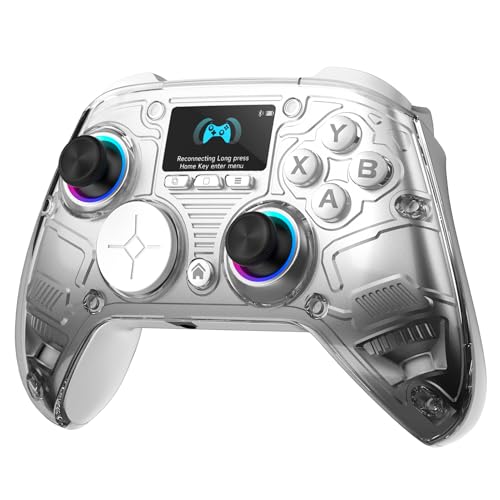
The AOC PC controller is built for cross‑platform versatility, with Bluetooth, 2.4G, and wired connections. It features a built‑in 1.5‑inch display for direct on‑device customization. Hall Effect joysticks prevent drift, and the dual Hall Effect triggers offer adjustable travel distances, giving players precise control whether racing, shooting, or exploring. The controller is positioned as a plug‑and‑play option for PC, Switch, iOS, Android, and Steam Deck users.
ECHTPower Wireless PC Gaming Controller

Note: This entry is kept for breadth of comparison, highlighting a model with Hall Effect joystick technology, a 1000 Hz polling rate, and multi‑platform compatibility including PC and Switch. It emphasizes drift reduction and rapid input recognition, supporting wired and 2.4G wireless connections along with USB‑C for modern devices. Users should verify platform mode settings before pairing to ensure compatibility with their setup.
MSI Force GC30V2 (Optional Context)

The MSI Force GC30V2 is included here for context on wireless gaming controllers with dual vibration and multiple connection modes. While primarily marketed for PC and Android compatibility, its feature set illustrates common expectations for budget‑to‑midrange PC game controllers. Prospective buyers should compare firmware support, input latency, and cross‑platform behavior with other models listed in this guide.
Buying Guide: Key Purchase Considerations
- Platform compatibility: Confirm whether the controller works with PC, Switch, Android, iOS, or Steam Deck. Some models perform best on Windows, while others emphasize multi‑platform versatility with specific pairing modes.
- Connection type and latency: Wireless 2.4G or Bluetooth offers convenience, but wired connections typically deliver the lowest latency. Look for controllers with high polling rates (e.g., 1000 Hz) for competitive play.
- Drift reduction: Hall Effect joysticks and triggers help eliminate stick drift over time, preserving precision in first‑person and racing games. Check the number of Hall sensors and the travel distance options.
- Programmable buttons: Back or rear buttons add quick access for macros and complex combos. Consider how many programmable inputs are available and how easy they are to remap.
- On‑board displays and customization: Some controllers include built‑in screens for settings without software. This can simplify in‑game tuning but may add bulk or power consumption considerations.
- Battery life and charging: Wireless controllers require reliable battery performance. Review battery capacity and charging options, especially if a charging dock is included.
- Build quality and comfort: Ergonomic grip, weight balance, and button feel influence long sessions. Look for textured surfaces and durable triggers for extended use.
- Software and updates: Some devices rely on companion apps or firmware updates. Verify ongoing support and whether features like macro editing require software.
- Price vs. value: While prices vary, evaluate which features align with your needs—drift‑free sticks, back buttons, and cross‑platform support often justify higher costs for serious gamers.