If you’re shopping for a PC flight joystick, you want gear that delivers precision, comfortable ergonomics, and flexible setup options. This guide highlights five solid options that cover single-stick setups, dual-station HOTAS configurations, and a full flight yoke system for realism. The selections are suited for beginners choosing a first controller, intermediate sim enthusiasts chasing better precision, and seasoned pilots needing robust programmable controls. Below is a quick snapshot to help you compare at a glance.
| Product | Best For |
|---|---|
| Thrustmaster T-Flight Hotas X | Entry-level HOTAS with detachable throttle for compact desks |
| Logitech G X56 HOTAS | Combat sims needing multiple programmable controls and RGB |
| Thrustmaster T16000M FCS Space Sim Duo | Ambidextrous dual-stick control with Hall Effect sensors |
| Logitech Saitek X52 Pro | Illuminated, precise yoke-style control with throttle |
| Logitech G PRO Flight Yoke System | Professional-grade yoke and throttle quadrant for realism |
Thrustmaster T-Flight Hotas X

The Thrustmaster T-Flight Hotas X combines a full-size throttle with a compact joystick connected in a single hotas setup. It features a wide, ergonomic hand rest and a throttle that enables natural hand positioning, reducing fatigue during long sessions. Its 12 programmable buttons and 5 axes provide comprehensive in-sim command access for civil flight routes or military maneuvers.
Best for: New and mid-level pilots who want a practical, space-efficient HOTAS solution with a detachable throttle for flexible desk setups. It’s a strong starter for cockpit-style sims and can be configured for a variety of aircraft profiles.
Why selected: It delivers an authentic feel with comfortable grip and extensive customization options without overwhelming new users with too many features. The detachable throttle adds layout flexibility for smaller desks.
Caution: The compact design may feel less ideal for users seeking ultra-wide hardware with advanced center consoles or extreme precision beyond entry-to-mid level sims.
Logitech G X56 H.O.T.A.S
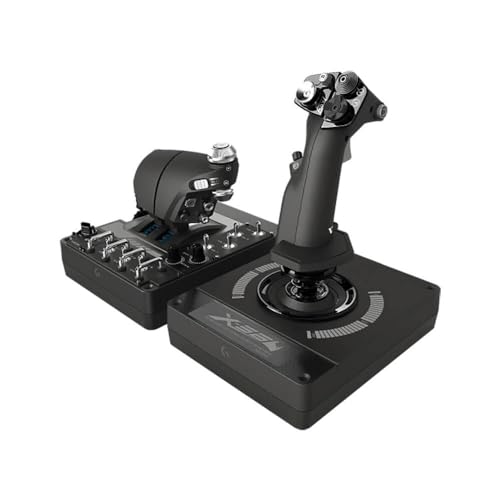
The Logitech G X56 HOTAS emphasizes high configurability with dual spring options, RGB lighting, and a wide range of programmable controls (up to 189). It supports Windows PCs with multi-axis precision and allows detailed customization through its software, including independent gimbaled weapon control and color-matched illumination for a personalized rig.
Best for: Enthusiasts pursuing highly customizable control surfaces, RGB aesthetics, and a robust option for combat and space sims that need many programmable actions.
Why selected: The X56 stands out for its expansive programmable surface area and visual feedback via RGB lighting, aiding quicker button location during fast-paced missions.
Caution: Software setup can be more involved, and some users may prefer a more compact alternative if desk space is limited.
Thrustmaster T16000M FCS Space Sim Duo

The T16000M FCS Space Sim Duo pairs a Hall Effect sensor-based stick with a second stick, delivering precise, drift-free input across axes. It includes 32 programmable buttons across both sticks and a fully ambidextrous design with three detachable components to tailor the grip for left-handed, right-handed, or shared use. This setup is ideal for users who want dual-stick realism with tactile button identification.
Best for: Players who want precise dual-stick control with long-term drift-free performance and tactile feedback across a broad set of functions in space or aviation sims.
Why selected: Hall Effect sensors offer durable precision, and the ambidextrous configuration provides flexibility for different gripping styles and mission profiles.
Caution: The dual-stick configuration requires more desk space and may have a steeper learning curve for users new to space or dual-stick flight sims.
Logitech G PRO Flight Yoke System

The Logitech G PRO Flight Yoke System provides a professional-grade yoke with a 3-mode configuration, a dedicated throttle quadrant, and 75 programmable controls. Its stainless steel shaft and multiple knobs deliver precise, realistic control ideal for serious sim enthusiasts seeking an authentic cockpit experience.
Best for: Pilots aiming for a highly realistic cockpit setup, where a yoke and quadrant layout best replicate real-world flight control surfaces for both training and immersion.
Why selected: It offers a comprehensive, professional-grade configuration that closely mirrors actual aircraft controls, enabling in-depth practice and muscle memory development.
Caution: This system is larger and heavier than stick-only options and may require more desk space and a sturdy mounting setup.
Buying Guide: Key Purchase Considerations
What type of controller best fits your needs?
- Single-stick HOTAS vs dual-stick setups: If you mainly fly fighters and space sims, a dual-stick arrangement can improve targetting and maneuvering. For general aviation or entry-level sims, a single-stick with a throttle can be enough.
- Ambidextrous design: Ambidextrous sticks help if you switch hands or prefer left-handed operation. Consider models like the T16000M FCS for flexible handedness.
- Sensor technology: Hall Effect sensors provide drift-free precision over time, making them preferable for long-term accuracy. This is a common feature on higher-end Thrustmaster and Logitech sticks.
- Programmable controls: More programmable buttons and switches enable faster access to critical functions. Think about the number of buttons you’ll use in your most played titles.
- Setup and space: Some units include detachable throttles or modular components. Measure your desk space to ensure a comfortable layout.
How to choose by use case
- Casual flight sims and training: Thrustmaster T-Flight Hotas X offers ergonomic comfort with a straightforward setup.
- Combat simulations and space games: The Logitech G X56 HOTAS provides many programmable controls and vivid RGB lighting for quick command access.
- Ambidextrous and precise control: The Thrustmaster T16000M FCS Space Sim Duo is ideal for players who want true ambidexterity and precise dual control sticks.
- Immersive realism with yoke: The Logitech G PRO Flight Yoke System is best when you want authentic yoke feel and a full throttle setup for advanced simulations.
FAQ
- What is Hall Effect sensing and why does it matter? Hall Effect sensors provide drift-free accuracy and long-term stability, ensuring inputs stay consistent over time.
- Are detachable throttles worth it? Detachable throttles offer flexible setups for smaller desks or varied cockpit layouts, making the overall system more adaptable.
- Do these devices work with modern Windows versions? Most listed options are designed to work with Windows PCs and are supported by their respective manufacturer software for configuration.
- Is a yoke system better than a joystick for flight sims? A yoke provides a more realistic aircraft-feel for many users, especially in general aviation and airliner sims, while joysticks excel in space and combat titles.
- How many programmable controls do I need? That depends on your typical mission loadout. For most sims, 16–32 buttons and a few hat switches cover essential commands; larger setups offer far more customization.
- Should I prioritize RGB lighting? RGB lighting helps with quick button identification in dark setups, but it is not essential for performance.