OCR pen scanners offer a portable solution for turning printed text into editable, spoken, or translated content. This guide highlights five top options available on Amazon, focusing on languages, text-to-speech features, offline usability, and ease of use for students, travelers, and professionals. Each product section includes key strengths and practical use cases to help you pick the right device for your needs.
| Product | Brand | Languages | Key Feature |
|---|---|---|---|
| Scan Reader Pen | FLTIDUNDI | 55+ OCR languages; 112-language real-time translation | High-speed OCR with audio playback |
| PenPower WorldPenScan | PenPower | Up to 41 languages (OCR); online web app | Web-based editing and TTS |
| Scanmarker Air | Scanmarker | Over 140 languages online; 102 offline | Real-time text-to-speech and translation |
| NIELEIT Language Translator Pen | NIELEIT | 142 online languages; 10 offline | Wide language coverage with offline support |
| Scanmarker Pro | Scanmarker | Over 100 languages online | Standalone reading and translation with highlighting |
Scan Reader Pen By FLTIDUNDI

The Scan Reader Pen from FLTIDUNDI combines OCR scanning with real-time translation to help users access multilingual text quickly. It supports scanning in 55 languages and translates across 112 languages via two-way voice output, making it a versatile tool for travelers and professionals who encounter international documents, labels, and screens. The device emphasizes accuracy, with an up-to-date recognition rate of about 98%, enabling reliable extraction for editing on a computer via USB. A 3.5-inch touch screen provides on-device viewing and quick playback, while the built-in speech function reads translations aloud, supporting both formal and informal contexts.
Practical use cases include reading books or papers in a foreign language, translating menus while traveling, and capturing important phrases during meetings. The pen’s ability to record audio adds a layer of note-taking convenience for interviews or lectures. While online access enhances translation speed for many languages, the on-device features ensure offline usability for essential tasks. Its compact form factor makes it suitable for daily carry in a bag or pocket, balancing portability with robust translation capabilities.
PenPower WorldPenScan Wi-Fi

PenPower WorldPenScan Wi-Fi emphasizes quick document capture and online editing. It can scan large amounts of text rapidly—up to 1,000 words per minute—and converts printed text into editable digital format for immediate use in cloud storage or online documents. The device supports text-to-speech through its web app, allowing users to listen to the scanned material with adjustable voice settings for tone, speed, and pitch. Multilingual OCR supports up to 41 languages, which is especially useful for bilingual readers or those studying foreign texts. Sign-in accounts enable saving work online, promoting a seamless workflow between devices.
Use cases center on academics and multilingual work environments where quick digitization and native-reading support are valuable. The ability to listen to translations while following along with the text can support language learners and those with reading challenges. While the Wi-Fi connection expands features, the offline capability of core scanning remains a practical fallback, ensuring productivity in places with limited connectivity.
Scanmarker Air Reading Pen
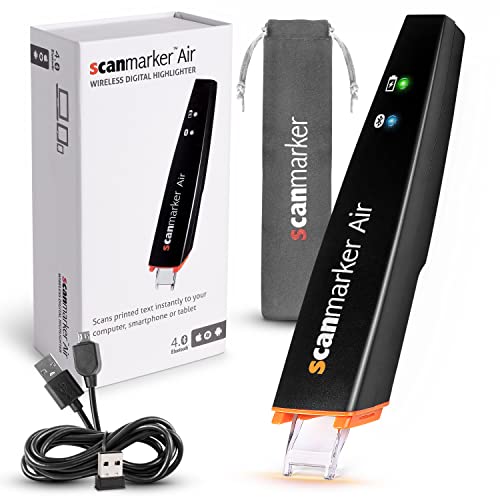
The Scanmarker Air Reading Pen focuses on speed and portability for busy students and professionals. The device pairs with a web app where scanned text appears instantly on screen, enabling quick summaries and note-taking workflows. It supports over 140 languages for translation and text-to-speech integration, making it a strong option for travelers and language learners. A notable feature is its ability to read text aloud in real time, which can aid memorization and comprehension when studying or reviewing documents. A standalone mode allows for flexible use without constant device pairing, though some functionalities rely on an online connection.
With its emphasis on rapid text capture and speech output, the Scanmarker Air is well-suited for classrooms, research tasks, and fieldwork where speed and multilingual support are important. It’s particularly beneficial for ESL learners and individuals who benefit from audio reinforcement while reading. Users should note that some benefits require initial setup with the web app, and performance can depend on internet connectivity for cloud features.
NIELEIT Language Translator Pen

NIELEIT offers broad language coverage through online and offline modes. It supports 142 online languages for voice translation and 144 online languages for text translation, with an additional 10 offline languages. This makes it a flexible option for travel, study, and daily usage where connectivity may be intermittent. The device can convert scanned text into editable digital text and deliver real-time voice output, which helps with listening and speaking practice. The handwriting and screenshot features enable easy study material capture, making it useful for students who work with multilingual textbooks and resources.
For users who need extensive language coverage and offline reliability, NIELEIT provides a strong balance between internet-reliant translation and offline capability. The system’s ability to recognize a broad range of languages supports diverse study environments and international business contexts. When offline use is essential, users should verify which offline languages remain fully functional and how the device handles mixed online/offline sessions.
Scanmarker Pro

The Scanmarker Pro positions itself as an all-in-one reading and translation pen. It reads scanned text aloud with on-screen highlighting to aid reading comprehension, making it suitable for dyslexia support, ESL classrooms, and independent learners. Translation covers over 100 languages online, with offline capabilities for a core group of languages to ensure functionality without constant internet access. A built-in English dictionary and word translator enhance vocabulary learning, while the standalone design means it can be used without connecting to other devices. This makes it a practical option for classroom use and travel where quick translation and reading support are needed.
Ideal use cases include bilingual education, language immersion activities, and personal study. The Pro model focuses on portability and an accessible learning toolkit, though users should consider whether the offline language set meets their specific needs and if classroom integration is a priority. It remains a strong choice for those seeking a comprehensive, portable language aid with intrinsic reading support.
Buying Guide: Key Considerations For Choosing An OCR Pen Scanner
- Language Coverage: Assess how many languages are required for your typical tasks. Some pens excel with 140+ online languages, while others offer robust offline options for travel or remote work.
- Offline vs Online Capabilities: If you frequently travel or work in areas with limited connectivity, prioritize devices with strong offline translation and OCR performance.
- Text-To-Speech And Voice Quality: Look for adjustable speech speed, tone, and accent options. Real-time pronunciation support can be a decisive factor for language learners.
- OCR Speed And Accuracy: A higher recognition rate reduces errors in text extraction. Consider whether you need rapid line-by-line translation for long documents or quick notes for meetings.
- Editing And Export Options: Some devices sync with cloud apps, offer USB transfer, or support direct editing in word processors. Decide if you need offline editing, online storage, or both.
- Device Independence: Standalone pens work without a connected computer, whereas others rely on a companion app or web platform. Your preferred workflow will influence this choice.
- Form Factor And Usability: A compact, lightweight design with a comfortable grip benefits extended use. A touchscreen or accessible buttons can improve on-the-go efficiency.
- Special Features: Consider note-taking, audio recording, text excerpts, or synchronized highlighting, especially for study or classroom settings.
In evaluating these options, consider your primary use—travel, study, business, or everyday reading. The right device will provide reliable OCR, meaningful translations, and accessible speech output while fitting your workflow and budget. All five selected models offer solid foundations for multilingual reading, with varying emphases on offline reliability, cloud integration, and learning-focused features.