Discover top multi USB hub options that simplify device expansion for laptops, desktops, and today’s peripherals. This guide highlights five reliable choices with fast data transfer, multiple ports, and user-friendly features. Whether you need extra USB 3.0 ports for keyboards and mice or data-heavy peripherals like external drives, these hubs help streamline your workspace without clutter.
Summary of selected products:
| Product | Brand | Ports | Key Strength |
|---|---|---|---|
| Acer USB Hub 4 Ports | Acer | 4 USB 3.0 | Dense, fast data transfer with 5Gbps and power passthrough |
| Anker USB Hub 4 Ports | Anker | 4 USB 3.0 | Trusted brand, high-speed data, plug-and-play |
| UGREEN USB 3.0 Hub 4 Ports | UGREEN | 4 USB 3.0 | Slim design, strong performance, broad compatibility |
| ONFINIO 7-Port USB 3.0 Hub | Onfinio | 7 USB 3.0 ports | More ports, individual on/off switches, hot swap |
| WENTER 11-Port Powered USB Hub | WENTER | 11 ports (10 data + 1 charging) | Powered solution with dedicated charging port |
Acer USB Hub 4 Ports Review

Acer’s 4-port USB 3.0 hub expands a single USB-A interface with four additional ports, making it suitable for laptops and desktops. The device uses a USB 3.0 data channel with speeds up to 5Gbps, enabling quick transfers for files and peripherals. For stability, the hub supports a power passthrough via a USB-C power port, which helps maintain reliable connections when multiple devices are connected. The GL3510 chipset is designed for efficiency and heat management, and the setup is plug-and-play without the need for extra drivers. This makes it a straightforward option for boosting peripheral capacity on the go or at a workstation.
Why choose this model
- Solid 4-port expansion with high-speed data transfer
- Power passthrough ensures stable operation with power-hungry devices
- Compact, easy setup with good thermal design
Anker USB Hub 4 Ports
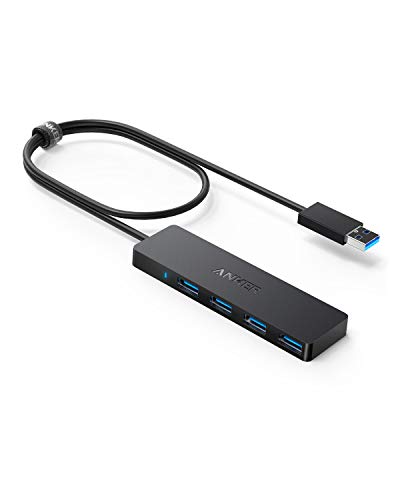
The Anker 4-Port USB 3.0 hub emphasizes the brand’s reliability and user-friendly design. It converts one USB port into four, offering SuperSpeed data transfer up to 5Gbps. The hub is explicitly noted as not intended for charging devices, which helps set expectations for power delivery. Its construction focuses on simplicity and compatibility, making it an excellent choice for expanding a laptop or PC setup without adding complexity. It’s a practical option for users who prioritize dependable performance and brand trust.
What to consider with this hub
- Not designed for charging peripherals
- Excellent data transfer speeds for peripheral devices
- Widely compatible across major operating systems
UGREEN 4-Port USB 3.0 Hub

UGREEN’s 4-port USB 3.0 hub focuses on expanding a single USB A port into multiple, making it ideal for keyboards, mice, and flash drives. It delivers up to 5Gbps transfer speeds, allowing quick movement of larger files. The hub is plug-and-play with broad compatibility across Windows, macOS, Linux, and Chrome OS, removing the need for driver installation. The slim, unobtrusive form factor makes it convenient for travel or a neat desk setup, especially when you want a compact solution without sacrificing performance.
Key advantages
- Plug-and-play across major platforms
- High data transfer rate supports quick file movement
- Compact, portable design for on-the-go use
ONFINIO 7-Port USB 3.0 Hub

ONFINIO’s seven-port hub increases connectivity with a robust 7-port layout. It supports USB 3.0 speeds up to 5Gbps and is backward compatible with USB 2.0/1.0. The hub emphasizes a heat-aware design and a high-performance chipset to maintain device safety and stable operation during data transfers. It offers plug-and-play functionality with hot-swapping support. A separate power option is recommended for power-hungry devices to maintain peak performance and avoid underpowered connections.
When this hub is best used
- Multiple peripherals needing independent ports
- Setup where hot swapping is beneficial
- Mac or Windows environments requiring broad compatibility
WENTER 11-Port Powered USB Hub

This powered USB hub from WENTER expands connectivity with 11 ports, including 10 USB 3.0 data ports and a dedicated smart charging port. The unit ships with a 12V/3A power adapter to deliver higher current where needed. Each data port supports up to 5Gbps, enabling rapid file transfers for large drives or media collections. Individual LED indicators per port provide quick visibility into power status, and the built-in switches offer simple control without unplugging devices. This solution suits desks with multiple peripherals requiring reliable power distribution.
Practical considerations
- Dedicated charging port to handle devices that require power
- Multiple data ports reduce the need for alternate hubs
- LED indicators help monitor port activity and power
Buying Guide: Key Considerations For Choosing A Multi USB Hub
When selecting a multi USB hub, consider port count, power delivery, data speed, and compatibility. A higher port count is helpful for complex setups, but you should verify whether the hub is powered or unpowered. Powered hubs can support more devices and higher power demands, reducing the risk of underpowered peripherals. Data transfer rates of up to 5Gbps are common with USB 3.0 hubs and support fast file transfers for media and large backups.
Power delivery matters for laptops and devices with limited built-in USB power. If you connect external hard drives, docking stations, or USB-C devices that draw power, a hub with a dedicated power adapter is often necessary. Also check compatibility across operating systems—Windows, macOS, Linux, and Chrome OS—especially if you work across multiple devices. Plug-and-play capability simplifies setup, but ensure the hub uses a quality chipset to minimize throttling and heat buildup during extended use.
Design considerations include size and portability for travel, as well as the availability of individual on/off switches for each port. Individual switches help you manage power consumption and reduce wear from repeatedly unplugging devices. For workspace aesthetics, slim profiles and cable management features can reduce clutter. If you need USB-C compatibility, verify if the hub includes USB-C data or charging passthrough, as this affects compatibility with newer laptops and accessories.
Bottom line: choose a hub that aligns with your primary use. For notebook users needing minimal setup with high-speed data, a 4-port USB 3.0 hub from a trusted brand offers a balance of portability and performance. For home offices with many peripherals or power-hungry devices, a powered 7- or 11-port hub provides the necessary headroom and convenience, while preserving data speed and device safety.