People with trigger thumb or wrist discomfort can benefit from trackball mice that minimize repetitive movements while delivering precise cursor control. This guide highlights five ergonomic, thumb-controlled options that reduce strain, support natural hand positioning, and offer smooth tracking across multiple devices. Each product section includes key features, setup notes, and compatibility to help you compare quickly and choose the right model for PC, Mac, and laptop use.
Summary of Selected Products
| Product | Brand | Key Benefit | Connection |
|---|---|---|---|
| Nulea M501 Wireless Trackball Mouse | Nulea | Ergonomic thumb control; 3-device supervision | Bluetooth / USB |
| Logitech Ergo M575S Wireless Trackball | Logitech | Relaxed forearm posture; quiet clicks | Bluetooth / USB dongle |
| seenda Wireless Trackball Mouse | seenda | Ergonomic, 3-device, smooth tracking | Bluetooth / USB |
| J-Tech Digital Ergonomic Mouse V638 | J-Tech Digital | Removable palm rest; adjustable DPI | Wireless |
| ELECOM EX-G Left-Handed Trackball | ELECOM | Left-handed design; 6 buttons | 2.4 GHz USB |
Nulea M501 Wireless Trackball Mouse

The Nulea M501 emphasizes an ergonomic trackball design to minimize wrist movement and muscle strain. Its smooth thumb control enables precise cursor navigation while keeping the hand in a natural, comfortable position for extended use. The trackball allows you to work on various surfaces without significant arm movement, enhancing comfort during long sessions.
Key features include adjustable DPI for precise tracking, and wireless freedom to connect with up to three devices via Bluetooth or a USB receiver. The 2.4G USB receiver is stored discreetly at the bottom of the mouse for easy access. This model is suitable for PC, laptop, Mac, and Windows environments, supporting multi-device workflows.
Logitech Ergo M575S Wireless Trackball

The Ergo M575S is designed to reduce forearm strain with an ergonomic shape that keeps the hand relaxed during long sessions. Thumb-controlled navigation pairs with quiet clicks and a more natural posture, aligning your forearm for extended comfort. It includes Bluetooth connectivity and an encrypted dongle option for secure, dependable wireless use, making it a strong choice for PC and Mac users alike.
seenda Wireless Trackball Mouse

The seenda trackball emphasizes an ergonomic design with a palm-anchored grip to minimize wrist movement. Its thumb-accessible trackball enables efficient navigation without repositioning the entire arm. It supports 3-device connections and offers smooth, precise tracking across multiple surfaces, making it a versatile option for users who switch between devices frequently.
J-Tech Digital V638 Ergonomic Mouse
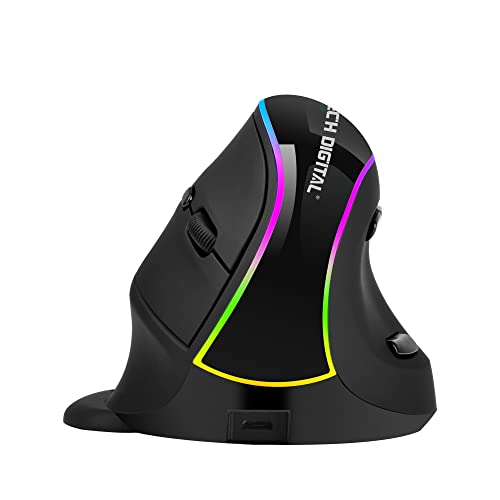
The V638 focuses on an ergonomic “handshake” design with a removable palm rest to reduce drag and strain. It features adjustable DPI settings (800, 1200, 1600, 3200) for responsiveness across tasks. Thumb buttons add convenience for web navigation and document handling, while the wireless connection keeps the desk tidy and clutter-free.
ELECOM EX-G Left-Handed Trackball

This left-handed trackball is tailored for left-handed users, featuring 6 programmable buttons and 2.4 GHz wireless capability. It provides precise optical tracking and a DPI switch between 750 and 1500, enabling fast cursor movement or careful precision depending on the task. It’s a strong option for left-handed users seeking hands-friendly ergonomics.
MicroPack Trackball Wireless Mouse

The MicroPack blends vertical mouse ergonomics with trackball control, offering a unique hybrid that reduces wrist strain. It includes multiple DPI levels (600/800/1200/1600/2400) for various tasks and a redesign that suits larger hands. Note that its buttons are not programmable, but the form factor supports steady, comfortable use for extended periods.
Buying Guide
- Ergonomic fit: Look for a shape that supports the natural angle of your wrist and hand. A palm-rest or vertical design can substantially reduce strain for trigger thumb sufferers.
- Thumb control vs. full-hand control: Thumb-acting trackballs minimize arm movement, while larger hands may benefit from ergonomic, contoured grips or palm rests for better control.
- DPI and precision: Adjustable DPI helps tailor cursor speed to your workflow. Higher DPI is useful for detailed tasks; lower DPI offers steadier control for document work.
- Connectivity: Bluetooth and USB dongle options provide flexibility across devices. If you switch between multiple devices, a model with multi-device pairing is advantageous.
- Surface compatibility: Trackballs work on many surfaces, but some require a mouse pad or a flat surface. Consider models with higher-precision sensors for varied environments.
- Button customization: If you rely on shortcuts, seek devices with programmable buttons or software to tailor actions to your tasks.
- Left-handed options: For left-handed users, left-handed designs reduce strain and improve control, particularly in long sessions.
When selecting a trackball mouse for trigger thumb, prioritize models that minimize wrist and forearm movement, offer reliable thumb control, and support your device ecosystem. The listed options cover a range of ergonomic DNA, from palm-resting designs to compact thumb-focused controls, ensuring there is a suitable fit for different hands and workflows.