For professionals who navigate complex CAD models, a dedicated 3D mouse can dramatically improve precision, speed, and comfort. This guide highlights five top options that blend intuitive 3D control with reliable hardware, helping designers, engineers, and educators optimize their workflows. Each product section includes key features to help you compare options at a glance.
- Name: 3DConnexion 3DX-700059 Spacemouse Compact 3D Mouse — Brand: 3Dconnexion
- Name: 3Dconnexion CadMouse Pro Wireless Mouse — Brand: 3Dconnexion
- Name: 3Dconnexion 3DX-700040 SpaceMouse Pro 3D Mouse — Brand: 3Dconnexion
- Name: ProtoArc Wireless Trackball Mouse EM01 NL — Brand: ProtoArc
- Name: 3Dconnexion CadMouse Compact Mouse — Brand: 3Dconnexion
| Product | Brand | Key Feature |
|---|---|---|
| Spacemouse Compact | 3Dconnexion | Six-degrees-of-freedom navigation for CAD, compact form |
| CadMouse Pro Wireless | 3Dconnexion | High-precision 7200 dpi, wireless with smart features |
| SpaceMouse Pro | 3Dconnexion | Full-sized 6Dof with multiple programmable keys |
| Wireless Trackball EM01 NL | ProtoArc | Trackball ergonomics with multi-device Bluetooth/2.4G |
| CadMouse Compact | 3Dconnexion | Compact ergonomic 7-button CAD mouse |
Spacemouse Compact 3D Navigation
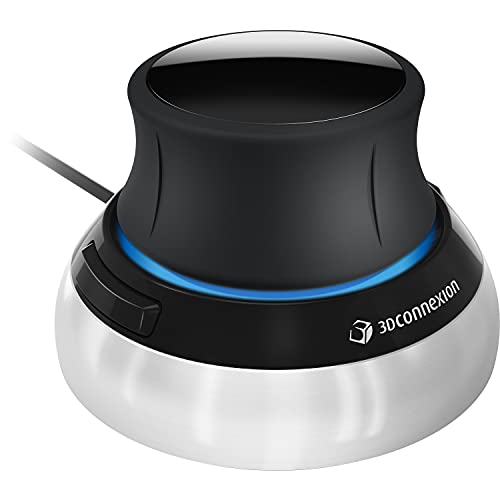
The Spacemouse Compact from 3Dconnexion is designed to deliver intuitive 3D navigation for CAD applications. Its six-degrees-of-freedom (6Dof) sensor enables precise movement of digital models, making it easier to pan, zoom, and rotate with fluid control. Compatible with major operating systems, this device emphasizes direct access to common commands via its radial menus, streamlining workflow in software like CAD applications. A compact form factor suits desktops with limited space without sacrificing precision.
CadMouse Pro Wireless — Precision CAD

The CadMouse Pro Wireless from 3Dconnexion combines a high-precision 7200 dpi optical sensor with wireless connectivity (2.4 GHz RF, Bluetooth, and USB-C). Designed for CAD work, it offers a Smart Mouse Wheel and a comfortable, ergonomic shape suited for long sessions. Users gain reliable accuracy and flexible connection options, reducing cable clutter while maintaining precise control for intricate modeling tasks.
SpaceMouse Pro 3D Mouse
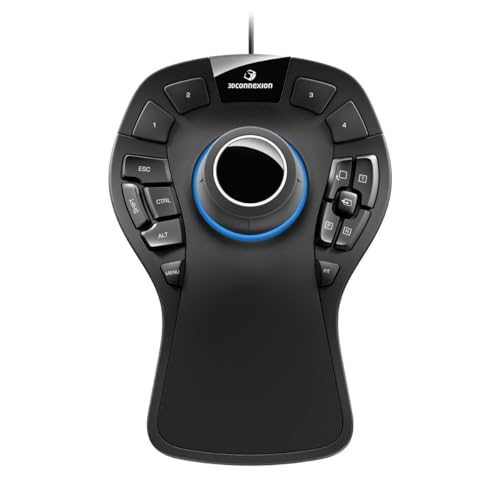
The SpaceMouse Pro from 3Dconnexion is a full-featured 3D navigation device featuring a six-degrees-of-freedom sensor, a soft-coated hand rest, and a suite of programmable keys. It includes on-screen displays and keyboard modifiers, providing convenient shortcuts and enhanced control for complex CAD operations and 3D design tasks. The integrated features aim to boost productivity by reducing the need to switch between keyboard and mouse during modeling sessions.
TECH8 3D Hologram Mouse Jiggler

The TECH8 USA Mouse Mover Device provides a novel approach to maintaining activity without software installation. It uses a 3-D holographic disc and adjustable activity levels to simulate mouse movement and prevent idle states on conferencing platforms. While not a traditional CAD tool, this device can complement a workstation by minimizing interruptions in collaborative environments where screen activity status matters.
TRELC Ergonomic Gaming Mouse
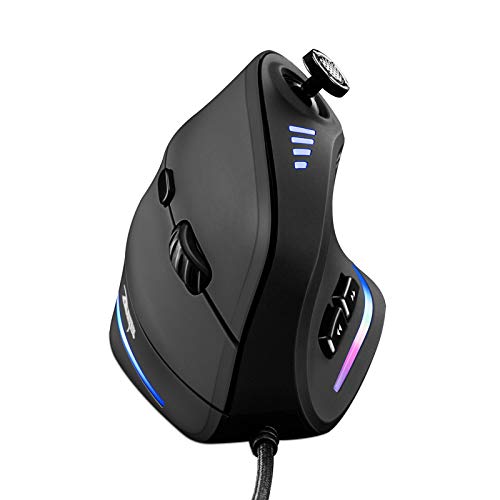
The TRELC Gaming Mouse introduces an ergonomic vertical design with 11 programmable buttons and a 10000 DPI sensor. While primarily positioned for gaming, its ergonomic shape and multi-button configuration can be advantageous for users who require extensive customization and comfort during long design sessions. The vertical grip can help reduce wrist strain compared to traditional horizontal mice.
ProtoArc EM01 NL Wireless Trackball

The ProtoArc EM01 NL is a wireless trackball mouse offering ergonomic thumb control and precise navigation. It connects via Bluetooth or 2.4 GHz and supports multiple devices. Its adjustable angle and trackball approach can reduce arm movement, appealing to users who navigate long documents or CAD sketches with minimal wrist motion.
Original BambooLab Makerworld MH002

The BambooLab Makerworld MH002 kit offers a modular, model-based mouse component compatible with BambooLab 3D printers’ ecosystem. It focuses on assembly and customization for those who enjoy building and tailoring their hardware. Batteries are not included, but the kit supports Windows, Linux, and Mac OS, enabling broad compatibility for makers and DIY enthusiasts.
3Dconnexion CadMouse Compact

The CadMouse Compact from 3Dconnexion provides a compact ergonomic shape with seven buttons, including a dedicated middle mouse button. This model emphasizes a balance between tactile control and space efficiency, making it suitable for CAD workflows where desk real estate is a concern and precision is a priority.
Buying Guide: Key Purchase Considerations
- 6Dof Navigation vs. Trackball: If you prioritize fluid model manipulation in 3D space, a 6Dof-spatial device (like Spacemouse models) offers direct 3D control. Trackballs (like ProtoArc EM01 NL) reduce arm movement and are comfortable for long sessions but require a different learning curve.
- Ergonomics and Comfort: Look for a design that reduces wrist strain and fits your hand size. Hand rests, soft coatings, and natural grip positions help during extended CAD work or gaming sessions.
- Button Customization: CAD work often benefits from programmable keys and radial menus. Check the number of programmable buttons and whether the device supports per-application profiles.
- Connectivity: Wireless options (Bluetooth or RF) reduce desk clutter but may require batteries. USB-C compatibility can simplify charging and cable management.
- Software Integration: Ensure compatibility with your CAD software and operating system. Some devices come with software that maps functions to commonly used commands or views within specific applications.
- Form Factor: Compact devices save desk space but may trade off some comfort for large hands. Full-size models provide a comfortable grip for long sessions with more programmable keys.
- Compatibility and Ecosystem: If you already own other 3Dconnexion products, compatibility and shared software can streamline workflows across devices.
- Price vs. Value: Consider whether specialized 3D navigation justifies the cost based on your drafting needs, frequency of use, and time saved during modeling.
When selecting a 3D mouse, weigh how you primarily work with CAD, 3D modeling, or document navigation. A device that accelerates model orientation and reduces repetitive hand movements can deliver meaningful efficiency gains in professional settings, while alternative pointing devices may suit casual or multi-purpose use.