Monitors with integrated cameras offer productive all-in-one solutions for hybrid work, remote meetings, and on-camera content creation. This guide highlights five top options, covering UltraWide immersion, conferencing focus, and field-monitor versatility. Each entry includes key features, connectivity, and why it stands out for everyday use.
style=”display:none;”>Summary Table
| Product | Brand | Key Benefit | Resolution | Specialty |
|---|---|---|---|---|
| Philips 34E1C5600HE | Philips | UltraWide multitask with built-in webcam | 3440 x 1440 | Windows Hello webcam, 100 Hz |
| ASUS BE279QSK | ASUS | Video conferencing with integrated webcam and mic | 1920 x 1080 | 2MP webcam, mic array |
| VILTROX DC-550 | VILTROX | High-brightness camera monitor for field use | 1920 x 1080 | 1200 nits, 4K HDMI in/out |
| FEELWORLD FW568 | FEELWORLD | Compact field monitor with LUTs | 1920 x 1080 | Waveform, LUTs |
| FEELWORLD S55 V3 | FEELWORLD | Bundle with accessories for on-set use | 1920 x 1080 | 4K HDMI, tilt arm, power options |
Philips 34E1C5600HE 34″ UltraWide Monitor With Built-In Webcam

The Philips 34E1C5600HE blends immersive display technology with practical conferencing features. Its 3440 x 1440 UltraWide QHD resolution and 21:9 aspect ratio maximize workspace, letting you view multiple documents, chats, and apps side by side without constantly switching windows. The 1500R curved VA panel contributes to a more engaging visual experience while maintaining color accuracy, which helps reduce eye strain over long sessions. Built-in Windows Hello webcam and a noise-canceling microphone simplify remote meetings by eliminating the need for an external device. USB-C docking further enhances desktop setup by delivering power, data, and video through a single cable. The monitor’s broad color gamut supports accurate, vibrant imagery for productivity and media consumption alike.
Key considerations:
– Connectivity: USB-C docking supports modern laptops, reducing cable clutter.
– Color and clarity: WQHD resolution with a curved panel improves depth perception and immersion.
– Audio and privacy: Built-in webcam and mic provide convenient conferencing, with potential privacy controls needed for some environments.
– Durability and service: Philips’ long-term replacement plan adds assurance in a business setting.
ASUS BE279QSK 27″ Full HD Video Conference Monitor

The ASUS BE279QSK is designed for video conferencing and online learning with an integrated 2MP webcam, mic array, and speakers. Its 27-inch Full HD IPS panel offers wide viewing angles, ensuring that conference participants appear clearly from different seating positions. The monitor supports flexible connectivity (DisplayPort, HDMI, VGA) and includes USB upstream for the webcam, plus an audio line-in/earphone jack for flexible audio routing. The frameless design and adjustable stand enable easy alignment on crowded desks. This option emphasizes reliable collaboration features within a traditional 1080p workflow, making it a budget-conscious pick for teams prioritizing built-in camera and audio without sacrificing screen real estate.
Key considerations:
– Built-in camera and audio: Streamlined for conferencing without extra peripherals.
– Connectivity flexibility: Multiple video inputs support diverse setups.
– Screen quality: IPS panel provides consistent color and good viewing angles.
– Ergonomics: Height-adjustable stand helps maintain comfortable posture during long meetings.
VILTROX DC-550 Touch Screen Field Monitor

The VILTROX DC-550 is a compact field monitor tailored for professional video work. A 5.5-inch IPS touchscreen delivers sharp 1080p imagery with 1200 nits brightness for sunlit shoots. It supports 4K HDMI input and output up to 4K 30Hz, enabling you to monitor footage from the camera on a larger display while keeping reliably synced audio via the 3.5 mm headphone jack. Notable is its robust monitoring software suite, including 3D LUT support uploaded via SD card, and professional tools like waveform, vectorscope, and exposure assist. This monitor is ideal for directors and cinematographers who need precise on-set evaluation and creative control in a compact form factor.
Key considerations:
– Brightness and clarity: 1200 nits optimize outdoor monitoring.
– Professional tools: LUTs, waveform, and vectorscope aid in exposure and color decisions.
– Interfaces: HDMI loop in/out facilitate seamless camera-to-monitor workflows.
– Portability: Lightweight design suited for handheld or on-set use.
FEELWORLD FW568 6″ Camera Field Monitor
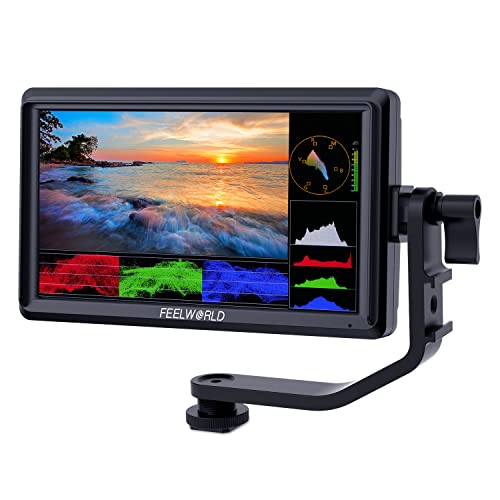
The FEELWORLD FW568 is a compact, feature-rich 6-inch field monitor designed for precise on-set monitoring. With a Full HD 1920×1080 display, it delivers crisp visuals and a compact build ideal for handheld or gimbal use. It supports 4K HDMI input/output, enabling compatibility with modern cameras and external recorders. Real-time preview includes built-in Waveform and LUT support, allowing shooters to preview looks with 32 custom LUTs. The monitor is geared toward flexibility, offering lightweight construction and straightforward operation for quick setup during shoots or field work. This makes it a practical choice for videographers needing reliable monitoring without bulky gear.
Key considerations:
– LUTs and waveform: Enhanced color grading and exposure checking on location.
– 4K HDMI support: Broad compatibility with high-end cameras.
– Portability: Small size reduces on-set fatigue during long shoots.
– Power and accessories: Compatible with common NP-F750 batteries for field use.
FEELWORLD S55 V3 6″ DSLR Field Monitor Bundle

The FEELWORLD S55 V3 bundle combines a compact 6-inch monitor with a tilt arm and power options, delivering a complete on-set monitoring package. It features a high-contrast 1080p display, 4K HDMI input/output, and a tilting arm that supports flexible shooting angles. The bundle includes a battery setup and carry accessories, making it a ready-to-use option for camera operators who need a compact external monitor with reliable exposure tools and smooth control for difficult shooting conditions. Its user-friendly design emphasizes practical field usability across various production environments.
Key considerations:
– Bundle value: Included tilt arm and power options reduce extra purchases.
– Monitoring tools: HD display with ample brightness for critical focus and exposure checks.
– Setup speed: Quick attachment and straightforward controls support on-set efficiency.
– Compatibility: Works with a wide range of cameras via 4K HDMI.
Buying Guide: Choosing Monitors With Built-In Cameras
When selecting a monitor with an integrated camera, consider how you plan to use it: home office, business conferencing, or on-set production. A few critical purchase considerations:
-
<li Camera quality and privacy: Built-in webcams vary in resolution and field of view. Check if the camera supports privacy shutters or disabling options to maintain confidentiality when needed.
<li Display performance: Screen size, resolution, and panel type influence readability and multitasking. UltraWide formats improve workflow by housing multiple windows side by side; high brightness helps in bright environments.
<li Connectivity: USB-C or docking capabilities simplify desk setup, while HDMI/DisplayPort inputs ensure compatibility with a broad range of devices and cameras.
<li Color accuracy and calibration: For content creation or color-critical work, look for wide color gamut coverage and support for calibration tools or LUTs.
<li Audio features: Built-in mics and speakers should be evaluated for clarity and noise handling, especially for meetings or streaming.
<li Ergonomics: Adjustable stands and VESA compatibility aid long-term comfort and versatile installations in different workspaces.
<li Portability vs size: Field monitors prioritize brightness and ruggedness in smaller forms, while office-oriented models may prioritize screen real estate and webcam quality.
In practice, choosing a model with a balanced mix of camera quality, display performance, and flexible connectivity will cover most common needs—from daily video conferences to professional on-set monitoring. For desk-centric use, prioritizing USB-C docking and privacy features helps minimize cable clutter and security concerns. For video production, seek out higher brightness, robust LUT support, and reliable HDMI loop-through to streamline workflows.