Choosing the right monitor is essential for creatives who rely on accurate colors, sharp details, and comfortable long sessions. This guide highlights five top picks that balance clarity, color depth, and user-friendly features. Each option supports varied workflows—from photo and video editing to graphic design and 3D work—so you can find a screen that fits your process and workspace.
| Product | Brand | Key Strength |
|---|---|---|
| Dell S2425HS Monitor | Dell | IPS color accuracy, built-in speakers, eye comfort |
| Dell 27 Plus 4K Monitor – S2725QS | Dell | 4K resolution, rich color, high refresh for hybrid work |
| Samsung 27″ Essential S3 (S36GD) | Samsung | Curved panel, 100Hz, gaming-friendly with strong contrast |
| SANSUI 22 Inch FHD | SANSUI | HD clarity, adaptive sync, eye comfort features |
| LG 27US500-W Ultrafine 4K | LG | 4K HDR, wide color with accurate rendering, borderless design |
The following sections review each option’s strengths, screen technology, and how they support creative workflows. Each product includes a brief, objective summary of features to help you compare at a glance.
Dell S2425HS Monitor

The Dell S2425HS emphasizes a slim, lifestyle-inspired design with ultrathin bezels that minimize distractions during creative work. It delivers a comfortable viewing experience with TÜV Rheinland Eye Comfort features and a 100 Hz refresh rate, reducing motion blur in video editing and scrolling tasks. The display uses In-plane Switching (IPS) technology for wide viewing angles and color consistency, offering 99% sRGB coverage to support accurate color representation across tasks. Integrated 2x5W speakers provide basic on-screen audio without external gear, which is convenient for review sessions in small studios.
Dell 27 Plus 4K Monitor – S2725QS

The Dell S2725QS offers a sharp 4K (3840×2160) display with IPS panel technology for consistent color from wide viewing angles. It supports high-refresh interactions up to 120 Hz with AMD FreeSync Premium, enabling smoother workflow when panning, animating, or editing high-resolution footage. ComfortView Plus reduces blue-light emissions for extended sessions without sacrificing color accuracy, while 99% sRGB coverage helps preserve vibrant, true-to-life colors essential for photo and video work. Built-in speakers add convenience for quick reviews and collaborative sessions.
Samsung 27″ Essential S3 (S36GD)

The Samsung S36GD introduces a curved 27-inch panel designed to immerse viewers and reduce peripheral distractions, which can assist with focus during complex editing tasks. With a 100 Hz refresh rate, it offers smoother motion handling for video editing and casual workflow. The monitor’s game-oriented calibration options allow you to adjust color and contrast to suit different project types, while the curved design helps create a more natural viewing experience for long sessions. HDMI and D-sub connections support versatile integration with existing workstations.
SANSUI 22 Inch FHD with Adaptive Sync
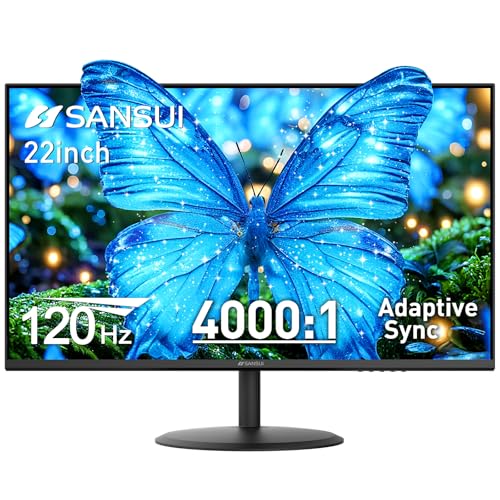
The SANSUI ES-22X3AH provides a compact FHD option with 120 Hz refresh and Adaptive Sync, supporting smoother scrolling and reduced motion blur—useful for motion graphics drafts and editing. Its 4000:1 contrast ratio helps deepen blacks and separate shadow details, which is beneficial for tasks requiring precise tonal grading. The monitor emphasizes eye comfort with anti-flicker and low blue-light features, making it suitable for long editing sessions. Dual HDMI inputs broaden connectivity for laptops and desktops alike.
LG 27US500-W Ultrafine 4K

The LG 27US500-W Ultrafine 4K delivers a true 4K HDR viewing experience with a 3840×2160 resolution and 1000:1 contrast. The 27-inch IPS panel supports wide viewing angles and color accuracy, making it a strong choice for photo and video editing, as well as design work. HDR10 support and a broad DCI-P3 color representation help render content with rich detail. Onscreen Control simplifies workspace customization, including window tiling and quick monitor adjustments, which can boost productivity in creative workflows.
Buying Guide
Key considerations when selecting a monitor for creatives include color accuracy, panel type, resolution, and ergonomic options. Here are essential factors to weigh:
- Color accuracy and coverage: Look for monitors with wide color gamuts (sRGB, Adobe RGB, or DCI-P3) and factory calibration if possible. IPS panels generally provide stronger color consistency and viewing angles than TN panels.
- Resolution and size: 4K displays provide sharp text and detailed imagery, which is valuable for high-precision tasks. If desk space is limited, a 27-inch 4K panel offers a practical balance of density and scale.
- Refresh rate and response: For motion-heavy work and video editing, higher refresh rates (up to 120 Hz) can improve workflow smoothness. Adaptive-Sync helps reduce tearing during cross-platform work.
- Ergonomics and ports: Adjustable stands (height, tilt, swivel, pivot) reduce strain during long sessions. USB-C or docking options enable single-cable setups that simplify desk clutter and power delivery.
- Eye comfort features: Low blue light, flicker-free backlighting, and ComfortView modes help reduce eye strain during extended editing sessions.
- Built-in speakers vs. external audio: While integrated speakers are convenient for quick reviews, many professionals prefer dedicated studio monitors or external speakers for accurate audio reproduction.
- Connectivity and compatibility: Ensure the monitor has the necessary HDMI, DisplayPort, USB-C, or Ethernet options to fit your existing workstation and future peripherals.
- Color calibration workflow: Some monitors support hardware calibration via dedicated devices. If color-critical work is a focus, this can improve long-term accuracy.