Choosing a monitor that includes a built-in webcam and speakers can streamline setups for video calls, collaborative work, and online learning. The following picks prioritize sharp displays, reliable audio, and convenient connectivity to keep meetings and productivity flowing without extra accessories. Each option offers a balance of image clarity, integrated audio, and practical features like USB-C docking, eye-care tech, or ergonomic stands to support long work sessions.
Summary of chosen products
| Product | Brand | Key Features | Display | Webcam & Audio |
|---|---|---|---|---|
| Philips 34E1C5600HE | Philips | Windows Hello webcam, USB-C dock, stereo speakers | 34″ UltraWide QHD | Built-in webcam and mic, speakers |
| ASUS BE279QSK | ASUS | Fully integrated webcam, mic array, speakers | 27″ Full HD | Built-in webcam, mic, speakers |
| MSI PRO MP272PMG | msi | Webcam, adaptive sync, EyeErgo | 27″ IPS FHD | Webcam with mic, speakers |
| ASUS BE279QFK | ASUS | Frameless design, 100 Hz, built-in webcam | 27″ Full HD | Webcam, mic, speakers |
| ASUS BE24EQK | ASUS | Telecommuting ready, built-in webcam, stereo speakers | 23.8″ Full HD | 2MP webcam, mic, speakers |
The following sections review each model’s strengths, focusing on display quality, video call capabilities, and ease of use in typical American home or office setups. All products include integrated components to reduce desk clutter while supporting clear communication during video conferences.
Philips UltraWide Monitor With Built‑In Web Cam

The Philips 34E1C5600HE combines 34-inch UltraWide QHD resolution with a curved 1500R VA panel for immersive productivity and improved color accuracy. The model emphasizes extended desk real estate and reduced eye strain through a wide viewing angle and sRGB coverage. Built-in Windows Hello webcam and noise-canceling mic support secure and clear video communications, while integrated stereo speakers provide on‑screen collaboration without external peripherals. USB-C docking adds a streamlined single‑cable connection for newer laptops and devices.
ASUS BE279QSK: Full HD Conference Monitor

The BE279QSK pairs a 27-inch Full HD IPS panel with a built-in adjustable 2MP webcam, mic array, and stereo speakers, making it a straightforward choice for video conferencing and online learning. Wide viewing angles and multiple inputs (DisplayPort, HDMI, VGA) enhance connectivity for mixed setups. The frameless design and adjustable stand promote ergonomic alignment, while the included webcam and audio components keep calls and meetings clear and convenient.
MSI PRO MP272PMG With Webcam And Speakers
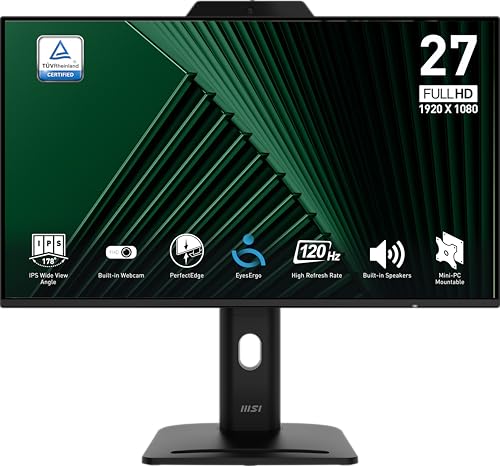
The MSI PRO MP272PMG is a 24-inch IPS display featuring 1080p resolution, a built-in FHD webcam with a digital microphone, and a pair of built-in speakers. It emphasizes eye comfort with TÜV-certified display standards and MSI EyesErgo technology, including anti-flicker to minimize fatigue during long sessions. A 1 ms response time helps reduce motion blur, and the monitor’s ergonomic tilt and height adjustments support comfortable all‑day use in mixed work environments.
ASUS BE279QFK: High‑Performance Video Conferencing Monitor

The BE279QFK offers a 27-inch Full HD IPS panel with a built-in webcam, mic array, and speakers facing front for natural conversations. The 100 Hz refresh rate and frameless design support smooth, tear-free video and a modern aesthetic for desk setups. Wide color coverage and ergonomic stand choices ensure comfortable, productive use during long video conferences or training sessions.
ASUS BE24EQK: Compact Teleconferencing Monitor

The ASUS BE24EQK focuses on compact, telecommuting-friendly performance with a 23.8-inch Full HD IPS panel, integrated 2MP webcam, mic array, and stereo speakers. The frameless design helps maximize screen real estate, while DisplayPort and HDMI inputs enable straightforward connections to laptops and desktops. It’s a capable choice for home offices needing a compact, all‑in‑one solution for calls and collaboration.
Buying Guide
When selecting a monitor with a built-in webcam and speakers, consider these purchase factors:
- Display quality: Look for IPS panels for accurate colors and wide viewing angles; higher resolutions (like QHD or 4K) improve clarity for video calls and documents.
- Webcam quality and security: A pop-up or retractable webcam adds privacy; ensure the camera supports reliable facial recognition or Windows Hello features where available.
- Audiography and microphone: Built-in mics and stereo speakers should offer sufficient clarity for meetings. Consider mics with noise suppression and echo cancellation for better remote conversations.
- Connectivity: USB-C docking is highly convenient for modern laptops, enabling video, data, and power over a single cable. Check for DisplayPort, HDMI, USB-A, and USB-C options.
- Ergonomics: Adjustable height, tilt, and swivel help achieve ergonomic alignment. A curved or large ultrawide screen can boost productivity for multitasking.
- Eye comfort: Features like anti-flicker, low blue light modes, and stable brightness can reduce eye strain during long sessions.
- Space and setup: Consider desk space and whether a larger screen or a more compact monitor better fits your room or office.
- Security and privacy: Some monitors provide privacy shutters or privacy modes for webcams; evaluate privacy needs in shared spaces.
- Warranty and support: Look for solid warranty terms and replacement policies, especially for devices used daily in professional contexts.
For buyers prioritizing video conferencing, the combination of an integrated webcam, microphone, and speakers reduces clutter and simplifies setup. If you frequently multitask with multiple windows, an ultrawide monitor may offer a smoother workflow, while higher refresh rates support smoother video during calls. Always verify compatibility with your computer’s ports and docking setup to maximize convenience and performance.