In today’s hybrid work and remote learning environments, a monitor with a built-in camera can simplify setups, reduce clutter, and improve video quality. This guide highlights top options that fuse display quality with integrated webcams, mics, and speakers for clear video conferences and online collaboration. Each selection balances image fidelity, viewing comfort, and convenient connectivity to keep teams productive. Below you’ll find a quick summary, detailed product sections, and a comprehensive buying guide to help you compare features and choose the right model for your space.
| Product | Brand | Key Feature |
|---|---|---|
| ASUS BE279QSK | ASUS | Full HD webcam, mic array, speakers; slim frameless design |
| Philips 34E1C5600HE | Philips | 34″ UltraWide with built‑in Windows Hello webcam and noise-canceling mic |
| ASUS BE279QFK | ASUS | Built-in webcam, mic array, 100 Hz, ergonomic design |
| ASUS BE24EQK | ASUS | 2 MP webcam, mic, stereo speakers; frameless 24″ IPS |
| ViewSonic VG2741V | ViewSonic | 5 MP IR Windows Hello webcam; built-in mic and speakers |
ASUS 27” BE279QSK: Full HD Video Conferencing

ASUS BE279QSK combines a 27-inch Full HD IPS panel with an adjustable built-in 2 MP webcam, microphone array, and stereo speakers. The frameless design supports flexible mounting and provides wide viewing angles for group calls and presentations. Connectivity includes DisplayPort, HDMI, VGA, and an upstream USB connection for the webcam, plus audio in and earphone ports for flexible audio routing. The monitor emphasizes eye care and ergonomic adjustability, making it suitable for long sessions and multi-person video conferences.
Philips 34E1C5600HE: UltraWide With Built-In Windows Hello Webcam

This 34″ UltraWide monitor delivers a 3440 x 1440 WQHD resolution and a curved 1500R VA panel for immersive productivity and reduced eye strain. The built-in Windows Hello webcam and noise-canceling microphone enhance video calls, while USB‑C docking and stereo speakers streamline connections and multimedia. The expansive color coverage and ultra-wide aspect ratio support multitasking, even during long sessions, with a comfortable curved viewing experience that can help reduce fatigue.
ASUS BE279QFK: Full HD 27” Video Conferencing Display

The BE279QFK pairs a 27-inch Full HD IPS panel with a built-in webcam, mic array, and stereo speakers. With a 100 Hz refresh rate and ergonomic design, this model is tailored for smooth video conferencing and collaborative work. The screen provides wide sRGB coverage for vibrant color accuracy, making it a balanced option for general productivity where video calls are frequent.
ASUS BE24EQK: Frameless 24” with Integrated Camera

The BE24EQK offers a 24-inch Full HD IPS panel with an integrated 2 MP webcam, microphone array, and stereo speakers. Its frameless design and wide viewing angles support comfortable group viewing and conferencing. The monitor includes HDMI and DisplayPort inputs, along with USB 2.0 for peripheral connectivity, making it a compact, telecommuting-friendly option for office desks and home setups.
MSI PRO MP272PMG: 27” 1080p with Webcam Accessory
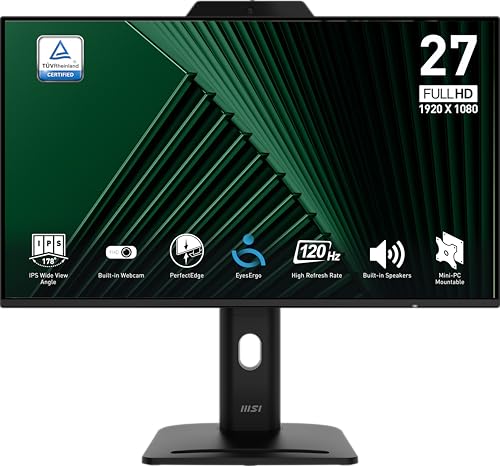
MSI PRO MP272PMG features a 27-inch IPS FHD panel with a built-in webcam, mic array, and speakers. It includes a TÜV-certified display for eye comfort and MSI EyesErgo technology to reduce eye strain through anti-flicker and color accuracy. The 120 Hz refresh rate supports smoother video playback and conferencing, while multiple inputs ensure compatibility with a variety of devices and docking stations.
ViewSonic VG2741V: 27” IPS With Windows Hello Camera
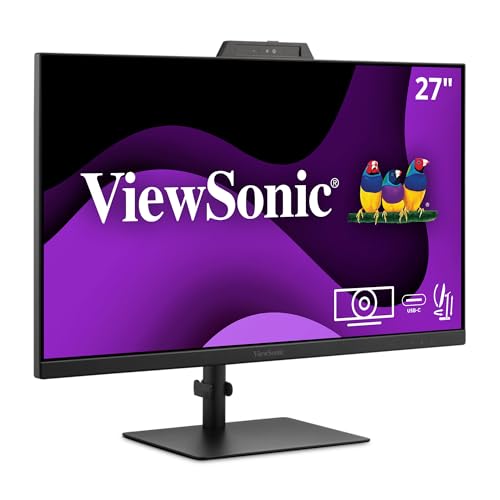
The ViewSonic VG2741V provides a 27-inch IPS panel with a built-in Windows Hello certified 5 MP IR webcam, plus an integrated microphone and speakers. The monitor emphasizes ergonomic versatility with height adjustability, tilt, swivel, and pivot options, as well as USB-C, HDMI, and DisplayPort inputs to simplify device connections during video conferences and collaborative work sessions.
SKitphrati 27” Business Webcam Monitor

The 27-inch SKitphrati monitor features a built-in adjustable 3 MP webcam, mic array, and speakers. It offers 1080p resolution at 120 Hz for smooth conferencing and playback. Connectivity includes HDMI, DisplayPort, VGA, and USB 2.0 for broad device compatibility, with frameless design aiding seamless multi-monitor setups for professional environments.
Buying Guide: Key Purchase Considerations
When selecting a monitor with a built-in camera, consider display size and resolution to balance workspace visibility with desk space. A higher refresh rate (where available) can improve video quality during calls, while IPS panels provide wider viewing angles and more consistent color. Look for a reliable webcam resolution (2 MP to 5 MP is common) and a clear microphone array with noise reduction for better voice capture. Built-in speakers are convenient, but external audio can offer richer sound for conferences. Connectivity options (HDMI, DisplayPort, USB, USB-C) determine future-proofing and docking compatibility. Windows Hello or IR cameras add authentication convenience and privacy controls. Finally, check ergonomic features like height adjustment, tilt, swivel, and VESA compatibility for flexible mounting.
Product diversity in this category ranges from compact 24-inch frameless designs to expansive 34-inch UltraWide displays. For users who rely heavily on video calls, models with Windows Hello or IR cameras provide quick sign-ins and improved security. If multitasking is essential, UltraWide or high‑resolution panels can help keep multiple windows visible without sacrificing camera placement. Always verify the specific camera position and privacy features to ensure comfortable long sessions and confident collaboration across teams.