Finding a monitor that champions USB-C connectivity can streamline your workspace, deliver power delivery, and simplify cable management. This guide highlights five top choices that balance clarity, speed, and versatility for home offices, creative work, and casual gaming. Each option supports USB-C in various ways, from data and video transfer to charging devices, so you can pick the model that best fits your laptop, desktop, or USB-C hub ecosystem.
Quick Overview
| Product | Brand | Key USB-C Benefit | Resolution / Refresh |
|---|---|---|---|
| Sceptre E275W-FP100T | Sceptre | USB Type-C connectivity with IPS visuals | 1080p / 100 Hz |
| Lenovo L27m-30 | Lenovo | USB-C with 75W PD and data/video transfer | 1080p / 75 Hz |
| LG 27U631A-B | LG | USB-C 15W PD for power and data/video | 1440p / 100 Hz |
| Dell S2725QC | Dell | USB-C, HDR, 4K option with FreeSync | 4K / 120 Hz |
| LG 27UP850K-W | LG | USB-C 90W PD and versatile color profile | 4K / 60 Hz |
Sceptre New IPS 27-Inch Prime Gaming Monitor
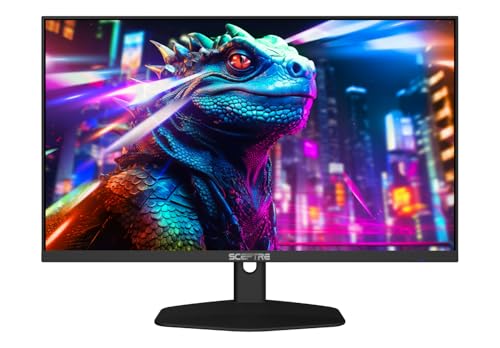
The Sceptre E275W-FP100T delivers an IPS panel with a broad color gamut and true-to-life visuals, designed to elevate clarity across software, photos, and video. The unit supports a 100 Hz refresh rate paired with a responsive 1 ms blur reduction, delivering smoother motion in gaming and fast-paced tasks. USB Type-C connectivity adds a streamlined path for modern laptops and hubs, while built-in blue-light shift technology helps reduce eye strain during long sessions. This configuration makes it a strong pick for creators who value color accuracy and comfortable, extended viewing.
Key features include 100% sRGB coverage for vibrant, consistent colors and wide viewing angles. The combination of IPS depth and a modern 27-inch form factor makes this model suitable for coding, content consumption, and productivity. While primarily targeted at mainstream users, the 1 ms response and 100 Hz refresh offer a compelling balance of speed and image fidelity for everyday gaming and multitasking. The device emphasizes eye comfort with a blue-light reduction feature, supporting longer sessions without compromising visual quality.
Overall, this Sceptre provides a versatile USB-C hub for power delivery, data transfer, and display compatibility with many laptops. The screen’s color fidelity and eye-friendly features address both creative and office workflows, making it a well-rounded entry in USB-C monitor options for US buyers.
Lenovo L27m-30 Monitor

The Lenovo L27m-30 focuses on flexibility with a 27-inch IPS panel and a 1080p resolution at 75 Hz, delivering dependable everyday performance. USB-C connectivity provides a convenient path for data transfer, power delivery up to 75W, and audiovisual transmission, enabling a cleaner desk setup when paired with compatible laptops or docking stations. This model also includes integrated speakers for improved multimedia convenience and a stand capable of height adjustment, tilt, and swivel to tailor the viewing angle for different tasks or users.
For professionals balancing remote work with casual gaming or media consumption, the L27m-30 offers a practical blend of performance and comfort. The presence of multiple ports (HDMI, USB-C, and USB 3.2) facilitates peripheral expansion, while FreeSync support helps reduce tearing in casual games. This monitor is especially suitable for users who want a compact, budget-conscious USB-C option without compromising essential functionality.
In the context of USB-C monitors, Lenovo emphasizes stable color rendering and ergonomic adaptability. While it does not push ultra-high resolutions, it remains a reliable choice for office productivity, video calls, and light entertainment in a compact 27-inch footprint.
LG 27U631A-B 27-Inch QHD IPS Monitor

The LG 27U631A-B pairs a 27-inch QHD IPS panel with a 100 Hz refresh rate, offering crisp detail and smooth motion for work and play. The 2560×1440 resolution enhances productivity, enabling more screen real estate for multitasking and document comparison. A key feature is the USB-C port with 15W Power Delivery, allowing basic charging and data transfer while keeping your desk uncluttered. HDR10 support improves contrast and color depth, while Flicker Safe and Reader Mode assist long hours of reading and coding without fatigue.
Color accuracy and viewing angles are enhanced by IPS technology, ensuring consistent visuals across a wide range of angles. The monitor’s broad color gamut supports rich greens and blues, beneficial for photo editing and creative tasks. For users seeking a balance between crisp visual quality and flexible USB-C usage, the 27U631A-B stands as a solid option with a streamlined modern workflow in mind.
Dell 27 Plus 4K USB-C Monitor S2725QC

The Dell S2725QC brings a 27-inch 4K display with USB-C connectivity designed for versatile productivity and entertainment. The monitor includes built-in speakers and a compact, elegant design suitable for modern workspaces. With AMD FreeSync Premium and a high 4K resolution, the S2725QC delivers sharp detail and smooth motion, making it a strong candidate for editors and designers who need precise imagery and reliable color performance. The 120 Hz potential at certain configurations reduces motion blur, enhancing both gaming and video playback experiences.
Incorporating 4K clarity, this monitor supports comprehensive color work and media consumption with a broader color gamut and HDR readiness. It integrates well into a USB-C-centric setup, enabling single-cable power and display for compatible laptops. The inclusion of ergonomic stands and flexible inputs further supports a comfortable, productivity-minded user base. Overall, the S2725QC represents a high-end USB-C monitor option for users who require high resolution and strong multimedia capabilities in a single package.
LG 27UP850K-W 27-Inch Ultrafine 4K IPS Monitor

The LG 27UP850K-W is a 27-inch 4K IPS monitor that emphasizes a robust USB-C experience, including 90W Power Delivery to charge laptops and other devices from a single cable. The 60 Hz refresh rate is well-suited for productivity, content consumption, and light creative work, while DisplayHDR 400 and a wide color gamut ensure vivid, lifelike imagery. This model stands out for its single-cable simplicity, premium color performance, and ergonomic stand with tilt/height/pivot adjustments, helping users tailor the viewing position for long sessions at a desk.
For professionals who rely on precise color and high-resolution detail, the 27UP850K-W provides a compelling mix of 4K clarity and USB-C convenience. The monitor’s image processing and color science support accurate skin tones and greens, suitable for photo and video workflows, presentations, and design tasks. As a versatile USB-C monitor, it suits modern setups that prioritize power delivery, minimal cable clutter, and reliable performance for a range of use cases.
Buying Guide: Key USB-C Monitor Purchase Considerations
- Resolution and size: Higher resolutions (QHD, 4K) provide more workspace and sharper images. Choose based on desk size, viewing distance, and intended tasks (productivity vs. color-critical work vs. gaming).
- USB-C capabilities: Look for USB-C with power delivery (PD), data transfer, and video signal support (DisplayPort Alt Mode) to minimize cables and simplify docking.
- Refresh rate and response: For video, gaming, and smooth scrolling, consider 75 Hz–144 Hz, with lower response times (1 ms MPRT) for faster motion handling on gaming content.
- Color and HDR: IPS panels offer wide viewing angles and accurate color; HDR support (HDR10 or higher) improves contrast and color depth for media and creative work.
- Ergonomics and stand: Height adjust, tilt, pivot, and swivel help reduce strain during long work sessions. VESA compatibility adds mounting flexibility for different setups.
- Speakers and additional ports: Built-in speakers are convenient, yet external audio can offer richer sound. Check HDMI, DisplayPort, USB-C, and USB-A hubs for peripheral connectivity.
- Ergonomic and eye comfort features: Blue light reduction, flicker-free technology, and uniform brightness help with long hours of use.
- Software and color profiles: Look for factory-calibrated presets or easy-to-use color management options if you work with precise color workflows.
These considerations help users compare models across the spectrum—from budget-friendly options with essential USB-C features to premium panels delivering higher resolutions and broader color gamuts. When selecting a USB-C monitor, align the device’s capabilities with your typical tasks, whether it’s office productivity, content creation, or gaming, to maximize value over time.