The right triple monitor stand can transform a crowded desk into a clean, productive workspace. This guide highlights five top-rated options that support three displays, focusing on adjustability, durability, and ease of installation. Whether you work with design, data analysis, or gaming, these mounts help you position each screen for optimal comfort and efficiency. Below, you’ll find quick product snapshots, followed by in-depth sections and a buying guide to help you choose the best fit for your setup.
| Product | Brand | Key Benefit |
|---|---|---|
| HUANUO Triple Monitor Mount (B084RF63FK) | HUANUO | Gas spring adjustment for easy angle control |
| WALI Triple Monitor Stand (MF003) | WALI | Two-stage locking, versatile mounting options |
| HUANUO Triple Monitor Mount (B0CHMPTPW4) | HUANUO | High stability with extensive tilt/swivel/rotation |
| VIVO Triple Monitor Mount (STAND-V003E) | VIVO | Heavy-duty base with solid adjustment range |
| MOUNTUP Triple Monitor Stand (B07Z7ZWC6S) | MOUNTUP | Gas spring arms and full motion for ergonomic setup |
HUANUO Triple Monitor Mount B084RF63FK

The HUANUO triple mount accommodates monitors up to 32 inches with VESA patterns of 75x75mm or 100x100mm. Each arm supports 4.4 to 17.6 pounds, ensuring stability across common monitor sizes. The gas-spring system enables straightforward height, tilt, and swivel adjustments, letting users quickly tailor each screen to landscape or portrait orientation. This setup frees desk space by lifting three monitors off the desk, reducing clutter and creating a more organized workspace. Carefully verify monitor compatibility before purchasing to ensure a proper fit.
WALI Triple Monitor Stand MF003

The WALI MF003 supports three monitors up to 27 inches, with a per-arm weight capacity of up to 22 pounds. It offers two mounting options: a two-stage locking free-standing base and a 4″ diameter grommet base for desk thicknesses from 0.3″ to 2.4″. The arm setup allows full height adjustment along a 16″ pole, with +/- tilt, +/- swivel, and 360° rotation for landscape-to-portrait transitions. Detachable mounting plates and VESA compatibility (75x75mm or 100x100mm) enhance versatility for mixed monitor setups.
HUANUO Triple Monitor Mount B0CHMPTPW4

This Huanuo model emphasizes rock-solid stability with aerospace-grade aluminum construction, supporting up to 17.6 pounds per arm. It provides a wide motion range: 360° rotation, ±90° swivel, ±45° tilt, plus a 12.2″ height adjustment for precise positioning. It’s designed for monitors up to 27″ with 75x75mm or 100x100mm patterns and supports desk thicknesses from 0.39″ to 3.15″. Tilt-lock bolts and tension adjustments help fine-tune the feel of each arm for secure, custom placement and reduced wobble during activity.
VIVO Triple Monitor Mount STAND-V003E
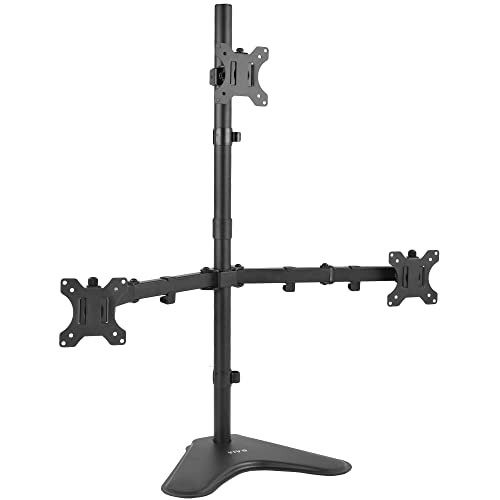
The VIVO STAND-V003E supports three monitors from 13″ to 30″ with a weight rating of up to 10 kg per arm and VESA patterns 75x75mm or 100x100mm. It offers +15° to -15° tilt, 360° swivel, 360° rotation, and independent height adjustment along the central pole to achieve optimal viewing angles. The heavy base provides stability, while padded feet protect desk surfaces. Cable management clips help maintain a tidy workstation, though stability may be affected if the stand isn’t bolted for very forward or backward monitor positioning.
MOUNTUP Triple Monitor Stand B07Z7ZWC6S

The MOUNTUP stand is designed for monitors up to 27″ with arms capable of 4.4-19.8 lbs per screen and supports VESA 75x75mm and 100x100mm. It includes both C-clamp and grommet mounting options for diverse desk builds. The arms offer tilt (-35° to +35°), swivel (-90° to +90°), and 360° rotation, with a center screen height adjustable. The gas-spring arms enable smooth extension, retraction, and height changes, while integrated cable management helps reduce clutter and keep wires organized for a clean setup.
Buying Guide: Key Considerations For Triple Monitor Setups
When selecting a triple monitor stand, consider the following factors to ensure a solid, ergonomic fit for your workstation:
- Monitor compatibility: Check monitor sizes, weights, and VESA patterns (75x75mm or 100x100mm) to confirm the stand supports your displays. Some mounts are limited to 27″ or lighter monitors.
- Mounting options: Determine whether you need a clamp or grommet base, and whether you prefer a freestanding design or a wall/pedestal attachment. Desk thickness compatibility is essential for grommet mounts.
- Adjustability range: Look for tilt, swivel, and rotation capabilities, plus height adjustments. A wide range of motion helps you find comfortable postures for writing, coding, or design work.
- Stability and build quality: Aluminum or premium steel builds with robust arms reduce sag and wobble. Check load ratings per arm and total system rigidity under movement.
- Space savings: The benefit of triple stands is desk space reclamation. Verify that the mount actually elevates screens to reduce clutter without interfering with keyboards or lamps.
- Cable management: Integrated clips and channels keep cables organized, reducing tangling and improving aesthetics.
- Ease of installation: Some models require tools or professional mounting; others are straightforward with included hardware and clear guidance.
- Desk compatibility: Ensure your desk can accommodate clamped or grommet bases without damaging surfaces and that there’s sufficient clearance behind the monitors for cables and movement.
Across the selected options, users gain enhanced ergonomics, more usable desk real estate, and flexible viewing angles. For teams with shared workspaces, these stands support collaborative viewing and quick reconfiguration. With proper installation and compatible displays, triple monitor setups can deliver substantial productivity gains while maintaining a tidy desk footprint.