For workflows that demand multitasking, a reliable triple monitor mount can free up desk space, reduce neck strain, and improve productivity. The selections below cover solid builds, robust adjustability, and wide compatibility with common monitor sizes and VESA patterns. Each option supports multiple mounting methods and dynamic movement, helping you tailor your setup for work, gaming, or design tasks.
Summary Table of Selected Products
| Brand | Model | Screen Range | Weight Capacity per Arm | Mount Type | Key Features |
|---|---|---|---|---|---|
| HUANUO | Triple Monitor Mount for 17 to 32 inch Screens | 17–32 in | 4.4–17.6 lbs | Clamp/Grommet | Swivel, Tilt, Rotation; Portrait/Landscape |
| WALI | Triple Monitor Mount M003S | 13–27 in | Up to 22 lbs | Clamp | Tilt, Swivel, Rotation; Height adjustable |
| MOUNTUP | Triple Monitor Stand Mount | Up to 27 in | 4.4–19.8 lbs | Clamp/Grommet | 360° rotation; Center height adjustable |
| PUTORSEN | Triple Monitor Mount Up To 49 Inches | Up to 49 in | 4.4–44 lbs (center 49″; sides 35″) | Clamp/Grommet | Gas spring on sides; full motion |
| BONTEC | BONTEC Triple Monitor Desk Mount | 13–32 in | Up to 22 lbs per monitor | Clamp/Grommet | Full motion; VESA 75×75/100×100; cable management |
HUANUO Triple Monitor Mount For 32-Inch Max Value

The HUANUO triple monitor arm set is designed for desks supporting three screens from 17 to 32 inches. Each arm accommodates monitors weighing 4.4 to 17.6 pounds and uses VESA 75x75mm or 100x100mm mounting patterns. It enables full movement with swivel, tilt, and rotation, allowing landscape or portrait orientations. The kit is compatible with both clamp and grommet mounting options, enabling versatile desk integration and keeping monitors neatly elevated for a clean workspace.
WALI M003S Triple Monitor Desk Mount

Designed for 13–27 inch screens, the WALI M003S supports up to 22 pounds per arm and uses 75x75mm or 100x100mm VESA patterns. The arms tilt, swivel, and rotate, with height adjustment for the center monitor. The dual mounting options include a clamp and a grommet base, making it adaptable to different desk configurations while maintaining a tidy, organized appearance.
MOUNTUP Triple Monitor Stand Mount

The MOUNTUP system supports up to 27-inch displays with 4.4–19.8 pounds per arm and accepts VESA 75x75mm or 100x100mm patterns. It offers clamp or grommet mounting and features extensive articulation: tilt ±35°, swivel ±90°, and 360° rotation, plus a height-adjustable center monitor. A cable management channel helps keep cords organized, and the three-arm design frees up desk space for a clean, ergonomic setup.
PUTORSEN Triple Monitor Mount For Ultrawide Setups

The PUTORSEN mount is built for larger displays, with a center arm supporting up to 49 inches and 4.4–44 pounds, while side arms accept up to 35-inch screens at 26.4 pounds each. It uses VESA 75x75mm and 100x100mm patterns and offers tilting ±35°, swiveling ±90°, and 360° rotation. The gas spring arms deliver smooth motion, and both C-clamp and grommet mounting options adapt to various desk thicknesses. The center monitor is height-adjustable to create a comfortable multi-monitor arrangement.
BONTEC Triple Monitor Desk Mount

The BONTEC mount supports two 13–27 inch screens on the arms and a central 13–32 inch monitor, with per-monitor capacity up to 22 pounds. It uses VESA 75x75mm and 100x100mm patterns and provides full motion: ±15° tilt, ±15° swivel, and 360° rotation for the top monitor, with the side monitors offering ±90° tilt and swivel plus 360° rotation. Cable management and both clamp and grommet mounting options help reduce desk clutter while enabling ergonomic viewing angles.
WALI Free-Standing Triple Monitor Mount
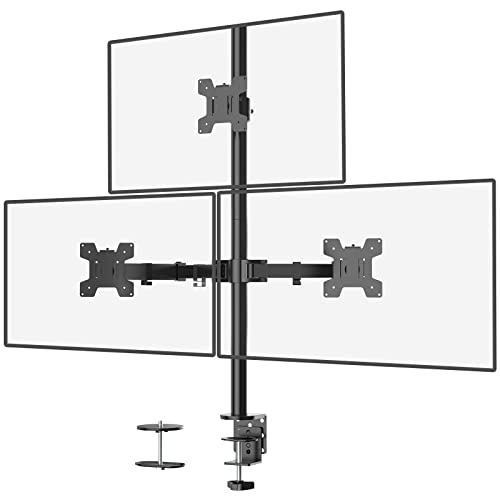
The WALI MF003 model fits up to 27-inch screens with a 22-pound per arm limit and supports VESA 75x75mm or 100x100mm. It offers two installation options—a free-standing V-base and a grommet-base—plus adjustable arms that tilt, swivel, and rotate. The center column allows height adjustments, enabling varied layouts for desktop space optimization and more flexible viewing angles.
Buying Guide: Key Purchase Considerations
- Monitor compatibility: Check size range, weight per arm, and VESA patterns (75×75 or 100×100 typically). Ensure your monitors fit within these limits for safe operation.
- Mounting method: Clamp mounts are desk-friendly, while grommet mounts require an additional hole. Consider desk thickness and whether you prefer a clean top surface or a sturdier mount anchored below.
- Articulation and ergonomics: Look for tilt, swivel, and rotation ranges that suit your workflow. A height-adjustable center monitor can improve posture and reduce neck strain.
- Center vs. side balance: Some setups place heavier monitors on one arm. Choose a mount with balanced load distribution or center-adjustable arms to maintain stability.
- Cable management: Integrated channels help hide cables for a tidier workspace and easier maintenance.
- Special features: Gas spring arms, full motion, or stacked configurations can expand flexibility. Larger ultrawide monitors may require higher load capacities and sturdier bases.
- Desk compatibility: Confirm desk thickness limits and whether your desk supports a grommet or clamp installation. Consider if you need free-standing bases for portable setups.