Choosing the right monitor for video and photo editing is essential for color accuracy, detail, and comfortable long sessions. This guide highlights five top options that balance size, color coverage, calibration options, and practicality for both professionals and enthusiasts in the United States. Each featured display offers strong color accuracy, robust connectivity, and features tailored to editing workflows, from built-in calibration to useful viewing angles and hardware or ICC color matching.
Summary of Selected Products
| Product | Key Benefit | Notable Feature |
|---|---|---|
| BenQ PV3200U 32” 4K UHD Monitor | Excellent color accuracy for video editing | Factory-calibrated with Delta E ≤ 2; 95% DCI-P3 |
| BenQ SW321C Photo/Video Editing Monitor | Professional-grade color with wide gamut | Hardware calibrated; 16-bit 3D LUT; 60W USB-C |
| INNOCN Portable OLED 13.3″ | Portable high-contrast color on the go | 100% DCI-P3; 1MS response; USB-C/HDMI |
| TANXJIA Pro 15.6″ OLED Portable | Compact, color-accurate travel editor | 10-bit color, 100% AdobeRGB; touch; 4K |
| ViewSonic VG2741V | Integrated conferencing features with editing usability | IPS, 27″ Full HD, 120Hz; Windows Hello camera |
BenQ PV3200U 32” 4K UHD Monitor

The BenQ PV3200U is a large-format option designed for professional video editing, featuring 32 inches of 4K UHD clarity with broad color coverage. It covers 100% Rec.709 and sRGB and 95% DCI-P3, enabling accurate color workflows from grading to final delivery. Factory calibration with Delta E ≤ 2 helps editors rely on consistent output across sessions. A 65W USB-C port simplifies MacBook or laptop connections, while built-in 2.1-channel audio supports basic monitoring needs without external speakers. Its ergonomic stand aids long editing sessions with tilt, swivel, and height adjustments.
BenQ SW321C Photo/Video Editing Monitor

The BenQ SW321C targets demanding editors with 32 inches of 4K UHD and professional color tools. It is hardware-calibrated with a 16-bit 3D LUT and supports 99% AdobeRGB, 100% sRGB, and 95% DCI-P3 color spaces for precise editing across workflows. With USB-C connectivity delivering up to 60W, it simplifies a modern workstation setup and helps keep color referenced when switching between devices. The SW321C emphasizes uniformity and color fidelity, making it a strong choice for photo retouching and video finishing alike.
INNOCN Portable OLED 13.3″ Monitor

This compact OLED option delivers cinema-grade contrast and vibrant color in a travel-friendly package. With 100% DCI-P3 color coverage, high brightness, and a fast response suitable for video editing on the move, it serves as a supplementary display for field work or quick client reviews. It connects via USB-C or Mini HDMI, allowing plug-and-play compatibility with most laptops and mobile devices. The self-emitting pixels of OLED technology provide precise black levels—an advantage for editors tweaking shadows and highlights away from a full editing suite.
TANXJIA Pro 15.6″ OLED Portable Monitor

The TANXJIA Pro 15.6″ OLED portable monitor combines 4K resolution with a 10-bit color pipeline and 100% AdobeRGB coverage, making it suitable for color-critical work on the go. The touch function adds interactive control for editing workflows, while a smart cover helps protect the screen in transit. For photographers and videographers traveling between shoots, this monitor offers a compact alternative to full-size displays without sacrificing color fidelity and detail.
ViewSonic VG2741V 27″ IPS Monitor
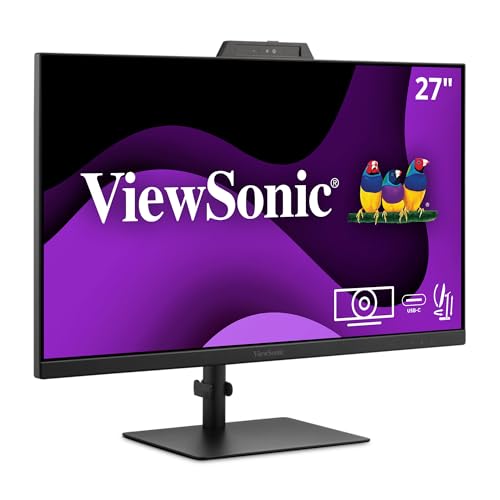
The ViewSonic VG2741V extends editing workflows with a 27-inch IPS panel offering wide viewing angles and solid color performance in Full HD. It includes built-in conferencing features that can aid collaborative sessions, such as a 5MP camera with privacy shutter and a microphone array, plus a Windows Hello IR option. While not a top-tier color-space monitor, its ergonomic stand and USB-C/HDMI/DisplayPort inputs provide practical flexibility for side-by-side editing, review, and meetings with clients or teammates.
Buying Guide: Key Considerations for Video and Photo Editing Monitors
Color accuracy and coverage: Look for models with wide color gamuts (DCI-P3, AdobeRGB, sRGB) and calibration options. Hardware calibration and 10- or 12-bit color pipelines reduce drift between sessions. Consider a monitor with built-in LUTs or factory calibration data for consistency.
Resolution and size: 4K resolution is beneficial for high-detail editing and precise pixel-level adjustments. Larger screens (27–32 inches) provide more real estate for editing timelines, color controls, and reference materials. Ultrawide or dual-monitor setups can improve productivity for complex projects.
Calibration and consistency: Factory calibration with Delta E values (lower is better) helps ensure accurate color right out of the box. Look for ICC profiles and ICCSYNC or similar color-matching features when using multiple devices in a workflow.
Connectivity: USB-C with power delivery can simplify modern workstations by reducing cable clutter. Ensure adequate HDMI, DisplayPort, and USB ports for peripherals, card readers, and external color meters or calibrators.
Ergonomics and viewing comfort: An adjustable stand (height, tilt, swivel) and good anti-glare coatings aid long editing sessions. Some editors prefer matte finishes to minimize reflections in bright rooms.
Additional features: Built-in speakers can be convenient for quick checks, while webcam and conferencing features are useful for collaborative reviews. Consider motion performance (refresh rate) if you hover between editing and light gaming or media playback.