Choosing the right portable monitor can dramatically expand your laptop’s capabilities while traveling or working remotely. The following selections emphasize compact design, easy setup, and strong image quality, helping you extend your screen space without sacrificing portability. The list covers a range of connections, viewing angles, and protective options to suit different devices and environments.
| Product | Brand | Key Strength | Connection Highlights |
|---|---|---|---|
| Ingnok Portable Monitor | Ingnok | Ultra-thin with adjustable stand | USB-C memory-friendly setup |
| InnoView Portable Monitor With Sleeve | InnoView | Protective sleeve and built-in stand | USB-C and HDMI for plug-and-play |
| Cocopar Portable Monitor | cocopar | VESA-mountable with cover stand | USB-C and mini HDMI inputs |
| Lenovo L15 Portable Monitor | Lenovo | Height-adjustable stand for comfort | USB-C connectivity |
| ASUS ZenScreen 16” | ASUS | Large 15.6” display in a slim form | Dual USB-C and mini-HDMI compatibility |
Notes: All products are intended as external displays for laptops, with a focus on portability, simple setup, and compatibility with common devices. The summaries above reflect notable strengths that align with a portable, laptop-enhancing workflow.
Ingnok Portable Monitor: Ultra-Thin 15.6” FHD Display

The Ingnok model emphasizes portability with a slim profile and light weight, making it easy to carry in a bag alongside a laptop. It delivers Full HD (1920×1080) resolution on an IPS panel, offering sharp detail and accurate color reproduction for on-the-go work or streaming. An adjustable stand supports flexible viewing angles, enabling comfortable use whether you’re seated at a cafe or at a train desk. USB-C connectivity provides a straightforward, single-cable setup in compatible environments, which helps minimize clutter during travel. This monitor is designed for travelers and office users who require a compact second screen without adding bulk to their kit.
InnoView Portable Monitor With Protective Sleeve
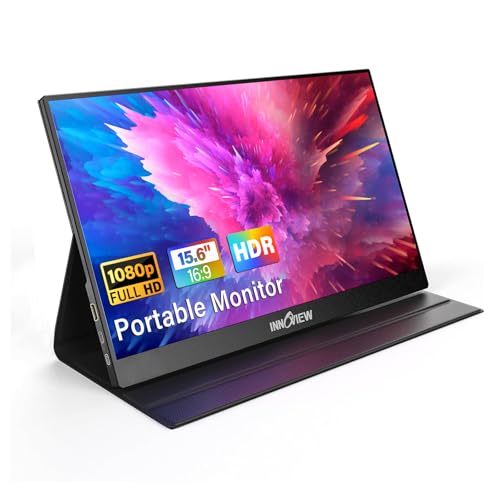
The InnoView portable monitor focuses on plug-and-play convenience with both USB-C and HDMI inputs, enabling quick connections to a wide range of laptops, tablets, and gaming devices. The 15.6-inch FHD display (1920×1080) provides clear detail and broad viewing angles, ideal for multitasking, presentations, or gaming on the go. The package includes a protective sleeve for added device protection during travel, and a built-in stand supports different tilt positions to reduce neck strain. It’s positioned as a versatile option for remote workers and students needing a reliable second screen without a heavy setup.
Cocopar Portable Monitor 15.6” With Stand

The Cocopar model is designed for easy attachment to laptops via USB-C and mini HDMI, supporting both extended and mirrored modes to adapt to various work styles. Its 1080p IPS panel delivers wide viewing angles and realistic color, with HDR support for more dynamic images and videos. A notable feature is its VESA-mount capability, allowing it to be installed on stands or compatible mounting arms for a more permanent, ergonomic setup. The monitor emphasizes flexibility for professionals who want a lightweight, portable display with mount options for desk or studio use.
Lenovo L15 Portable Monitor

Lenovo’s L15 emphasizes portability with a compact, lightweight form and a height-adjustable stand to optimize viewing angles. It offers Full HD imagery on an IPS panel, with a brightness level suitable for indoor and outdoor use. USB-C connectivity ensures simple, single-cable operations with compatible devices, which is convenient for travelers who want a lean travel setup or a compact second screen for presentations. The combination of portability and ergonomic stand design makes it a pragmatic choice for students, professionals, and road warriors alike.
ASUS ZenScreen 16” Portable USB Monitor

The ASUS ZenScreen MB169CK combines a larger 15.6-inch IPS panel with a lightweight, ultra-slim body. It supports USB-C connectivity (DP Alt Mode) for easy, single-cable setup with compatible devices and is designed with eye-care technologies to reduce fatigue during long sessions. Its dual-USB-C/min-HDMI compatibility broadens device compatibility, making it a versatile option for users who travel with a variety of laptops, tablets, or gaming devices. The monitor aims to offer a comfortable, portable option for extended productivity and media consumption on the road.
Buying Guide: Key Purchase Considerations
- Display size and resolution: For most travelers, a 15.6-inch display with 1080p resolution balances readability and portability. Larger screens improve multitasking but add weight.
- Connectivity: USB-C with power delivery and DP Alt Mode is ideal for beginners and power users alike. HDMI compatibility expands device support, especially with older laptops or consoles.
- Power and charging: Some models can pass power through to your laptop, reducing the need for extra adapters. Check whether a separate power cable is required when using USB-C alone.
- Ergonomics: An adjustable stand or stand-integrated design helps minimize neck strain during long sessions. Height and tilt adjustments improve comfort during extended use.
- Color and panel quality: IPS panels provide consistent color and wide viewing angles. Look for anti-glare coatings and low blue light features for eye comfort.
- Portability vs. durability: Ultra-thin profiles save space but may be more prone to scratches. Consider a protective sleeve or case for travel.
- Mounting options: VESA compatibility allows mounting on stands or arms for a more permanent desk setup, beneficial for home offices or studio spaces.
- Compatibility notes: Some models require Thunderbolt 3/4 or USB-C DP Alt Mode; verify your device’s capabilities before purchase to ensure a hassle-free setup.
- Protection and accessories: Sleeves, covers, and built-in stands add value by protecting the device and simplifying use in various environments.
This selection focuses on practical, travel-friendly displays that expand screen real estate without compromising portability. When choosing, consider your primary use cases—remote work, gaming, or presentations—and confirm compatibility with your laptop’s ports to ensure a smooth, single-cable experience.