For fast-paced gaming, a 300Hz monitor can deliver ultra-smooth motion, reduced input lag, and crisper imagery. This guide highlights five budget-friendly options around $300 that balance refresh rate, color, and response times. Each option prioritizes a strong gaming experience with adaptive sync, low input lag, and practical features for competitive play. Below, compare what each model offers and how it fits different gaming needs and setups.
| Product | Win For | Key Specification |
|---|---|---|
| Gawfolk 24.5” 300Hz | Competitive shooters and fast action | FHD 1080p, 98% sRGB, 1ms GTG, HDMI/DP |
| SANSUI ES-G25F6Q Pro 24.5” | High refresh, versatile inputs | QHD 2560×1440, 300Hz, 2x HDMI 2.1, 2x DP 1.4 |
| Z-Edge UG27S 27” | Immersive curved display | FHD 1080p, 300Hz, 2x DP, 2x HDMI, FreeSync |
| Amzfast 25” White Gaming Monitor | Budget 320/300Hz with eye care | FHD 1080p, 320Hz/300Hz/240Hz, TÜV Rheinland Eye Care |
| KTC 24.5” 300Hz (H25Y7) | Fast IPS with wide color | FHD 1080p, 300Hz, 119% sRGB, VESA |
Gawfolk 24.5 Inch 300Hz Gaming Monitor

The Gawfolk monitor delivers a 24.5-inch VA-panel gaming experience with a native 1080p resolution and a 300Hz refresh rate. It features a 1ms GTG response time for reduced motion blur and a wide viewing angle, aiding visibility during rapid in-game movements. The display supports adaptive sync for tear-free gameplay and natural color reproduction with 98% sRGB, helping players keep track of fast actions. Built-in dual speakers provide basic audio without external peripherals. Its 75×75 mm VESA compatibility allows wall mounting for space-saving setups. This model emphasizes speed and clarity for competitive shooting and racing games.
SANSUI ES-G25F6Q Pro 24.5” QHD Gaming Monitor
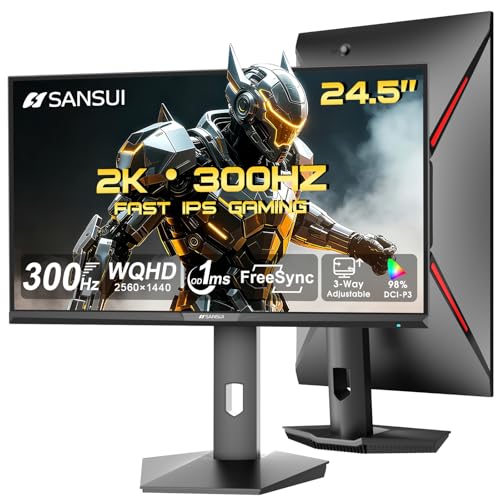
The SANSUI ES-G25F6Q Pro focuses on a higher-resolution gaming experience with QHD 2560×1440 on a 24.5-inch panel and a 300Hz refresh rate. The fast IPS panel minimizes motion blur, with a 1ms OD/MPRT response time and FreeSync technology to reduce tearing. It offers multiple ports (2× HDMI 2.1 and 2× DP 1.4) to accommodate newer GPUs and multi-device setups, plus a bundled DP cable. While it lacks built-in speakers, its strong color accuracy and high refresh rate make it suitable for competitive gaming and immersive titles that benefit from sharp visuals and quick reactions.
Z-Edge UG27S 27” Curved Gaming Monitor

The Z-Edge UG27S offers a larger curved display with a 27-inch panel and 300Hz refresh rate. The 1ms response time helps minimize motion blur during rapid gameplay, while the curved design enhances immersion. It includes dual DisplayPort and HDMI inputs to support high refresh rates across devices, plus FreeSync for tear-free gaming. The 4000:1 contrast ratio and 16.7 million color depth deliver deeper blacks and vibrant colors. It’s a practical choice for players who want a larger, engaging screen without sacrificing speed or responsiveness.
Amzfast 25” White Gaming Monitor

The Amzfast 25-inch monitor prioritizes ultra-smooth gameplay with up to 320Hz refresh rate (also offering 300Hz and 240Hz variants) and a 1ms MPRT response time. The 1080p resolution and FAST IPS panel deliver vibrant colors and sharp detail, while TÜV Rheinland Eye Care certification emphasizes reduced eye strain during long gaming sessions. The product includes a dual HDMI/DP connectivity option and a 12-month warranty, making it a practical choice for budget-conscious gamers seeking high-refresh performance in a compact size.
KTC 24.5” 300Hz Gaming Monitor

The KTC 24.5-inch monitor combines 300Hz refresh with a Fast IPS panel and 1080p resolution, delivering smooth motion and accurate colors. Its 178° viewing angles ensure consistent brightness and color across a wide field of view. With 119% sRGB coverage, HDR support, and VESA mounting, this model is well-suited for competitive gaming, streaming, and content creation where color depth and speed matter. Adaptive Sync helps minimize tearing, while a sturdy stand and ergonomic adjustments support comfortable long sessions.
Buying Guide
Key considerations when choosing a 300Hz monitor under $300 include panel type, resolution, and refresh consistency. Fast IPS panels typically offer better color accuracy and viewing angles than VA panels, though modern VA options can provide high contrast. Resolution matters: at 24.5 inches, 1080p remains crisp, while 1440p can improve clarity but may require a more powerful GPU to sustain 300Hz in demanding titles. Adaptive Sync (FreeSync or G-Sync compatible) is essential to minimize tearing at high refresh rates. Input lag and response time (1ms MPRT or GTG) influence how quickly your actions appear on screen. Connectivity (DP vs HDMI) ensures compatibility with current GPUs and potential multi-device setups. Finally, consider your space: curved displays and larger 27-inch panels offer immersion but require more desk depth. For wall-mounted setups, ensure VESA compatibility and mounting clearance. In practice, pick a model that matches your GPU’s output capacity, your preferred screen size, and whether you value color fidelity or pure motion clarity most. Compare inputs, feature sets, and warranty coverage to decide which monitor presents the best balance for your gaming style and budget.