For expansive ultrawide displays, a sturdy, adjustable monitor arm is essential to achieve optimal viewing angles, reduce neck strain, and reclaim desk space. This guide highlights five top mounts designed for 49″ ultrawide screens, with diverse mounting options, weight capacities, and motion ranges to fit gaming setups, home offices, and professional environments.
| Product | Brand | Max Weight | Screen Size | VESA |
|---|---|---|---|---|
| VIVO Heavy Duty Ultrawide Tension Arm | VIVO | 44 lbs | Up to 49″ Ultrawide | 75x75mm / 100x100mm |
| HUANUO TitanLift | HUANUO | 44 lbs | Up to 49″ | 75x75mm / 100x100mm |
| WALI GSM001XL Ultrawide | WALI | 44 lbs | Up to 49″ | 75x75mm / 100x100mm |
| ARES WING Ultrawide Arm | ARES WING | 44 lbs | 17–49″ | 75x75mm / 100x100mm |
| ULTRARM Heavy Duty MA20P-S | ULTRARM | 44 lbs | Up to 57″ | 75x75mm / 100x100mm |
Note: All products support VESA patterns of 75x75mm or 100x100mm. Load ratings and motion ranges vary by model; consult each item’s specs to confirm compatibility with your exact 49″ ultrawide monitor and desk setup.
VIVO Heavy Duty Ultrawide Tension Arm

Designed for ultrawide screens up to 49 inches and 44 pounds, this single-mount arm supports 75x75mm or 100x100mm VESA patterns. It clamps to desks up to 3.2 inches thick (or 1.4 inches with the optional grommet base). The tension arm provides spring-assisted weight balance for easy height adjustments. It offers +50° to -20° tilt, 180° swivel, 360° rotation, and up to 11 inches of height adjustment. A solid choice for gamers and productivity setups needing flexible positioning for large screens.
HUANUO TitanLift Heavy Duty Arm
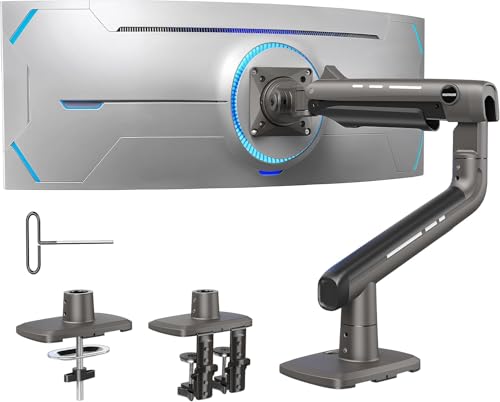
The TitanLift supports up to 49″ ultrawide screens with a 44 lb maximum load. It uses a robust aluminum alloy construction with reinforced head and wider base for durability. It includes a full motion range: tilt from +50° to -50°, swivel 180°, rotate 360° (with compatibility for screens up to 35″), and height adjustment up to 19.6 inches. It’s built to endure long-term use and is tested for high-cycle motion and load, making it suitable for intensive gaming and professional workflows alike.
WALI Ultrawide Gas Spring Arm GSM001XL
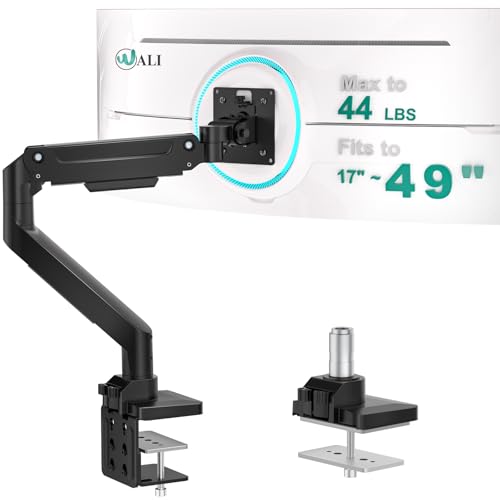
WALI’s heavy-duty arm supports ultrawide monitors up to 49 inches and 44 pounds with a gas spring for zero-drift stability. It offers +45°/-45° tilt, +90°/-90° swivel, and 180° rotation for portrait and landscape modes. The model helps reclaim desk space by elevating the monitor and routing cables through the arm, delivering a clean, ergonomic setup for gaming or work from home.
ARES WING Ultrawide Arm

The ARES WING arm supports up to 49″ screens and 44 lbs, with a strong build of steel and aluminum. It provides tilt from +50° to -20°, 180° swivel, 360° rotation, and a height range from 8.7″ to 18.7″ plus a maximum extension of about 22.4″. This model emphasizes robust construction and reliable positioning for immersive ultrawide setups, including compatibility with 75x75mm and 100x100mm VESA patterns.
ULTRARM Heavy Duty MA20P-S

ULTRARM’s MA20P-S arm is a heavy-duty solution for ultrawide displays up to 57 inches and 44 pounds. It features a pneumatic height adjust system, clear cable management, and a quick-release VESA bracket compatible with 75x75mm or 100x100mm patterns. The vertical motion offers +25° to -25° tilt, 180° swivel, 180° rotation, and up to 13 inches of height adjustment, delivering a versatile setup for gaming, workstations, and media stations.
Buying Guide
When selecting a monitor arm for a 49″ ultrawide, consider these key factors:
- Weight capacity: Ensure the arm supports your monitor’s weight with a comfortable margin (typically at least 10% over the monitor’s weight).
- VESA compatibility: Most 49″ ultrawide monitors use 75x75mm or 100x100mm patterns; verify your exact model’s mounting pattern and whether adapters are needed.
- Adjustability: Look for tilt, swivel, and rotation ranges that match ergonomic goals—higher tilt and rotation flexibility supports varied tasks and user heights.
- Extension and height: Arms offering substantial extension and height range help position the monitor for optimal viewing distance and line-of-sight alignment with the keyboard.
- Mounting system: Gas spring or tension-based mechanisms reduce sag and provide smooth adjustments; ensure desk compatibility (C-clamp, grommet base, or both).
- Build quality: Durable materials (steel/aluminum) and tested motion cycles indicate long-term reliability, especially for frequent adjustments during gaming or design work.
- Cable management: Integrated channels or channels along the arm help maintain a clean, organized desk surface.
- Compatibility with curved screens: Some ultrawide models have non-standard curvature; verify if the arm accommodates curved panels beyond flat displays.
Choosing between these models depends on desk setup, preferred adjustment style (tension vs. gas spring), and whether you need additional features like USB hubs or quick-release VESA plates. For users with Samsung Odyssey or similarly large ultrawides, prioritizing high weight capacity, robust articulation, and wide tilt/rotate ranges will yield the most ergonomic gains without sacrificing stability.