Choosing the right monitor arm for a 34 inch ultrawide screen can transform how you work, game, or design. The options below focus on sturdy builds, broad compatibility with ultrawide displays, and smooth motion for frequent adjustments. This guide highlights five top picks with strong weight ratings, wide tilt and swivel ranges, and easy mounting options to fit most desks. Each arm supports VESA patterns common to ultrawide monitors and offers some form of gas-spring or robust gas-assisted movement for effortless height changes. A quick summary helps compare core specs at a glance.
| Product | ||||
|---|---|---|---|---|
| WALI GSM001XL Ultrawide Arm | Up to 33 lbs | 180° rotate; +45°/-45° tilt; +/-90° swivel | 75×75 mm / 100×100 mm | Gas-spring like movement with heavy duty build |
| HUANUO TitanLift Ultra Arm | Up to 40 lbs | Extend up to ~24.8″; height up to ~19.6″ | 75×75 mm / 100×100 mm | 25% thicker head, 30% wider base for stability |
| ErgoFocus Dual Ultralarge Mount | Each arm 2.2–33 lbs | Full motion; height up to ~22.4″; extend up to ~20.87″ | 75×75 mm / 100×100 mm | Dual-arm, optimized for ultrawide dual setups |
| UPGRAVITY Ultralow Arm | Up to 26.5 lbs per arm | Extend forward to 22.8″; height up to 20″ | 75×75 mm / 100×100 mm | Aerospace-grade aluminum, robust construction |
| VIVO Single Ultrawide Arm STAND-V001 | Up to 22 lbs | Extend up to 16″ height; height adjust up to 16″ | 75×75 mm / 100×100 mm | Compatible with ultrawide up to 38″ |
WALI Ultrawide Monitor Arm GSM001XL

Designed to handle ultrawide displays up to 49″ and curved screens up to 35″, this arm supports up to 33 pounds with versatile VESA mounting options (75×75/100×100). It offers +45°/-45° tilt, +/-90° swivel, and 180° rotation for landscape or portrait viewing. The arm’s durable construction is built to endure frequent position changes, aiming to reduce neck strain and eye fatigue. Its single-monitor design is ideal for users moving between desk tasks and focused screen work. The heavy-duty construction is tested for extended life, promoting stability across varied desk configurations.
HUANUO Single Monitor Arm for 40 Inch Screens

HUANUO’s TitanLift is built for larger ultrawide displays up to 40 inches and up to 26.4 pounds per arm, with 75×75 or 100×100 VESA compatibility. It features +85° to -30° tilt, 180° swivel, and 360° rotation for flexible orientation. A notable USB 3.0 integration helps with light data transfers and charging, and integrated cable channels help reclaim desk space. The design emphasizes rapid height and angle adjustments, making it suitable for mixed tasks such as drafting, video editing, or programming where screen positioning matters for long sessions.
ErgoFocus Dual Ultrawide Monitor Mount
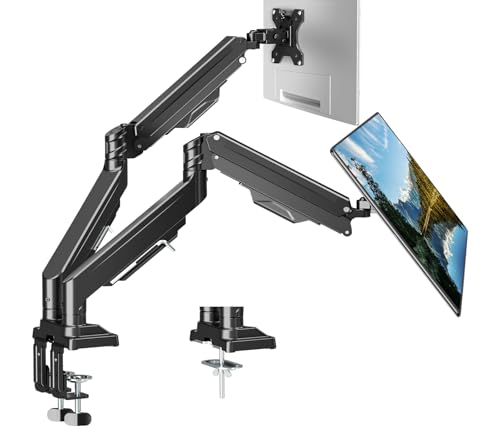
ErgoFocus offers a dual ultrawide setup supporting two screens up to 43″ and 33 lbs per monitor. The two-arm design provides an upgraded tilting head system to minimize sag and maintain image alignment. Internal gas springs undergo extensive fatigue testing (over 20,000 cycles) to ensure long-lasting performance. With a broad tilt range, 360° rotation, and substantial height and reach, this mount enables a broad spectrum of ergonomic configurations for workflows that require dual ultrawide displays, such as financial trading or video production.
UPGRAVITY Ultrawide Monitor Arm

UPGRAVITY’s ultrawide arm is compatible with 13″ to 35″ displays and supports 26.5 pounds. Built with aerospace-grade aluminum, the arm extends up to 22.8″ and reaches a maximum height of 20″, offering a wide range for standing and sitting workstations. It provides +90°/-45° tilt, 180° swivel, and 360° rotation for versatile landscape and portrait setups. The combination of high strength and adjustable geometry makes it suitable for people who frequently reposition their monitor during tasks like CAD work or large-screen multitasking.
VIVO Single Ultrawide Arm STAND-V001

The VIVO STAND-V001 is a single-arm solution that accommodates ultrawide monitors up to 38″ with a weight limit of 22 pounds. It offers +90° to -90° tilt, 360° rotation, and 360° swivel for flexible viewing angles. The setup includes both clamp and grommet mounting options, making it adaptable to various desk configurations. The build aims to balance simplicity with solid support for mid-to-large ultrawide displays, helping users position screens for optimal ergonomics without overcrowding the desk edge.
Buying Guide: Key Considerations When Choosing a 34″ Ultrawide Monitor Arm
- Weight capacity: Ultrawide monitors can be heavy, especially curved models. Look for arms rated well above your monitor weight to avoid sag or instability, ideally 25–40+ pounds per arm for larger models.
- VESA compatibility: Most ultrawide arms use 75×75 or 100×100 mm patterns. Confirm your monitor’s VESA pattern before purchasing.
- Range of motion: A good ultrawide arm should offer substantial tilt, swivel, and rotation (landscape/portrait). Width and depth adjustments matter for avoiding neck strain and enabling multi-monitor layouts.
- Extension and height: For standing desks or dense workstations, forward extension and maximum height impact ergonomics. Consider arms offering 20+ inches of height range and 20+ inches of extension.
- Mounting options: Clamp vs grommet mounts have different install requirements. If you need to preserve desk space or avoid clamp marks, ensure your desk thickness and construction support the chosen mount type.
- Durability and testing: Look for arms with fatigue testing (thousands of cycles) or claims of stable performance under frequent adjustments, especially for long sessions.
- Build material: Aluminum arms tend to be lighter yet strong; steel components add rigidity. A robust finish helps resist wear and tear in a busy workspace.
- Cable management: Integrated channels or clips help keep cables tidy, especially on sit-stand desks or shared workstations.
- USB or accessory integration: Some models add USB ports or additional features that can streamline workflow, particularly on desktop setups with limited ports.
- Warranty and support: A longer warranty offers assurance against movement drift, joint wear, or mounting plate issues over time.
When evaluating these five options, consider the size of your ultrawide display, whether you need dual-monitor capability, and how often you adjust your screen during the workday. For single ultrawide setups up to 40 inches, TitanLift and GSM001XL provide substantial movement and stability. If you require dual ultrawide support, ErgoFocus is specifically designed for two monitors with strong load ratings and fatigue-tested components. For lighter but still sizeable ultrawide setups, UPGRAVITY and VIVO offer robust options with different mounting styles and finishes. Each choice emphasizes ergonomic positioning to help reduce neck and eye fatigue during extended use.