For households seeking reliable, high-speed internet without renting equipment, a modem with built-in router is a smart choice. This guide highlights five top options, covering DOCSIS 3.1 performance, WiFi 6 coverage, and broad provider compatibility. Each pick balances speed, range, and ease of setup to support streaming, gaming, and smart-home devices.
Summary of selected products
| Product | Brand | Key Benefit | Approximate Coverage |
|---|---|---|---|
| NETGEAR Nighthawk Modem Router Combo (CAX30) | NETGEAR | WiFi 6 AX2700, 25 devices, 2,000 sq ft | Up to 2,000 sq ft |
| Arris G18 Cable Modem Router Combo | ARRIS | DOCSIS 3.1, WiFi 6, multi-gigabit | Multi-room coverage |
| Motorola MG8702 | Motorola | DOCSIS 3.1, AC3200, Intelligent Power Boost | Wide home coverage |
| TP-Link Archer AX21 | TP-Link | WiFi 6, AX1800, easy mesh | Medium to large homes |
| NETGEAR Nighthawk C7000 | NETGEAR | DOCSIS 3.0, AC1900, rental savings | Smaller to medium homes |
NETGEAR Nighthawk Modem Router Combo CAX30

Overview: The CAX30 combines a DOCSIS 3.1 cable modem with a WiFi 6 router, delivering AX2700 performance for households with multiple devices. It supports major providers and covers up to 2,000 sq ft with 25 concurrent devices. It features 4 gigabit Ethernet ports (with potential port aggregation) and a USB 3.0 port for shared storage or peripherals. This model emphasizes compatibility with Xfinity, Spectrum, and Cox, while noting exclusions for certain DSL and bundled voice services.
Key features include dual-band WiFi 6, robust device support, and convenience of a single equipment rental alternative. Suitable for streaming, online gaming, and smart-home networks requiring higher throughput and lower latency.
Arris G18 Cable Modem Router Combo

Overview: The Arris G18 is a DOCSIS 3.1 modem-router combo designed for fast, reliable performance with DOCSIS 3.1. It offers multi-gigabit throughput and strong Wi-Fi 6 coverage to support streaming, gaming, and home offices. Arris emphasizes compatibility with Comcast Xfinity, Cox, Spectrum, and similar providers, delivering a solid, long-range connection for modern households.
Key features include a robust modem chipset, integrated Wi-Fi 6, and a brand with broad residential deployment. This option aims to balance speed with broad compatibility for households seeking high-speed internet without separate devices.
Motorola MG8702
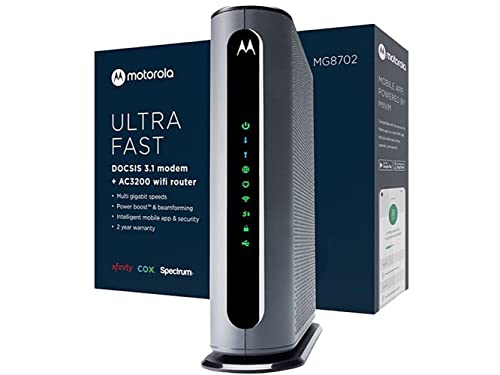
Overview: The Motorola MG8702 combines a DOCSIS 3.1 modem with an AC3200 WiFi router and Intelligent Power Boost, designed for high-speed cable plans and broad wireless coverage. It is marketed as a future-ready option supporting the fastest cable internet plans and providing strong performance for streaming, gaming, and smart-home devices across larger homes.
Key features include Power Boost and Range Boost technologies, ensuring strong signal strength and stable connections across multiple rooms. It is suitable for households seeking reliable, high-throughput wireless networking bundled with a modern cable modem.
TP-Link Archer AX21

Overview: The TP-Link Archer AX21 is a WiFi 6 router that pairs with a separate modem to deliver AX1800 performance. It provides improved speed, capacity, and efficiency for households with multiple streaming devices and online gaming. While not a modem-router combo (requires a separate modem), it offers an excellent upgrade path for users who already have a modem or prefer modular networking.
Key features include dual-band WiFi 6, OpenVPN/PPTP VPN server support, and Easy Mesh compatibility for scalable home networks. The AX21 is a practical choice for users prioritizing modern WiFi 6 features and flexible network expansion.
NETGEAR Nighthawk C7000

Overview: The NETGEAR Nighthawk C7000 is a DOCSIS 3.0 modem-router combo designed for cable plans up to 800 Mbps. While older than DOCSIS 3.1 models, it remains a viable option for budget-conscious users seeking to replace rental equipment. It supports major providers like Xfinity and Cox, with coverage suitable for small to medium homes and up to 1,800 sq ft per its listing.
Key features include AC1900 WiFi performance, rental savings potential, and an all-in-one solution that simplifies setup for homes with moderate internet needs. This model is best for users targeting compatibility and cost savings over multi-gigabit speed capabilities.
Buying Guide: Key Purchase Considerations
- Compatibility with your internet service: Verify provider support (Xfinity, Spectrum, Cox, etc.) and any exclusions such as Verizon, AT&T, or bundled voice services. DOCSIS 3.1 models generally offer higher future-proofing than DOCSIS 3.0.
- Speed versus coverage: WiFi 6 (802.11ax) improves efficiency in busy networks and supports more devices. Consider router range (square footage) and number of concurrent devices when choosing a model with built-in modem vs. separate modem/router.
- Gigabit ports and USB: Check Ethernet port count and USB capabilities to support gaming consoles, NAS storage, and other wired devices. Port aggregation can boost throughput on wired setups.
- Future-proofing: DOCSIS 3.1 readiness and WiFi 6/6E compatibility offer better longevity as internet speeds rise. For homes planning upgrades, prioritize multi-gigabit capable devices.
- Network features: Look for features like VPN servers, beamforming, Range Boost, and Easy Mesh compatibility for expanding your network easily.
- Cost of ownership: While renting from providers is convenient, purchasing a combo unit can save rental fees over time. Compare long-term costs and potential savings based on your service tier.
- Setup and management: Consider ease of setup, mobile app support, and parental controls if needed for a household with kids or multiple users.
- Future provider changes: Some models list up-to-date compatibility; check provider pages for the latest supported speeds and firmware notes before purchase.