Answering the question “modem to get” with solid options that fit common home setups. This guide highlights reliable modems for cable, 4G/LTE, and all-purpose networking. It helps buyers choose based on plan type, speed needs, and whether you want a standalone modem or a combo with routing. The top picks cater to households, students, remote workers, and tech aficionados seeking better performance without renting gear from providers.
Summary of selected products:
| Product | Best For | Key Benefit |
|---|---|---|
| ARRIS SURFboard SB8200 | Fast cable plans up to 2 Gbps | DOCSIS 3.1 with 2 Gigabit Ethernet ports |
| NETGEAR CM500 | Budget-friendly cable modem | Compatibile with major providers up to 400 Mbps |
| NETGEAR CM3000 | Future-proof DOCSIS 3.1 | Supports plans up to 2.5 Gbps with broad provider compatibility |
| GOWENIC 4G LTE Modem | Mobile or backup internet | Up to 300 Mbps, supports 4G/3G, multi-device sharing |
| GOWENIC 4G Router | Outdoor or travel hot spot | Up to 10 users, plug-and-play with SIM card |
GOWENIC 4G LTE Modem for Multi-Device Use

Best for: Homes or offices needing a mobile broadband option that supports several devices without a dedicated router. This device is designed for people who want immediate, plug-and-play 4G access for phones, laptops, tablets, TVs, and other smart devices.
- Easy Plug and Play Setup: Insert a SIM card and connect to power to access 4G networks.
- High Speed Connection: Up to 300 Mbps shared across multiple devices.
- Broad Network Support: Works with 4G LTE bands B1, B3, B5, B8 and TDD-LTE B38/39/40/41, plus WCDMA B1/B8.
Best for: Users needing reliable mobile internet without a fixed line. Limitations: May require data plan, and speeds depend on network coverage and signal.
ARRIS SURFboard SB8200 DOCSIS 3.1 Modem

Best for: Cable customers seeking maximum future-proofing with DOCSIS 3.1 and two Ethernet ports for a dedicated router or network switch.
- Multi-Gig Speed: DOCSIS 3.1 supports plans up to 2 Gbps, ideal for streaming, gaming, and fast downloads.
- Rental Savings: Owning a modem reduces ongoing rental fees if compatible with your provider.
- Compact Design: Fits neatly in most entertainment centers with clear indicators.
Limitation: Requires a separate WiFi router for wireless networking and a compatible cable internet plan.
NETGEAR Cable Modem DOCSIS 3.0 CM500
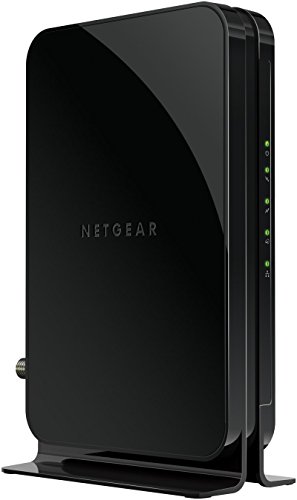
Best for: Value-conscious users with plans up to 400 Mbps who want a straightforward, compatible modem to pair with any WiFi router.
- Save on Rental Fees: Replaces your cable modem and can reduce monthly costs.
- Carrier Compatibility: Works with major providers and supports typical cable packages.
- Router Flexibility: Connects to any separate WiFi router to cover all devices.
Limitation: DOCSIS 3.0 vs 3.1 may limit speeds on higher-tier plans; ensure your plan aligns with capabilities.
NETGEAR Nighthawk CM3000 DOCSIS 3.1 Modem

Best for: Homes planning to leverage modern DOCSIS 3.1 networks with providers offering high-speed tiers.
- High-Speed Capability: Up to 2.5 Gbps downstream with 1 Gbps upstream in appropriate setups.
- Provider Compatibility: Works with major US providers and supports today’s fast speeds.
- Performance Benefits: Sustains consistent performance for demanding streaming and gaming.
Limitation: Requires a separate router to enable WiFi and a modem activation check with your provider.
GOWENIC 4G Router: Portable Hotspot

Best for: Travelers and outdoor enthusiasts needing internet on the go or a backup hotspot for critical devices.
- Up To 10 Users: Supports multiple devices simultaneously.
- Easy Setup: Insert a SIM card and connect for immediate 4G access.
- Plug-and-Play: Powered by USB power sources like chargers or power banks.
Limitation: Speeds depend on cellular coverage; not a replacement for fixed broadband in all locations.
Buying Guide: Key Considerations For Your Modem Choice
- What type of internet service do you have? Cable, DSL, fiber, or mobile? Match the modem to your provider and plan.
- Do you want a standalone modem or a modem-router combo? A separate router gives more flexible wireless options and easier upgrades.
- What speed tier do you need? DOCSIS 3.1 modems support higher plans; 3.0 is adequate for mid-range plans.
- Is future-proofing important? DOCSIS 3.1 models are better prepared for rising speeds and new plans.
- Coverage and placement: For wireless networks, consider router placement, antennal configuration, and whether a mesh or single-router setup is best.
- Mobile backup needs: If you require internet on the go, a portable LTE modem or hotspot can be essential.
Frequently Asked Questions
- What is the difference between a modem and a router? A modem connects to your internet service provider, while a router distributes that connection to multiple devices, often wirelessly.
- Can I use any modem with my provider? Most major providers have compatibility lists; always verify with your specific plan before purchasing.
- Do DOCSIS 3.1 modems require new routers? Not necessarily, but pairing with a modern router can unlock higher wireless speeds and better efficiency.
- Is it better to buy or rent a modem? Purchasing avoids ongoing rental fees and often provides long-term savings; ensure compatibility with your plan.
- Will a 4G modem work everywhere? Mobile networks depend on signal strength and coverage; for remote areas, a 4G modem can be a strong backup or primary option with the right plan.
- What should I consider when buying a modem for streaming or gaming? Look for DOCSIS 3.1 if you expect higher speeds, multiple Ethernet ports, and compatibility with your router for low-latency gaming.