MoCA adapters convert your existing coax cables into high-speed Ethernet connections, delivering stable, low-latency networking that often surpasses typical Wi‑Fi performance. This guide focuses on MoCA 2.0 and related adapters to help American buyers choose devices that fit home networks, gaming setups, and streaming rooms. The selections below are organized to help different buyers—homeowners with starter kits, multi-room setups, and those seeking higher speeds with 2.5 Gbps options. A compact comparison table is provided for quick reference.
Product Comparison Snapshot
| Product | Best For | Key Benefit |
|---|---|---|
| ScreenBeam Bonded MoCA 2.0 Network Adapter (Single) | Small home offices or single-room upgrades | 1 Gbps ethernet over coax, straightforward add-on |
| ScreenBeam Bonded MoCA 2.0 Network Adapter Starter Kit ECB6200K02 | Multi-room MoCA expansion | Two adapters, easy room-to-room coverage |
| TRENDnet TMO-311C Ethernet Over Coax Adapter | Government-friendly NDAA‑compliant setups | MoCA to Gigabit with 3‑year protection |
| ScreenBeam Bonded MoCA 2.5 Network Adapter Starter Kit ECB7250K02 | Higher-speed networks with 2.5 Gbps | Up to 2.5 Gbps, suitable for heavy streaming and gaming |
| goCoax MA2500D MoCA 2.5 Adapter (2‑Pack) | Powerful gaming and 4K in multiple rooms | 2.5 Gbps through coax, plug-and-play kit |
ScreenBeam Bonded MoCA 2.0 Network Adapter for High Speed Internet
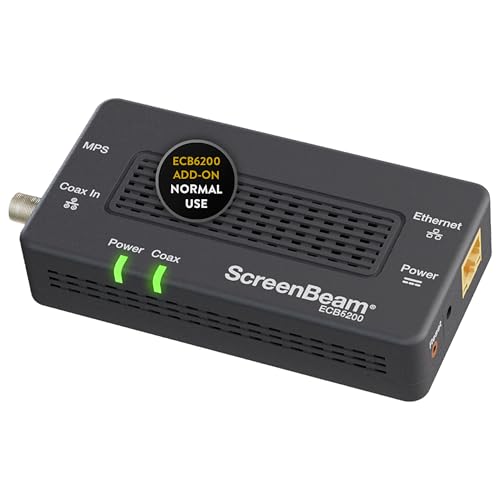
Best for: Small apartments or single-device upgrades that need reliable Ethernet over coax. This single add-on adapter extends a MoCA 2.0 network from the router to a device with an Ethernet port, delivering a potential 1 Gbps experience when conditions allow. It’s a simple way to upgrade a single room without replacing existing Wi‑Fi setups.
Why selected: It emphasizes a straightforward, single-adapter solution for users seeking faster, more secure wired performance than wireless for one device or a dedicated area. It supports up to 16 nodes on one network, which is suitable for growing networks in modest homes. Caution: Not compatible with Direct TV or AT&T coax networks; verify your provider uses bonded MoCA 2.0 for best results.
ScreenBeam Bonded MoCA 2.0 Network Adapter Starter Kit (ECB6200K02)

Best for: Homes that want to quickly extend Ethernet access to multiple rooms without wiring new cables. The starter kit includes multiple adapters and is designed to maximize speed and reliability over existing coax. It’s a practical choice for households with several devices needing wired connections.
Why selected: The kit format helps ensure MoCA compatibility across rooms, potentially delivering consistent speeds while avoiding wireless interference. Caution: Compatibility notes indicate certain satellite and AT&T coax networks may not work as expected; confirm your coax network aligns with MoCA 2.0 requirements.
TRENDnet Ethernet Over Coax Adapter TMO-311C

Best for: Home networks needing NDAA and TAA compliant MoCA adapters with a robust warranty-backed support. This model includes a MoCA coax interface and a Gigabit RJ-45 port, suitable for a reliable wired backbone across rooms.
Why selected: It provides a solid balance of compatibility and protection with third-party standards, useful for security-conscious setups, including government or business environments. Caution: Not all coax outlets may be MoCA-ready; test the connection at each location to confirm full functionality.
ScreenBeam Bonded MoCA 2.5 Network Adapter Starter Kit (ECB7250K02)

Best for: Users who need the fastest MoCA 2.5 speeds across a network of multiple rooms. The starter kit is ideal for households with 4K streaming, gaming, and heavy remote-work use where multiple devices require stable, wired connections.
Why selected: MoCA 2.5 pushes higher throughput and lower latency than 2.0, which is advantageous for bandwidth-intensive activities. Caution: Actual speeds depend on coax quality and network layout; ensure your coax wiring supports the higher standard for best results.
Hitron HTEM5 MoCA 2.5 Network Adapter (2-Pack)

Best for: Cable internet homes seeking a dual-pack solution to ensure wired connectivity across several rooms without new cabling. This two-pack supports up to 2.5 Gbps on a wired MoCA backbone.
Why selected: It explicitly highlights suitability for cable and most fiber environments by extending existing coax, with a clear warning about satellite wiring. Caution: Not compatible with AT&T fiber or satellite-only wiring; verify your service and coax network before purchasing.
Buying Guide: How To Choose The Right MoCA Adapter
What speed do you need?
MoCA 2.0 typically offers up to 1 Gbps, with real-world speeds influenced by coax quality and network traffic. MoCA 2.5 can reach up to 2.5 Gbps, which benefits heavy streaming, online gaming, and large file transfers. Choose MoCA 2.5 if you require the highest wired speeds across multiple devices.
How many rooms need coverage?
If you want to wire multiple rooms, consider a starter kit or a multi-adapter kit so you can place adapters in several rooms. A kit often provides better value and simpler setup than purchasing adapters individually.
Compatibility with existing infrastructure
Check if your coax network is bonded MoCA 2.0 or if you have equipment from providers with satellite TV wiring. Some adapters explicitly state non-compatibility with Direct TV, Dish, AT&T coax networks, or U-verse configurations. Confirm with your service provider before purchase.
Security and future-proofing
MoCA networks offer strong security through encryption and dedicated channels. If you plan to expand to more devices or upgrade to higher speeds later, a kit that supports up to 16 nodes can help future-proof your setup.
Ease of installation
Plug-and-play packages with included coax cables and Ethernet cables simplify installation. Look for kits that advertise zero configuration and quick auto-configuration to minimize troubleshooting.
Device types and limitations
Remember these adapters are network extenders, not modems or routers. You’ll still need a working router and compatible coax wiring to use MoCA adapters effectively. If your home uses isolated coax outlets or special wiring, verify compatibility with the MoCA standard you plan to deploy.
Important caveats
Speed claims depend on line quality, interference, and other MoCA devices on the network. Some adapters note not compatible with AT&T or satellite networks; verify the wiring layout before purchasing. Always ensure you have adequate backups for any critical home network.
Quick setup checklist
- Identify MoCA-ready outlets near your router and in target rooms.
- Confirm your coax wiring and splitter configuration is suitable for MoCA.
- Choose the right kit (single adapter, starter kit, or multi-pack).
- Connect adapters using an Ethernet cable to your devices and the router.
- Test connectivity and adjust placement for best performance.
FAQ
- What is a MoCA adapter used for?
It converts coax cabling into a wired Ethernet network to extend reliable connectivity to devices far from the router.
- Do MoCA adapters require an internet subscription?
No, they piggyback on your existing coax network and router; they do not require a separate internet plan beyond what your service already provides.
- Can MoCA replace Wi‑Fi entirely?
Not typically; MoCA is a wired backbone. You may still need Wi‑Fi for mobile devices, but MoCA can dramatically improve wired stability and speed.
- Are MoCA 2.5 adapters backward compatible with MoCA 2.0 networks?
Yes, MoCA 2.5 is designed to operate in mixed environments, though you will benefit most when all devices support the higher standard.
- What should I check before buying?
Verify compatibility with your coax wiring, confirm the presence of multiple compatible outlets, and ensure your router supports MoCA integration.