For digital artists, students, and professionals who sketch anywhere, a compact drawing tablet that works with mobile devices is essential. This guide highlights five top options that pair well with Android phones and tablets, offering battery-free pens, multi-function shortcuts, and portable form factors. Each product is chosen for ease of use, compatibility, and performance on mobile platforms.
The following quick-reference table helps compare core specs and ideal use cases at a glance.
| Product | Display/Size | Pen Type | Key Features |
|---|---|---|---|
| UGEE Q6 (6.5×4 inch) | 6.5×4 in | Battery-free | 6 shortcut keys, Android/mobile-optimized, USB-C |
| HUION H640P | 6×4 in | Battery-free PW100 | Customizable keys, lightweight, compact |
| Wacom MovinkPad 11 | 11 in | Pro Pen 3 | Android 14, no computer needed, anti-glare display |
| XP-Pen 6×4 in Tablet | 6×4 in | Battery-free | 16384 pressure, tilt support, portable |
| UGEE Q6 6.5×4 inch (Android Edition) | 6.5×4 in | Battery-free | 4 adjustable drawing modes, mobile-friendly |
UGEE Q6 6.5×4 Inch Mobile Drawing Tablet
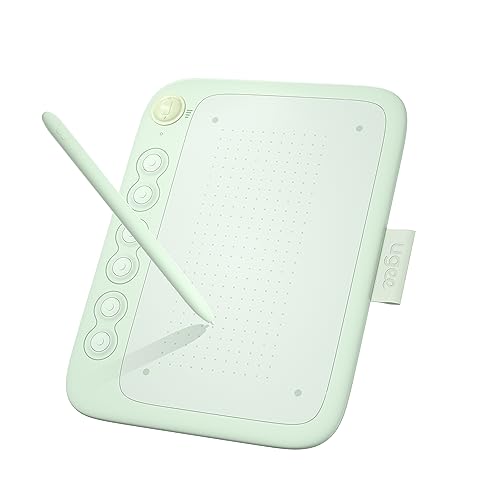
The UGEE Q6 is designed for mobile drawing on Android devices. It weighs about 249 g and ships with a detachable Type-C cable for easy storage. Its vertical layout aligns with natural mobile drawing workflows, including drawing on phones and tablets. Six shortcut keys are grouped in pairs for quick access, with deep integration into common software. This model emphasizes portability and straightforward use without requiring drivers for basic drawing tasks, making it a strong option for students and professionals on the move.
HUION H640P Drawing Tablet

The HUION H640P supplies a compact 6×4 inch drawing area with a battery-free PW100 stylus offering 8192 pressure levels. Its six customizable shortcut keys are designed to streamline workflow and adapt to different apps via the Huion driver. The lightweight, slim form factor (about 0.3 inches thick, around 1.41 pounds) makes it easy to carry between locations. It’s ideal for on-the-go illustration, note-taking, and design tasks on mobile or laptop setups.
Wacom MovinkPad 11 Android Drawing Tablet

The MovinkPad 11 is designed for mobile sketching with an 11-inch anti-glare etched glass screen. It runs Android 14 and includes 8GB RAM/128GB storage, a battery-free Pro Pen 3, and access to Wacom Canvas plus Clip Studio Paint Debut for two years. The device supports quick-draw actions, letting artists launch the sketching app with a tap and hold of the pen. Its performance is tailored to mobile studios, offering a seamless transition between drawing, note-taking, and app use without a computer.
Wacom MovinkPad Pro 14 Android Tablet

The MovinkPad Pro 14 combines a larger 14-inch display with Android 15, a battery-free Slim Pro Pen 3, and 12GB RAM/256GB storage. Its 3K resolution OLED with color accuracy and an etched glass texture offers a pen-on-paper feel. The device is designed for professionals who need a portable workstation for digital art, design, and concept work while traveling, maintaining high color fidelity and responsiveness without a PC.
UGEE Q6 Android Edition Drawing Tablet

This version of the UGEE Q6 emphasizes four adjustable drawing modes with 6 noise-reduced shortcut keys. It features a battery-free pen with 16K levels of pressure and 60° tilt, providing a natural drawing feel. The tablet is designed for mobile drawing on Android devices, with a portrait-friendly layout that accommodates left- and right-handed use and a straightforward USB-C connection for quick setup.
XP-Pen 10.95″ Standalone Drawing Tablet

The XP-Pen Magic Note Pad offers a slightly larger mobile canvas with a 10.95-inch display. It supports 16,384 pressure levels with the X3 Pro battery-free pencil and features multiple color modes for note-taking and drawing. An anti-glare screen and TÜV-certified low blue light help reduce eye strain during longer sessions. This option is well-suited for urban artists and students who want a bigger drawing area without a full workstation.
Buying Guide
- Compatibility and connectivity: Look for USB-C or OTG support to connect quickly with Android devices. Some models offer direct Android OS integration, while others rely on PC think-tanks or apps. Choose based on whether you primarily draw on a phone, tablet, or laptop.
- Pen tech and sensitivity: Battery-free pens with high pressure levels (8192 or more) and tilt support deliver more natural lines. Check if the pen supports left/right-handed modes and if nibs are replaceable or purchasable.
- Display and surface: For mobile use, a compact 6×4 inch area is standard. If you work with detailed illustrations, consider a larger display like 11–14 inches, but weigh portability against weight and battery reliance when off-PC.
- Shortcut keys and workflow: Dedicated quick-access keys save time in busy workflows. Ensure the keys are easy to memorize and can be customized per app.
- Portability and build quality: Light-weight tablets with rugged construction are ideal for travel or classroom use. Look for a slim profile, protective casing options, and comfortable grip or placement during long sessions.
- Software ecosystem: Devices that ship with or integrate well with drawing apps (like Wacom Canvas, Clip Studio Paint, or third-party apps) can simplify the creative process and reduce setup time.
- Power autonomy: Battery-free pens are advantageous for mobile use, but consider whether the tablet itself requires external power or relies on a connected device for operation.
When selecting a mobile drawing tablet, prioritize a balance between portability and drawing comfort. For quick sketches on the go, compact 6×4 inch tablets with a battery-free pen and well-placed shortcut keys can outperform larger models in travel scenarios. If you need more canvas for complex pieces, optical advantage comes from mid-sized tablets with responsive displays and a strong app ecosystem. Regardless of choice, these devices provide flexible options for artists and students who draw away from a traditional desk.
Always verify the latest compatibility notes and driver availability before purchase, as operating system updates can affect performance on mobile devices.