People want quick, portable ways to turn smartphone pictures into real photos. This guide targets buyers seeking compact, wireless photo printers that work with iOS and Android. If you’re a student, traveler, scrapbooker, or event planner who loves physical keepsakes, these models offer instant, high-quality prints from your phone. Below, five top options are analyzed for ease of use, print quality, and connectivity, helping you choose the right printer for your needs.
Summary of chosen products:
- KODAK Step Instant Smartphone Photo Printer — best for on-the-go, zero-ink, sticky-back prints.
- Liene M100 4×6 Photo Printer — best for home use with Wi-Fi and larger 4×6 prints.
- KODAK Dock Plus 4×6 Photo Printer — best for docked station use and easy setup.
- Nelko PP01 — best for ultra-compact portability with adhesive 2×3 prints.
- KODAK Mini 2 Retro — best for quick 2×3 prints with retro design and fast output.
KODAK Step Instant Smartphone Photo Printer
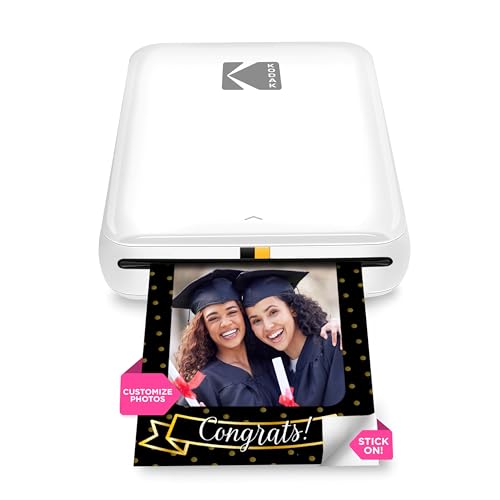
The KODAK Step Printer uses zero-ink technology and prints 2″ x 3″ sticky-back photos. It connects to iOS and Android via Bluetooth or NFC and includes a full editing suite in the KODAK app. This model is ideal for mobile users who want peel-and-stick photos for scrapbooking, journaling, or instant sharing after events. The built-in editing features let you create collages, apply filters, borders, stickers, and text before printing.
Best for: mobile users who want compact, pocketable printing with adhesive backing for quick scrapbooking, journaling, or label-ready photos. It’s a strong pick for travelers and party-goers who need fast, mess-free prints.
Caution: Print size is fixed at 2″ x 3″; larger formats are not available on this model. Data relies on the app’s editing tools to achieve advanced effects.
Liene M100 4×6 Photo Printer

The Liene M100 prints full-color 4×6 photos using thermal dye-sublimation technology for vibrant, durable results. The package includes printer, 100 sheets, and three color cartridges, with a built-in Wi-Fi hotspot that allows direct phone connections. It’s designed for home or small-office use where larger prints are preferred and a stable wireless connection is important. The device supports iPhone, Android, and PC printing via the dedicated app.
Best for: households or small offices that want reliable, edge-to-edge 4×6 prints with easy app-based editing and a direct hotspot connection for stable performance.
Caution: The setup relies on the printer’s own hotspot; some users may prefer a traditional Wi-Fi router for multi-device sharing.
KODAK Dock Plus 4×6 Photo Printer

The KODAK Dock Plus combines a docking station with 4×6” dye-sub prints, enabling quick prints while charging your phone. It uses the 4PASS dye-subulation process for three-layer color printing with a clear protective lamination. This model is straightforward to operate—turn on, pair via Bluetooth, and print. It is well-suited for desktop use, small gatherings, and immediate photo sharing from a plugged-in device.
Best for: users who want a simple, docked solution with easy charging while printing, especially in a home or studio setting.
Caution: Printing is tied to 4×6” paper stock; smaller or larger formats aren’t supported on this unit.
Nelko PP01 Photo Printer

The Nelko PP01 is a compact 2×3″ inkjet printer with sticky-backed paper. It includes 100 sheets, three color cartridges, and Bluetooth connectivity for iOS and Android. The unit is lightweight and ideal for school projects, travel, and scrapbooking. Its adhesive backing makes it easy to attach photos to notebooks or scrapbooks, and the cartridge yields around 80 prints per color set.
Best for: ultra-portable printing on the go, especially when adhesive-backed photos are a plus for memory books and crafts.
Caution: Inkjet printing can be sensitive to moisture; handle prints with care to maintain longevity.
KODAK Mini 2 Retro 2×3 Photo Printer

The KODAK Mini 2 Retro prints 2″ x 3″ photos using 4PASS dye sublimation for quick, high-quality results. It pairs with Bluetooth for easy wireless printing from smartphones and supports instant color prints with protective lamination. This model is popular for those who want a compact, stylish device with reliable performance for everyday photo printing.
Best for: fans of compact, retro-inspired devices who want fast, reliable 2×3 prints straight from their phone without complex setup.
Caution: The Mini 2 Retro relies on Bluetooth; in busy environments, interference could affect connection stability.
Liene M100 4×6 Photo Printer (Second Listing)

This second listing emphasizes similar capabilities: 4×6 print size, Wi-Fi connectivity, and a free supply set that includes paper and cartridges. The built-in Wi-Fi hotspot allows direct device connections, minimizing network setup. It is suitable for home printing where larger photo formats are preferred and a straightforward app workflow is valued.
Best for: users who want a stable, Wi-Fi-based workflow for home use with easy direct device connection and bundled paper supply.
Caution: Ensure you’re buying a complete kit; some bundles may vary in included consumables.
Buying Guide
What print size do you need?
Most portable photo printers come in 2×3″ or 4×6″ formats. Choose 2×3″ if you want pocket-sized convenience and adhesive-backed photos. Choose 4×6″ for larger, display-worthy prints and better detail for portraits and events.
Which connectivity matters?
Bluetooth works well for direct device pairing but can be less stable in crowded spaces. Wi‑Fi hotspots and docking stations offer more reliable connections and multi-device sharing. If you print from multiple family members’ phones, a printer with built-in Wi‑Fi or hotspot is advantageous.
What about ink and durability?
Zero-ink (ZINK) and dye-sub technologies differ in maintenance and print durability. ZINK is convenient with sticky-back surfaces but limited to certain sizes. Dye-sub prints are more durable, water- and fade-resistant, and typically give higher perceived quality, especially for 4×6 prints.
Is ease of use important?
Look for models with straightforward setup and a companion app that supports editing, borders, and stickers. If you want to edit photos before printing, ensure the printer’s app provides sufficient editing tools or supports easy sharing to the device’s photo library.
What’s the best value for households?
For home use, printers that bundle paper and cartridges and provide reliable Wi‑Fi sharing tend to offer the best overall value. If multiple people will print regularly, a docked or hotspot-enabled model can simplify operation and charging while printing.
Pricing and availability considerations
Prices and stock can change; evaluate total cost of ownership including consumables and replacement paper. Some models include starter paper packs, which can soften initial expenses and help you evaluate print quality before purchasing more supplies.
FAQ
What is the easiest mobile photo printer for a beginner?
Printers with simple Bluetooth pairing and a robust companion app are easiest for beginners. Models with starter paper packs help new users test prints quickly.
Do these printers require an internet connection?
Many models work via Bluetooth or a built-in hotspot, so no external internet is required. A Wi‑Fi or hotspot connection improves multi-device printing reliability.
Can I print 4×6 photos from an iPhone or Android device?
Yes. Several options in this guide support 4×6 printing, typically using dye-sublimation technology for durable results.
Are sticky-back prints durable enough for scrapbooks?
Yes, sticky-back or laminated prints are designed for scrapbooks and light handling, with resistance to moisture and smudges in many cases.
Which printer is best for travel?
Compact, single- or dual-function printers with adhesive-backed 2×3 papers are best for travel due to light weight and small footprint.
Do these printers require special ink?
Most use cartridge-free or dye-sub systems that do not require traditional ink cartridges, but some compact printers use inkjet cartridges for color prints.
| Product | Best For | Print Size | Connectivity | |
|---|---|---|---|---|
| KODAK Step Instant Smartphone Photo Printer | On-the-go Scrapbooking | 2×3 | Bluetooth/NFC | Zero-ink, sticky-back paper |
| Liene M100 4×6 Photo Printer | Home Use, Large Prints | 4×6 | Wi-Fi | Hotspot connection |
| KODAK Dock Plus 4×6 Photo Printer | Docked Desktop Printing | 4×6 | Bluetooth | Charging while printing |
| Nelko PP01 Photo Printer | Ultra-Portable Adhesive Prints | 2×3 | Bluetooth | Sticky-back; compact |
| KODAK Mini 2 Retro | Compact Daily Prints | 2×3 | Bluetooth | Retro design |