Looking for a portable second screen to boost productivity on the go? The following 5 mobile monitors pair well with laptops, phones, and game consoles, offering USB-C/HDMI connections, IPS panels, eye-friendly features, and built-in speakers. Ideal for travelers, students, remote workers, and gamers, these picks focus on portability without sacrificing display quality.
| Product | Brand | Display | Connection | Notable Feature |
|---|---|---|---|---|
| KYY Portable Monitor 15.6″ | KYY | 15.6″ FHD 1920×1080, IPS | USB-C, Mini-HDMI | Ultra-slim, built-in speakers, HDR |
| InnoView Portable Monitor | InnoView | 15.6″ FHD 1920×1080, IPS | 2 USB-C, HDMI | Plug-and-play, HDR, protective case |
| MNN Portable Monitor | MNN | 15.6″ FHD 1920×1080, IPS | 2 USB-C, HDMI | Lightweight, travel-friendly, eye protection |
| CIDETTY Laptop Screen Extender | CIDETTY | 14″ FHD 1080p, IPS | USB-C, HDMI | VESA mounting, protective case |
| Yxk Portable Monitor | Yxk | 15.6″ FHD 1080p, IPS | USB-C, Mini HDMI | Ultra-slim, kickstand |
The following sections showcase five solid options, each with practical advantages for different use cases—from hybrid workstations to compact gaming or media viewing. All selections emphasize easy setup, portability, and reliable performance for laptop users.
KYY 15.6 Inch Portable Monitor

- Size and Panel: 15.6″ FHD 1920×1080 IPS with 178° wide viewing angle.
- Connectivity: Dual Type-C and Mini-HDMI ensure compatibility with most laptops, smartphones, consoles.
- Features: HDR support, eye-care with reduced blue light and no flicker; built-in 2 speakers and 3.5mm audio input.
- Portability: Ultra-slim 0.3″ profile and about 1.7 lb for easy on-the-go use.
The KYY monitor supports a one-cable solution when devices are Thunderbolt 3/3.1 USB-C compatible, simplifying setup for mobile workstations or gaming stations. A premium smart cover and screen protection are included for travel.
InnoView Portable Monitor
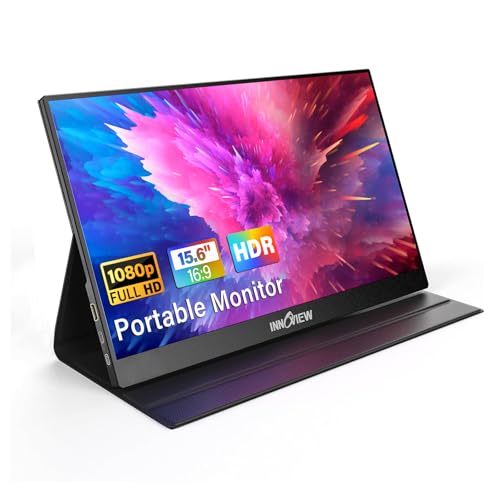
- Flexible Connectivity: 2 USB-C ports plus an HDMI, enabling single-cable power and display when supported.
- Compatibility: Works with laptops, desktops, MacBooks, phones, and game consoles; HDR adds depth to visuals.
- Plug-and-Play: No driver setup required; includes a protective case for travel.
- Display Quality: 15.6″ IPS panel with 178° viewing angles and 1080p resolution.
Note: Thunderbolt 3.0/4.0 or USB-C DP Alt Mode is required for some power pass-through features; otherwise HDMI can be used with external power.
MNN Portable Monitor 15.6″

- Resolution and Color: 1920×1080 with advanced IPS for accurate, bright colors and lifelike detail.
- Dual USB-C Ports: Power and display over a single USB-C cable when compatible; supports multiple devices including PS5/4, Xbox, and Switch.
- Lightweight Design: Designed for travel with portability in mind; eye-protective features reduce blue light and flicker.
- Versatile Use: Suitable as a second monitor for work, gaming, and media consumption.
Users should ensure a supported USB-C configuration (Thunderbolt 3/4 or USB 3.1 DP Alt Mode) for ideal power and video signaling through a single cable.
CIDETTY Laptop Screen Extender

- Display and Eye Comfort: 14″ FHD 1080p IPS with blue light filtering and anti-glare for prolonged use.
- Broad Compatibility: Plug-and-play with Windows, macOS, Linux; supports PS, Xbox, and Switch (note compatibility caveats for certain Mac variants).
- Portability: Ultra-slim with built-in speakers and a protective case for travel.
- Mounting Flexibility: VESA mounting holes allow stable use with stands or arms for landscape or vertical setups.
CIDETTY emphasizes a compact footprint with extendable screen real estate, suitable for mobile offices and on-the-go presentations.
Yxk Portable Monitor

- Display and Clarity: 15.6″ FHD 1080p with HDR and IPS panel for vibrant, sharp images.
- Connectivity: Double USB-C and a MINI HDMI port provide flexible setup options with a single-cable workflow when supported.
- Portability: Weighs around 1.43 lbs with a slim profile, ideal for travel and quick deployments.
- Use Case: Great for second screen in meetings, remote work, and gaming on the go.
Yxk’s design centers on lightweight portability with flexible inputs, supporting a simple extension to a laptop setup wherever you are.
Buying Guide: Key Purchase Considerations
- Display size and resolution: Choose 14–15.6 inches for portability; 1080p is standard for balance between clarity and power draw. If you work with detailed graphics, consider slightly larger options or an IPS panel with good color accuracy.
- Panel technology: IPS panels deliver wide viewing angles and consistent colors, which helps when sharing the screen with others.
- Connectivity: Look for USB-C with display and power (power delivery) to reduce cable clutter. HDMI inputs are essential for compatibility with older devices and consoles.
- Power considerations: Some monitors support power pass-through via USB-C; verify your device supports Thunderbolt 3/4 or USB-C DP Alt Mode for this feature.
- Portability features: Lightweight design, built-in kickstands, screen protectors, and protective cases enhance travel usability.
- Eye comfort: Low blue light and flicker-free panels reduce eye strain during long sessions, particularly for productivity tasks.
- Audio and stand options: Built-in speakers are convenient, but external speakers or headphones may be preferred for higher audio quality. Check if a protective case or VESA mounting is offered for more mounting flexibility.
- Compatibility: If using macOS or Linux, verify driver requirements or plug-and-play behavior. Some models require drivers or specific USB-C configurations for full functionality.
- Use case variety: Consider whether you need a secondary screen for work, gaming, or media; some models emphasize dual-screen setups with easy one-cable connections, while others focus on rugged travel or mounting flexibility.
In selecting a mobile monitor for a laptop, weigh the trade-offs between portability, display quality, and connection options. The five options presented here balance these factors to support remote work, travel, and entertainment with minimal setup friction.