Small form factor monitors bring big value to compact desks, PC builds, and creative workspaces. This guide showcases five high-quality mini or ultra-compact screens that pair well with PCs, laptops, and single-board computers. Each option emphasizes sharp color, solid build, and useful features like HDMI and USB-C connectivity, temperature monitoring, or touch capabilities. Whether you’re curating a case-side display, extending your desktop, or boosting diagnostics, these picks help you stay productive without crowding your space.
Summary table of selected products:
| Product | Brand | Key Focus | Connectivity Highlights |
|---|---|---|---|
| AISHICHEN 11.26″ Mini Monitor | AISHICHEN | PC case display & Aida64 monitoring | HDMI, Type-C |
| KAMRUI GK3Plus Mini PC | KAMRUI | Ultra-compact PC with multiple apps | USB-C, HDMI, Wi-Fi |
| HIGOLEPC Mini PC Win 11 Pro | HIGOLE PC | Full-feature mini PC with screen | Type-C, HDMI |
| Upgraded 8.8″ Small Touchscreen Monitor | AISHICHEN | Multi-function CPU/RAM data display | HDMI, USB-C (via device) |
| Lian Li 8.8″ Universal Screen | Lian Li | ARGB frame, temperature display | HDMI/USB |
AISHICHEN 11.26″ Mini Monitor: Ultra-Slim FHD Bar Display
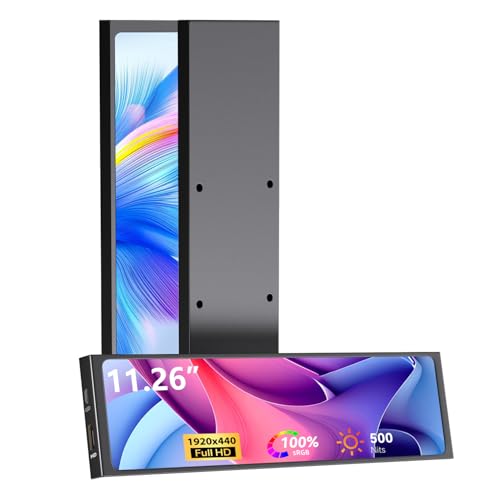
The AISHICHEN 11.26″ mini monitor is designed as a compact PC case display with a 1920×440 FHD resolution and an IPS panel that covers 100% sRGB. Its ultra-slim bar form factor and full-metal chassis support heat dissipation while maintaining a premium look. The display is suitable for color-sensitive tasks and real-time system monitoring when paired with Aida64, offering visible CPU/GPU temperatures and usage metrics without occupying desk space.
Key features include a wide 178° viewing angle for consistent color and clarity from any seat, and both HDMI and Type-C inputs to connect to PCs, laptops, Raspberry Pi devices, or other hardware. This monitor is especially appealing for users who want a dedicated diagnostic or system-monitoring screen integrated into a case or workstation.
KAMRUI GK3Plus Mini PC: Compact Powerhouse

The KAMRUI GK3Plus delivers a compact computing bundle built for small spaces. Equipped with a 12th-generation Alder Lake N95 processor, ample RAM (16GB) and a 512GB SSD, this mini PC targets professionals and power users who need responsive multitasking and quick data access. Its compact footprint pairs well with a compact display, or it can be mounted behind a monitor using VESA, helping to create a neat all-in-one setup for home offices or media rooms.
Key features include strong CPU/GPU performance for everyday productivity, 4K UHD output, and the potential to expand storage to 2TB via a 2.5″ SSD. The device supports basic upscaling tasks and can serve as a versatile hub for small workstations or digital signage in cramped spaces.
HIGOLE PC Mini PC Win 11 Pro: Touch-Enabled Mini Computer

The HIGOLE PC blends a full Windows 11 Pro experience with a compact footprint and a built-in cooling fan. This mini PC includes 8GB of DDR4 RAM and 128GB of storage, along with USB-C, USB-A, and HDMI interfaces. A notable advantage is the integrated screen option, which supports touch for convenient navigation in kiosk-like or diagnostic scenarios. The device also features Wi-Fi 5 and Bluetooth 5.2 for flexible peripheral connections, making it suitable for on-the-go workstations, media centers, or quick lightweight computing tasks.
Upgraded 8.8 Inch Small Touchscreen Monitor: AIDA64 Ready

This 8.8-inch touchscreen monitor delivers a versatile on-board display suitable for monitoring CPU, RAM, temperature, and more. It supports a 1920×480 resolution, 60Hz refresh, and an IPS panel with a wide viewing angle. The device is positioned as a case-side or chassis display, offering layout customization, drag-and-drop theme options, and brightness control. It suits technicians, PC builders, and enthusiasts who want a flexible display for real-time metrics and quick information access during tinkering or debugging sessions.
Lian Li 8.8″ Universal Screen: ARGB Frame & Temperature Display

The Lian Li 8.8″ universal screen is designed to be integrated into a modular PC setup with an ARGB frame option. It supports dynamic control via L-Connect 3 software, enabling themed displays and custom content. The device also doubles as a temperature display panel, providing real-time system metrics. Its compact size makes it a favored choice for users who want a stylish, data-forward accessory that can be tailored to match other components and lighting within a system.
KYY Portable Monitor 15.6″ USB-C: Big Screen, Tiny Footprint

The KYY 15.6″ portable monitor enlarges the mini-screen concept with a full-fledged 1080p IPS panel and HDR capabilities. It features USB-C and Mini-HDMI inputs for broad compatibility with laptops, phones, and consoles. With a slim profile and two built-in speakers, this option suits mobile setups, travel workstations, or second-screen configurations for gaming or productivity tasks.
Hagibis 3.5″ IPS USB Mini Screen with Hub

The Hagibis mini screen combines a compact IPS display with a USB-C hub, delivering a 960×640 resolution plus multiple ports for peripherals. The multi-function hub supports USB 3.0, USB-C, SD/Micro SD, and audio output, enabling a small, consolidated workstation extension. Note that compatibility for DP-based display mode depends on the host device; this option suits users seeking a compact secondary display with additional USB expansion rather than a primary computing platform.
KOGODA 5-Inch Mini Monitor: 3-in-1 Space Saver

The KOGODA 5-Inch Mini Monitor packs a display, USB hub, and Raspberry Pi mounting into a compact metal body. While not touchscreen, its one-cable Type-C connectivity and built-in hub simplify cable management for compact desktop setups. It accommodates Raspberry Pi projects and PC monitoring tasks with a small footprint, offering clear visuals and practical expansion options for DIY enthusiasts.
Buying Guide: Key Purchase Considerations
- Intended use: Diagnostics, secondary display, or secondary PC? Choose a display with the right resolution, viewing angle, and color accuracy for your task.
- Connectivity: Look for HDMI, USB-C/DisplayPort, and USB hubs. USB-C with DisplayPort support enables one-cable connections to many modern laptops and SBCs.
- Size and ergonomics: Ultra-compact screens fit cramped desks or case-side mounting; consider mounting options (VESA, stand, or behind a monitor).
- Power and heat: Some mini PCs integrate fans for cooling; for displays, ensure power needs won’t create clutter or heat issues in tight spaces.
- Software compatibility: For monitoring or diagnostic use, ensure compatibility with software like AIDA64, and verify color and luminance specs align with your needs.
- Build quality and durability: A metal chassis tends to offer better heat management and longevity compared with plastic enclosures.
- Future-proofing: If you anticipate expanding peripherals or higher resolutions, confirm that the chosen display and PC can still meet your needs with upgrades.
- Budget and value: Compare features across brands to identify which mini monitor best balances cost with essential capabilities for your setup.
These mini screens cover a broad range of use cases—from dedicated system-monitoring panels to compact all-in-one PCs and portable gaming displays. By evaluating size, connectivity, and intended task, you can select a display that preserves desk space while enhancing functionality.