Finding the right MIDI interface for Mac can streamline recording, editing, and performance. The following selections focus on macOS compatibility, low latency, and robust driver-free operation where available. Each option supports common Mac workflows, from GarageBand to Logic Pro. Below you’ll find five well-rounded choices with clear features to help you compare at a glance.
Product Overview
- LEKATO MIDI Cable, USB-C MIDI Interface (1 In / 1 Out) for Mac and Windows
- CME U6MIDI Pro USB MIDI Interface with Router, Mapper, and Filter
- iConnectivity mio 1-in 1-out USB to MIDI Interface for Mac and PC
- CME U2MIDI Pro USB MIDI Cable with Filter and Mapper
- FORE T1 Type-C to MIDI Interface 1-in 1-out for Mac and iOS
LEKATO MIDI Cable, USB-C MIDI Interface

The LEKATO USB-C MIDI interface provides a simple one-in, one-out connection ideal for Mac users who need quick setup and reliable data transmission. It supports up to 16 channels, with indicators to troubleshoot MIDI data flow. Built with soft copper and EMI-resistant construction, it aims to minimize signal degradation during fast transfers. The device is designed for plug-and-play use, requiring no special drivers on macOS, and lists compatibility with Windows as well. This makes it a straightforward option for those who want a compact, dependable MIDI link between keyboards, synthesizers, and Mac-based DAWs.
The interface emphasizes low latency in MIDI input and output, which helps when recording or performing live. Its Type-C connector aligns with newer MacBooks and iPads, enabling a clean, single-cable setup. While small, the unit covers essential MIDI routes and should suit studios or mobile setups that prioritize simplicity and portability. For Mac users starting with MIDI or upgrading from older USB-B devices, this can be an affordable, easy-to-use choice.
Key considerations for this model
- Pros: Plug-and-play on macOS, compact form, EMI resistance, straightforward 1-in/1-out routing
- Cons: Limited to 1 In / 1 Out; may lack advanced routing options needed by complex setups
CME U6MIDI Pro

The CME U6MIDI Pro blends professional routing, mapping, and filtering in a compact USB MIDI interface. It offers a standalone 3-in/3-out mode with a plug-and-play USB-C connection that is broadly compatible with macOS, Windows, iOS, and more. When connected to a computer, users gain access to a router, mapper, and filter functions via free software, enabling flexible MIDI data management without requiring a heavy setup. The device is designed to deliver close-to-zero latency and supports all MIDI channels and messages, including MIDI Time Code and MPE, making it a strong choice for macOS studios that need intricate MIDI processing alongside standard playback.
With CME’s long-standing presence in the MIDI field, this model emphasizes reliability, updates, and solid support. It’s especially suitable for users who require both a solid USB MIDI connection and robust standalone capabilities for complex performances or installations. It pairs well with modern Mac setups that demand meticulous control over how MIDI messages are routed and altered before reaching instruments or software.
Key considerations for this model
- Pros: Standalone routing and mapping, high compatibility, low latency
- Cons: May be more than needed for simple setups; software tools require familiarity
iConnectivity mio 1-in 1-out
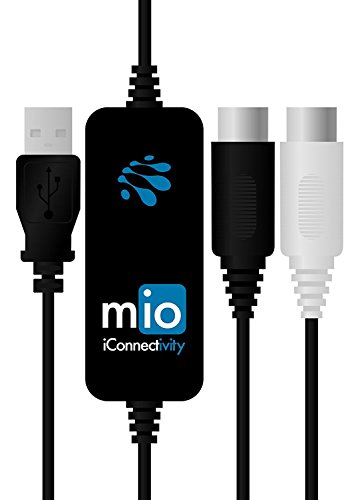
The iConnectivity mio offers native Mac compatibility with a simple, driverless setup. It supports 1-in, 1-out MIDI and emphasizes plug-and-play usability across macOS versions. The device promises ultra-low latency, ensuring responsive feel when playing virtual instruments or recording MIDI parts into a Mac-based DAW. The iConnectivity line is known for broad OS compatibility, making this unit a practical choice for Mac users who may also switch between devices or collaborate with others using different platforms.
Because it aims for minimal setup friction, this interface is well-suited for home studios, classrooms, or stage rigs where quick configuration is important. It’s a straightforward tool for connecting keyboards, controllers, and other MIDI devices to a Mac without becoming a bottleneck in the workflow.
Key considerations for this model
- Pros: Driverless on macOS, ultra-low latency, easy setup
- Cons: Limited to 1-in/1-out; lacks more advanced routing found in higher-end models
FORE T1 Type-C to MIDI Interface
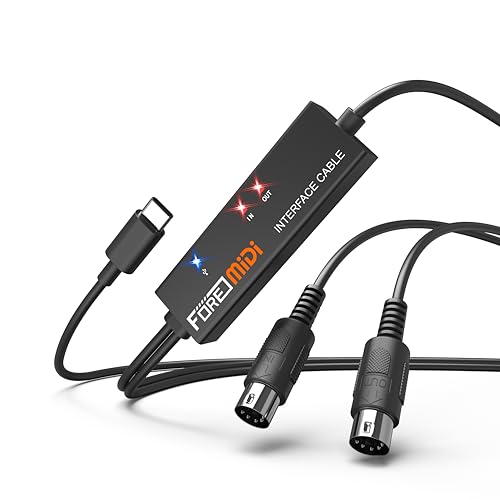
FORE’s T1 Type-C to MIDI Interface provides a compact, plug-and-play USB-C MIDI link suitable for Mac users. It features 1-in/1-out MIDI with 16 MIDI channels, enabling reliable data transmission for keyboards, synthesizers, and other MIDI devices connected to a Mac or iOS device. Built-in LED indicators simplify status checks, and the device highlights fast, delay-free MIDI input and output thanks to a capable processing chip. It’s designed for seamless work with common DAWs and MIDI software, with broad compatibility across GarageBand, Cubase, FL Studio, and other tools often used on Mac systems.
Designed for modern devices, the FORE T1 emphasizes ease of use, portability, and dependable performance in small to mid-sized setups. The LED indicators provide at-a-glance feedback during sessions, which can help with troubleshooting during recording or live performances. This model suits Mac users who want a reliable, no-fuss MIDI bridge to their studio software and hardware.
Key considerations for this model
- Pros: Plug-and-play, clear LED indicators, strong compatibility
- Cons: Basic feature set; lacks some advanced routing found in higher-end CME and iConnectivity models
Buying Guide: Key Purchase Considerations
- Compatibility and driver needs: macOS compatibility varies. Driver-free (class-compliant) devices offer the easiest setup, while some units provide extended software for routing and mapping.
- Latency and jitter: Low-latency performance is essential for real-time playing and recording; look for devices highlighting ultra-low latency.
- Routing capabilities: If you work with complex setups, routers, mappers, and filters can save time and reduce MIDI collisions.
- Standalone vs. computer-connected use: Standalone MIDI interfaces can operate without a computer, which can be useful for live rigs or studio environments.
- Connectivity options: USB-C is ideal for newer Macs; some devices also offer USB-A compatibility or multiple ports for future expansion.
- Build quality and support: Consider brand reputation and after-sales support, especially for professional use or performances.
- Portability: For mobile studios or traveling setups, a compact, lightweight unit can be advantageous.