Answering the question for mainstream PC builders: you want a mid-range power supply that balances efficiency, protection, and modularity without breaking the bank. These five models are suited for standard gaming rigs, creative workstations, and upgrade paths that don’t require the highest wattage. The list favors solid 80 Plus certifications, robust protection, and reasonable warranty terms. Readers will find who each unit is best for and why, plus practical buying tips to compare options side by side.
| Product | Wattage | Certification | Modularity | Notable Benefit |
|---|---|---|---|---|
| Thermaltake Smart 600W | 600W | 80 Plus | Non-modular | Good for mid-range builds with standard components |
| Thermaltake Smart 500W | 500W | 80 Plus | Non-modular | Compact, quiet cooling for smaller systems |
| MSI MAG A750GL | 750W | 80 Plus Gold | Fully modular | Ideal for mid/high-end GPUs and PCIe 5.0 readiness |
| MSI MAG A850GL | 850W | 80 Plus Gold | Fully modular | Headroom for power-hungry builds with future upgradability |
| ASRock PRO 750G | 750W | 80 Plus Gold | Non-modular | ATX 3.1 compatibility with solid efficiency |
Thermaltake Smart 600W ATX 12V PSU

The Thermaltake Smart 600W delivers 600W continuous output with a plus 40°C rating, and it aligns with Intel ATX 12V 2.31/EPS 12V 2.92 standards. It is 80 PLUS certified, offering up to 80% efficiency under typical load, with active PFC for power factor correction. This model is best for mainstream builds that require steady, efficient power without modular cabling. It supports two PCIe 6+2 pin connectors. A potential limitation is its non-modular design, which can affect cable management in compact cases. Suitable for: standard gaming rigs and compact desktops that don’t require extensive cable customization.
Thermaltake Smart 500W PSU

This 500W Thermaltake model provides continuous 500W output at 40°C and complies with ATX 12V 2.31 and EPS 12V 2.92 standards. It is 80 PLUS certified with about 80% efficiency under typical load and includes two PCIe 6+2 connectors. The power supply uses active PFC and has an MTBF around 100,000 hours. Best for smaller or mid-range builds where space is at a premium and a quieter, reliable PSU is desired. Note: non-modular design may complicate cable routing in larger cases.
MSI MAG A750GL PCIE5 PSU

The MSI MAG A750GL is an 750W, 80 PLUS Gold certified, fully modular power supply. It is designed for ATX 3.1 compatibility and PCIe 5.1 readiness, with a native dual-color 12V-2×6 cable and a 10-year warranty. This unit is best for mid-to-high-end builds that anticipate future PCIe 5.0 graphics upgrades and require clean cable management. Limitation: higher wattage may be overkill for very modest systems, increasing upfront cost.
MSI MAG A850GL PCIE5 PSU

The MSI MAG A850GL offers 850W of output with 80 PLUS Gold certification and full modularity. It is built to support ATX 3.1 and PCIe 5.1, with a dual-color 12V-2×6 connector and a long warranty. This is best for power-hungry systems, multi-GPU aspirations, or future-proofing a high-end build. Caution: consider the exact power needs of your GPU and CPU to avoid overbuying wattage in a mid-range setup.
ASRock PRO 750G Power Supply
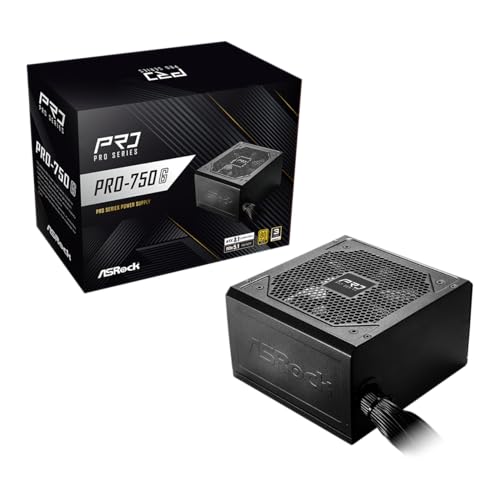
The ASRock PRO 750G is a 750W, 80 PLUS Gold certified power supply with ATX 3.1 compatibility and PCIe 5.1 readiness. It features a native 12V-2×6 connector and a 120mm low-noise fan for cooling. This option is best for users seeking modern standard compliance and reliable efficiency in a mid-range build. Limitation: it is non-modular, which may reduce cable management flexibility in tight builds.
Buying Guide: Key Purchase Considerations
- Wattage needs: Estimate total system draw, including GPU, CPU, drives, and peripherals. Choose 20-40% headroom for future upgrades.
- Efficiency certification: Prefer 80 PLUS Gold or higher for better long-term energy use and cooler operation.
- Modularity: Fully modular units simplify cable management in mid-tower or small form factor builds. Non-modular units can be adequate for simple builds.
- Protection features: Look for OVP, UVP, OPP, SCP, and short-circuit protection to guard components.
- Compatibility: Confirm ATX 3.1 readiness, PCIe 5.0 compatibility, and native 12V connectors if you plan future graphics upgrades.
- Warranty and durability: A longer warranty signals confidence in long-term reliability; MTBF figures are helpful for comparing expected lifespan.
Frequently Asked Questions
- What does 80 PLUS Gold mean for a mid-range PSU?
It indicates higher efficiency under typical loads, which can reduce heat and electricity usage over time. - Is modular cabling important for a mid-range build?
Modular designs simplify cable management and airflow, especially in smaller cases, but non-modular units can be cheaper. - How much wattage should I choose for a mid-range gaming PC?
Consider your GPU and CPU TDP plus potential future upgrades; 600-750W is common for many mid-range builds. - Should I prioritize ATX 3.1 or PCIe 5.1 readiness?
If you plan to upgrade to next-gen GPUs or power-hungry RTX/AMD cards, ATX 3.1 and PCIe 5.1 support help future-proofing. - What is a realistic warranty period for a mid-range PSU?
A 5-10 year warranty is typical and indicates durable component quality for standard builds. - Are non-modular PSUs still a good option?
They can be fine for simple builds, but cable management is harder in tighter spaces.