Answering the common question, which USB to 3.5mm adapter fits my mic and headphone needs? This guide highlights five reliable options that add USB-powered audio input and output to laptops, desktops, gaming consoles, and more. Ideal for creators, students, gamers, and professionals who need simple, driver-free compatibility. The top picks below are chosen for broad compatibility, clear sound, and easy setup.
Summary table of selected products:
| Product | Best For | Key Benefit |
|---|---|---|
| MOSWAG USB to 3.5mm Jack Audio Adapter | Multimedia users needing combined mic and audio out | Support for CTIA/OMTP with stable 16-bit/48kHz audio |
| Fidioto USB to 3.5mm Audio Jack Adapter | Hi-fi sound enthusiasts | EMI shielding for stable performance |
| 3.5mm AUX to USB OTG Car Cable | Car setups with decode-enabled aux | Car-specific use, designed for aux ports with decode function |
| USB Audio Adapter by biaze | Windows/mac/Linux across devices | Crystal-clear DAC and noise reduction |
| SABRENT USB External Stereo Sound Card | Plug-and-play on Windows & Mac | Reliable, widely compatible external sound card |
MOSWAG USB To 3.5mm Jack Audio Adapter

- Designed as a USB external sound card that adds a 3.5mm TRRS port for microphone-in and audio out.
- Built-in DAC chip supports CTIA and OMTP headsets with 16-bit/48kHz audio and noise reduction.
- Broad compatibility: Windows, Mac, Linux, Chromebook, Raspberry Pi, PS4/PS5, and more.
- Best for users needing combined mic and headphone support without installing drivers.
- Limitation: The 3.5mm microphone jack may not support TS or TRS connectors.
Best for: Creators and students who want plug-and-play USB audio using a single 3.5mm TRRS jack. It’s particularly helpful when your device lacks a dedicated mic input or a reliable headset port.
Fidioto USB To 3.5mm Audio Jack Adapter
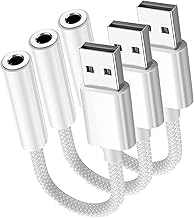
- USB to 3.5mm adapter with integrated microphone-in and audio out, supporting dual functions.
- Electromagnetic interference shielding aims to reduce static and noise, improving listening clarity.
- Hi-Fi sound features a smart DAC for high-speed decoding and restored audio quality.
- Best for: users seeking cleaner audio in environments with potential interference and for general PC or console use.
- Limitation: It does not support TS, TRS, and requires a TRRS-compatible headset.
Why chosen: It emphasizes robust noise reduction and clear sound, making it a solid pick for multimedia work and gaming where interference can be an issue.
3.5mm AUX to USB 2.0 OTG Car Cable

- Special-purpose cable for cars with AUX IN and audio decode function; supports music playback from a USB drive.
- Compatibility note: Not an all-around audio cable; car port must have audio decode capability.
- Best for: car owners who need a simple USB-to-AUX setup when the car supports decode in its AUX port.
- Limitation: Not universally compatible with all cars or audio sources; verify decoder function before purchase.
Choosing this: Use only if your car’s AUX port explicitly supports decode functions; otherwise, a standard USB audio adapter is often more reliable.
USB Audio Adapter USB Sound Card (biaze Store)

- USB stereo sound card that extends 3.5mm mic input and speaker output via USB.
- Supports CTIA jacks and works with Windows, Mac OS X, Linux, Chromebook, Raspberry Pi, PS4/PS5.
- Built-in DAC delivers high-resolution audio with noise reduction up to 16bit/48kHz.
- Best for: those who want a universally compatible external sound card across multiple OSs.
- Limitation: Some configurations may require careful driver handling for niche devices; driver-free is favored but not guaranteed on all systems.
When to choose: Ideal for replacing a faulty built-in sound card or expanding port availability on multi-OS setups.
Sabrent USB External Stereo Sound Card

- Plug-and-play USB audio adapter for Windows and Mac with 3.5mm headphone and mic jacks.
- No driver installation required in many cases; supports simple setup across devices.
- Best for: users who want a dependable, widely compatible external sound card for daily use.
- Limitation: Some advanced features or unique hardware configurations may require drivers on certain systems.
Why selected: It provides reliable cross-platform compatibility and a straightforward setup, making it a good baseline option for most users.
Buying Guide
What to consider when choosing a USB to 3.5mm adapter
- Device compatibility: Ensure the adapter supports your operating system and hardware (Windows, Mac, Linux, PS4/PS5, Raspberry Pi, etc.).
- Input/output needs: If you need both mic input and headphone output, look for a USB audio adapter with a TRRS jack.
- Audio quality: A built-in DAC and support for 16-bit/48kHz offer clear, stable sound; EMI shielding helps minimize interference.
- Car use vs. computer use: Car adapters may specify decode functionality; they are not universal audio solutions for all vehicles.
- Driver requirements: Prefer driver-free options for quick setup, but verify compatibility with your system if you have niche configurations.
How to choose by scenario
- For gaming and streaming: Choose an adapter with robust noise reduction and reliable mic input, such as MOSWAG or biaze options.
- For travel or education: A compact, driver-free model with wide OS support is ideal.
- For car audio: Only select a USB-to-aux adapter designed for car AUX ports with decode capability if your car supports it.
Frequently asked questions
- Do USB to 3.5mm adapters require drivers? Most offer plug-and-play, but some systems may need drivers for full functionality.
- Can I use these adapters for both mic input and headphone output at the same time? Yes, many TRRS-compatible adapters support both simultaneously.
- Will all headsets work with these adapters? Most CTIA-standard headsets will, but some non-standard jacks or TS/TRS plugs may not.
- Are there compatibility issues with Linux or Raspberry Pi? Some adapters work out of the box; others may need minimal configuration.
- Is EMI shielding important for audio quality? It helps reduce interference, improving stability in noisy environments.
- Can I use these adapters with car stereos? Only if the car’s AUX port supports decode and is compatible with a USB-to-AUX setup.