Answering your VR headset mic needs, these options cover attachable boom mics, replacement mics for popular headsets, and USB or 3.5mm solutions. The best picks suit streamers, casual gamers, and immersive VR enthusiasts seeking clear voice pickup in virtual environments. Below is a quick summary of five strong choices and who they’re best for.
| Product | Best For | Key Benefit |
|---|---|---|
| Antlion ModMic Wireless | PC/mac users, streamers | Wireless attachable mic with high-quality audio |
| MJKOR Replacement Mic | Razer Barracuda X owners | Simple, compatible replacement mic |
| J.M.SHOW Replacement Mic | Logitech G PRO X series | Reliable, adjustable detachable mic |
| DMXY VR-1S Binaural | ASMR/3D audio fans | Binaural stereo for spatial effects |
| Antlion ModMic Uni 2+ | PCs, consoles, VR | Inline mute and versatile 3.5mm connection |
Antlion Audio ModMic Wireless Attachable Boom Microphone
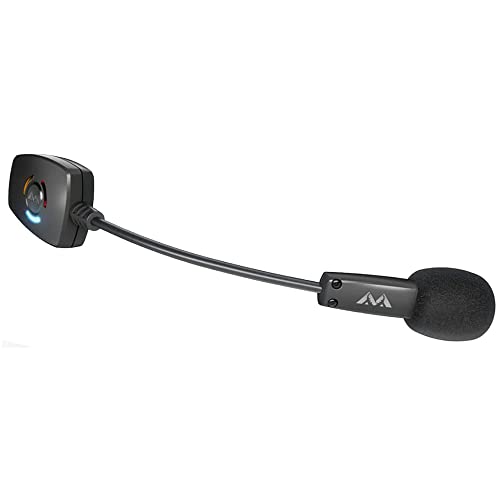
The ModMic Wireless attaches to any headphones, VR visor, or flat surface using a patented magnetic clasp. It is ideal for buyers who want a removable, desk-ready mic without sacrificing headphone versatility. This model is best for PC, Mac, Linux, PS4, and other USB-A devices, offering desktop-level audio with no wires.
Why it’s selected: It provides a professional audio profile (16bit 48kHz) with faster transmit speed than typical Bluetooth mics, supporting streaming and competitive gaming. The dual mic modes let you switch from directional noise cancellation to a higher-quality recording setting, depending on the situation.
Caution: Wireless performance can depend on your environment and USB bandwidth; ensure your USB port and dongle placement minimize interference.
MJKOR Replacement Mic for Razer Barracuda X

Best for Barracuda X owners seeking a straightforward, plug-and-play replacement mic. This option emphasizes compatibility with the Barracuda X headset and offers a 3.5mm gold-plated jack for clear signal transmission.
Why it’s selected: Its detachable mic design makes it easy to replace damaged components without buying a full headset. The clear sound focus suits players who need dependable voice pickup in VR chats.
Caution: Limited to Barracuda X compatibility; not suitable for other headset models without adapters.
J.M.SHOW Replacement Game Mic for Logitech

Best for Logitech G PRO X2 and G PRO X Wireless users needing a spare microphone with reliable performance. The mic matches the popular Logitech shells and includes a windscreen for cleaner voice capture in VR sessions.
Why it’s selected: It provides a 1:1 size with compatible jacks and a robust build, allowing comfortable positioning and easy replacement when needed.
Caution: Only fits specific Logitech models; not a universal replacement for all headsets.
DMXY Binaural ASMR VR-1S Microphone

Best for ASMR creators and VR enthusiasts who want immersive spatial audio. The DMXY VR-1S provides binaural recording, which can create a realistic sense of space in VR environments and streams.
Why it’s selected: The dual-ear stereo setup captures depth cues that standard mics may miss, making it a standout for content that relies on precise spatial audio cues.
Caution: Larger footprint than single-ear mics; may require careful placement for best stereo balance.
Antlion Audio ModMic Uni 2+ Attachable 3.5mm Mic
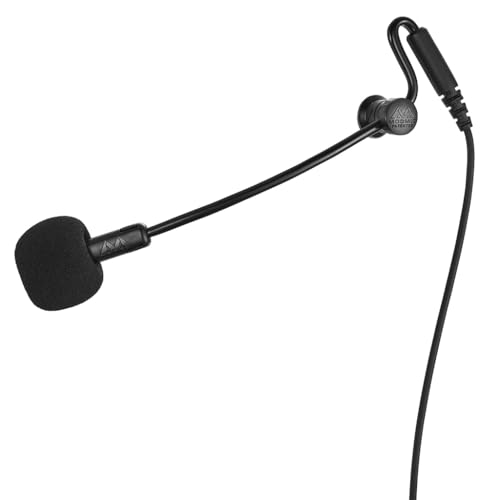
Best for users who want a uni-directional, noise-canceling mic with inline mute. It supports PC, console, laptop, and VR usage thanks to its 3.5mm termination and compact capsule.
Why it’s selected: The inline mute switch adds quick control during VR sessions, and the uni-directional capsule helps reduce ambient noise for clearer voice pickup.
Caution: 3.5mm termination may require adapters for some devices; verify compatibility with your VR ecosystem before purchase.
PDEEY Detachable Headset Microphone Replacement

Best for Oculus Quest 2, PS4/PS5 headsets, and other gaming rigs that use a 3.5mm mic. The PDEEY mic is a versatile replacement suitable for several headset families.
Why it’s selected: Its broad compatibility and detachable design make it a practical upgrade for VR players who want a reliable voice mic without changing headsets.
Caution: Functionality can vary by headset model; confirm jack compatibility and any required adapters for VR uses.
Buying Guide
What type of mic should you choose for VR? Decide based on how you play and where you’ll use the mic. Attachable boom mics like the ModMic Wireless are ideal for users who want a single mic that travels between headphones and VR visors, while replacement mics are best when you own a headset you love and need a reliable spare or upgrade. For immersive VR experiences, consider binaural mics to capture spatial audio for streams or recordings. If you need on-the-fly mute control, inline mutes on Uni models offer quick access without removing the mic.
Connectivity matters too. Wireless mics reduce cable clutter but can introduce latency or interference in busy setups. USB-C or 3.5mm terminations align with PC, VR rigs, or consoles, but verify compatibility with your specific headset and console ecosystem. Consider mic pickup pattern: uni-directional caps capture mainly the voice in front of you, while multi-directional or binaural mics capture more ambient sound, which may be desirable for certain VR recording styles.
Durability and ease of use are practical concerns. Detachable mics simplify replacement if a mic fails or gets damaged. Inline mute switches provide quick control during live sessions. Weight, balance, and windscreen filters affect comfort during long VR sessions, so factor these into your decision when choosing a mic that attaches to your headset or VR visor.
FAQ
- What makes a VR microphone different from a regular gaming mic? VR mics are chosen for compatibility with headsets and VR visors, with options for detachable, wireless, or inline-muted designs to minimize cable clutter and adapt to VR use cases.
- Is wireless better for VR than a wired mic? Wireless can reduce cable clutter and improve headset movement, but may introduce latency or interference. Wired mics offer stable, instant audio transmission but require cable management.
- Can I use a standard USB mic with VR headsets? Some VR systems support USB mics, but check compatibility with your specific headset and platform. Adaptors may be needed for certain connections.
- What should I consider for voice clarity in VR chat? Look for a mic with noise rejection or directional pickup, and consider a windscreen or pop filter to reduce plosives in close VR conversations.
- Are replacement mics compatible across brands? Replacement mics are usually brand- or model-specific. Verify the jack type (3.5mm vs USB-C) and the headset model to ensure proper fit.
- Do VR mics require phantom power? Most consumer VR mics do not require phantom power; condenser mics that need it are typically larger studio setups, not common in VR headsets.