Answering the question “which mesh network access points should I buy?” this guide highlights five top options for American homes and small offices. These picks are suitable for different needs—from budget-conscious setups to high-end multi-room homes with heavy streaming and smart devices. Each product is explained with who it’s best for, plus a realistic trade-off to help you choose confidently. A compact buyer’s table follows to compare core specs at a glance.
| Product | Best For | Key Benefit |
|---|---|---|
| Deco 7 Dual-Band BE5000 WiFi 7 Mesh | Medium to large homes needing strong coverage | WiFi 7 with robust backhaul options |
| Deco 7 Pro Tri-Band BE10000 | Power users needing top performance | Tri-band WiFi 7 with high throughput |
| TP-Link Deco X55 AX3000 | Budget-friendly Sweet Spot | WiFi 6 mesh with solid coverage |
| Omada 7 BE5000 Wireless AP | Small businesses or tech-savvy homes | Centralized management, WiFi 7 |
| TP-Link Deco 7 Pro BE17000 | Premium multi-room homes | Tri-band with 10G wired backhaul options |
Deco 7 Dual-Band BE5000

Product overview: Deco 7 Dual-Band BE5000 is a WiFi 7 mesh system designed for high-speed home networks. It supports multiple backhaul configurations, enabling strong coverage up to several thousand square feet. Best for homes with a mix of streaming, gaming, and smart devices, especially where a straightforward 2-package setup fits the budget.
Who it’s best for: Homes needing solid WiFi 7 performance with flexible wired backhaul, and users who value AI-driven roaming and a robust home network security suite.
Limitations: Dual-band design may offer less aggressive performance in extremely dense device environments compared to more advanced tri-band options.
Deco 7 Pro Tri-Band BE10000
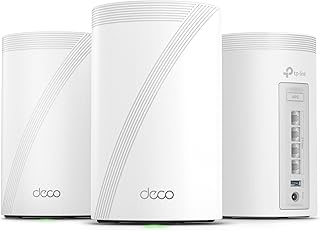
Product overview: Deco 7 Pro is a Tri-Band WiFi 7 mesh system designed for maximum throughput with multiple backhaul options. It features four smart internal antennas and 4 x 2.5G wired backhaul options, enabling strong performance in large homes or offices with many devices.
Who it’s best for: Households with very high bandwidth needs, 4K/8K streaming, gaming, and many smart devices across multiple floors.
Limitations: Higher price point and more complex setup may be unnecessary for smaller spaces or standard internet plans.
TP-Link Deco X55 AX3000

Product overview: Deco X55 is a WiFi 6 mesh system designed to replace traditional routers and extenders. It covers up to 6,500 square feet in a 3-pack and supports Ethernet backhaul. It balances cost and performance well for mid-sized homes with numerous connected devices.
Who it’s best for: Homes seeking a solid, budget-friendly mesh solution with broad coverage and reliable WiFi 6 performance.
Limitations: Lacks WiFi 7 capabilities; may not be future-proof for the very latest devices or extreme multi-user environments.
Omada 7 BE5000 Wireless AP

Product overview: Omada 7 BE5000 is a WiFi 7 dual-band access point designed for managed networks. It includes a 2.5G port and supports centralized management via Omada Cloud, offering features like Roaming, WPA3, and scalable deployment for homes and small businesses.
Who it’s best for: Tech-forward homes or small offices that value centralized management, predictable performance, and future-ready backhaul connectivity.
Limitations: Requires a compatible Omada management setup to unlock full benefits; standalone use is limited without the ecosystem.
TP-Link Deco 7 Pro BE17000

Product overview: Deco 7 Pro BE17000 is a premium Tri-Band WiFi 7 whole-home mesh system with a 10G RJ45/SFP+ combo port and multi-gig wired backhaul options. It aims to deliver very high throughput across large residences and demanding networks.
Who it’s best for: Large homes with many devices, home offices, or entertainment setups needing top-tier wired and wireless performance.
Limitations: Higher configuration and cost; may be more capability than needed for smaller dwellings.
Buying Guide: Mesh Network Access Points
Key considerations when choosing mesh access points include coverage area, backhaul options, WiFi standard, and network management. Consider how many devices you must support, whether you want a managed network for remote administration, and how future-proof you need the setup to be.
- Coverage and scale: Look for units that collectively cover your home size. If you have multiple floors or thick walls, prioritize systems with strong backhaul performance and optional wired backhaul (Ethernet) to maximize stability.
- WiFi standard and speed: WiFi 7 offers the latest features and the highest throughput potential, followed by WiFi 6/6E. If your internet plan is modest, a WiFi 6 system may suffice and save cost.
- Backhaul options: Wired (Ethernet) backhaul can improve reliability in dense networks. Wireless backhaul is simpler but can share bandwidth with client devices.
- Management and security: If you value centralized management, look for platforms that offer a cloud-based dashboard, roaming features, and security services (such as firewall, VPN, or parental controls).
- Future needs: For growing device counts, choose tri-band or higher systems and consider multi-Gig Ethernet ports for future broadband upgrades.
Frequently Asked Questions
What is the difference between WiFi 7 and WiFi 6 for mesh systems?
WiFi 7 offers higher theoretical speeds, more efficient multi-device handling, and advanced features like Multi-Link Operation. WiFi 6 can still deliver strong performance for typical households, often at lower cost.
Is a 3-pack enough for a two-story home?
Yes, a typical 3-pack covers many two-story homes, but larger residences or homes with thick walls may benefit from four or more units or wired backhaul.
Should I choose tri-band or dual-band mesh?
Tri-band systems better handle multiple devices and backhaul traffic, especially in dense networks. Dual-band units are usually more affordable and adequate for moderate use.
Do I need a managed network?
Managed networks are helpful for remote configuration, monitoring, and security features. They suit tech-savvy users or small offices.
Can I mix brands in a mesh network?
Mixing brands is generally not recommended due to roaming and compatibility differences. Use a single ecosystem for best seamless roaming.