Looking for a compact, numpad-free mechanical keyboard that still delivers a premium typing and gaming experience? This guide highlights five top options optimized for space-saving setups. Each pick targets a specific use case—portable workstations, dual-boot Mac/Windows, and gaming rigs—so you can choose the best fit for your desk, latency needs, and switch preferences. Below you’ll find quick comparisons, why each model stands out, and practical buying considerations.
| Product | Best For | Key Advantage |
|---|---|---|
| Kisnt KN85 Wireless Mechanical Gaming Keyboard | Small desks and hybrid work | Tri-mode connectivity and macro-ready |
| Redragon K552 Mechanical Gaming Keyboard | Gaming and quiet typing | Linear red switches with vibrant RGB |
| Keychron K8 Tenkeyless Wireless Mechanical Keyboard | Mac and Windows users with wireless needs | Dual connection modes and easy system switching |
| MageGee Mini 60% Gaming Keyboard | Ultra-compact setups | 61 keys and IPX4-friendly waterproofing design |
| Newmen GM611 Mechanical Keyboard | Budget-friendly 60% with vibrant backlight | 19 LED rainbow backlight effects |
Kisnt KN85 Wireless Mechanical Keyboard

The Kisnt KN85 uses a 75% layout, retaining essential keys including F1-F12, arrows, and shortcuts while omitting the right-side number pad. This makes it ideal for small desks, laptop setups, or users who want more desk space without sacrificing core functionality. The keyboard supports wired USB-C, 2.4GHz wireless, and Bluetooth 5.0 with three channels, allowing easy switching between Windows and Mac systems. When wired, it charges a built-in 4000mAh battery, enabling longer wireless use between charges.
Best for: compact office desks, multi-device users, and gamers who value space efficiency. The KN85 is chosen for its tri-mode connectivity and macro-ready software, which can boost productivity and playstyle acceleration. Caution: the driver is Windows-only in wired/2.4G mode, which may limit macro customization on other OS.
Redragon K552 Mechanical Gaming Keyboard

The Redragon K552 is an 87-key compact keyboard with linear red switches designed for smooth, rapid actuation and quiet operation. Its six dynamic backlighting modes deliver eye-catching visuals, with adjustable brightness for different lighting conditions. The keyboard supports software-driven customization for complex macros, enabling tailored workflows or game-specific configurations. This model is best for gamers who want a compact footprint without sacrificing competitive features. Limitation: rainbow backlighting on certain versions is fixed and does not support full software customization.
RK ROYAL KLUDGE R98 Pro Wired Keyboard

The R98 Pro is a 96% keyboard that retains a number pad while offering a gasket-mount design and hot-swappable pre-lubed linear switches for a creamy, thocky typing feel. It uses an MDA profile PBT keycap set for a wrapped, comfortable typing experience. Best for: users who want a near-full layout with a slim footprint and customizable switches. Caution: this model includes a number pad, which may not fit a strictly numpad-free requirement.
Keychron K8 Tenkeyless Wireless Mechanical Keyboard

The Keychron K8 offers a near-87-key layout with a white backlight. It supports macOS and Windows with included system-specific keycaps and multimedia controls. Dual connections include Bluetooth 5.1 for wireless multi-device use and USB-C wired mode for stable, low-latency performance. This model is best for Mac users who want seamless cross-platform use, with a straightforward setup and reliable wireless switching. Caution: some users may find the layout less familiar if they frequently rely on Apple-specific keys.
AULA F99 Wireless Mechanical Keyboard

The AULA F99 offers tri-mode connectivity—BT5.0, 2.4GHz, and USB-C—supporting up to five devices with quick switching. It is hot-swappable, allowing easy switch replacement and customization with pre-lubed linear switches for smooth keystrokes. With 16 RGB lighting effects and macro support, the F99 suits multi-device gamers and productivity users who want a highly configurable keyboard. Limitation: some features rely on the driver, which may affect full customization on certain systems.
MageGee Mini 60% Gaming Keyboard
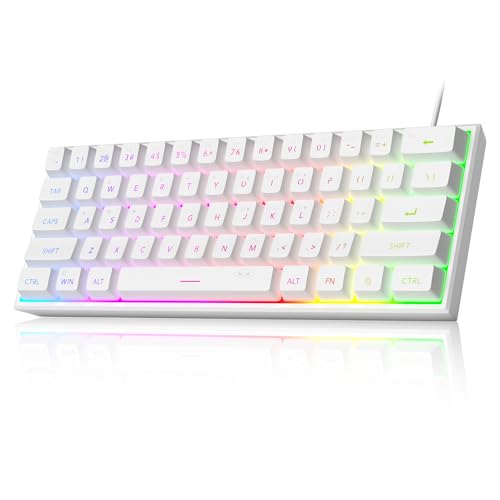
The MageGee Mini 60% is a compact 61-key keyboard emphasizing space savings. It features RGB backlighting with multiple modes and adjustable brightness, plus IPX4-friendly waterproofing for the non-exposed circuit board. It’s best for minimal desk setups and on-the-go gaming or typing where space is at a premium. Caution: 60% layouts require function-layer usage to access secondary keys, which may require a learning curve for some users.
Newmen GM611 Mechanical Keyboard

The Newmen GM611 is a compact 60% keyboard with rainbow backlighting and multiple LED effects. It uses 60% layout to optimize desk space while maintaining essential keys, making it suitable for gamers and typists who want a straightforward, space-saving design. It offers N-key rollover and anti-ghosting for accurate keystrokes during fast action. Best for: budget-conscious buyers seeking a compact, feature-rich start in mechanical keyboards. Caution: backlight modes may be basic on the lowest-cost version.
Buying Guide
What layout should I choose?
- 60% keyboards maximize space but require function-layer navigation for secondary keys. They’re ideal for very small desks or travel setups.
- 87-key or 75% layouts retain essential keys (navigation, F1-F12) while still skipping a full numpad, balancing usability and footprint.
What connectivity matters?
- Wired-only keyboards offer the most stable latency for gaming and work.
- Wireless keyboards with Bluetooth and/or 2.4GHz options reduce desk clutter but can introduce variable latency on some devices.
- Tri-mode setups (wired, 2.4GHz, Bluetooth) provide the broadest compatibility across devices and OSes.
What switch type should I choose?
- Linear switches are smooth and quiet, suited for gaming and long typing sessions.
- tactile or clicky switches offer feedback, which can improve typing accuracy for some users.
What about software and macros?
- Some keyboards offer macro support and per-key customization via proprietary software. Check OS compatibility and whether macOS support is limited in wired/2.4G mode.
- Driver availability can affect advanced customization; Windows often has broader support than macOS for some models.
What are the practical considerations?
- Desk space, portability, and whether you need multi-device switching.
- Keycap material (PBT vs ABS) and profile (OEM vs DSA vs SA) affect feel and durability.
- Backlighting and macro capabilities should align with your gaming or productivity needs.
FAQ
- What is a numpad-free keyboard good for?
- It frees up desk space, reduces cable clutter, and can improve ergonomic comfort on small desks.
- Are 60% keyboards harder to use?
- They require function-layer shortcuts for secondary keys but save substantial space and can be faster once learned.
- Do wireless keyboards have latency?
- Tri-mode keyboards can mitigate latency concerns by offering a wired option when needed.
- Which switches are quiet?
- Linear switches are generally quieter than tactile or clicky switches, but case and keycap materials also affect sound.