Finding the right stand for a MacBook Air can improve posture, reduce neck strain, and enhance cooling during long work sessions. The following picks focus on sturdy aluminum builds, adjustable heights, and travel-friendly designs that work well with MacBook Air models. Each option supports multiple angles and sizes, balancing stability with portability for desk and on-the-go use.
| Product | Brand | Key Benefit |
|---|---|---|
| RIWUCT Foldable Laptop Stand | RIWUCT | Adjustable height up to 7.48″, sturdy aluminum, foldable |
| Lamicall Adjustable Laptop Stand | Lamicall | Wide compatibility, large base, portable |
| BESIGN LS03 Aluminum Stand | BESIGN | Ergonomic elevation, strong aluminum, easy assembly |
| Bestand Laptop Stand | Bestand | High load-bearing, corrosion-resistant aluminum alloy |
| UGREEN Vertical Laptop Stand | UGREEN | Space-saving vertical design, adjustable width |
Below are five highly relevant options tailored for MacBook Air users, emphasizing stability, heat dissipation, and portability. Each product section includes a direct link to its Amazon listing, a quick visual, and a concise feature summary to help you compare at a glance.
RIWUCT Foldable Laptop Stand
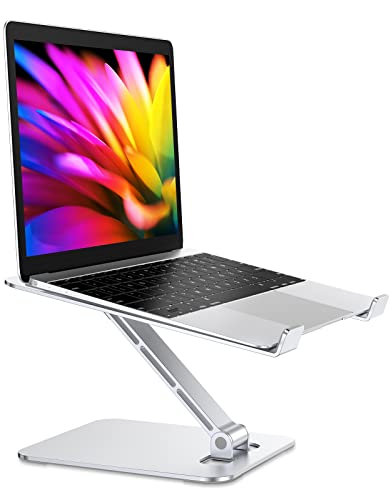
RIWUCT’s foldable stand uses an aluminum alloy frame to provide durability while keeping the unit lightweight. It raises the laptop up to 7.48 inches, with adjustable incline angles to fit different working postures. The design emphasizes stability, featuring four bottom silicone pads and non-slip straps to secure the laptop hands-free. A key benefit is improved cooling efficiency, since the open panel layout allows heat to vent more effectively than a flat base.
Lamicall Adjustable Laptop Stand

Designed for 10 to 17.3 inches, the Lamicall stand emphasizes a stable base and a lightweight, portable form. Its aluminum construction provides robust support for MacBook Air and other notebooks. Users can adjust height and angle for ergonomic viewing, and the larger base reduces any wobble during typing. The foldable design makes it convenient for travel, meetings, or moving between workstations.
BESIGN LS03 Aluminum Laptop Stand

The BESIGN LS03 elevates a laptop by about 6 inches, promoting an eye-level viewing position to help reduce neck strain. It supports laptops from 10″ to 15.6″ and uses premium aluminum alloy for a sturdy feel with anti-slip elements to prevent sliding. The stand is easy to detach and reassemble, which adds to its practicality for frequent movers or shared workspaces.
Bestand Laptop Stand

Bestand emphasizes high-strength construction with 7000-series aluminum for superior durability and corrosion resistance. It offers a wide loading capacity and compatibility with 11-16″ laptops, including MacBook Air and MacBook Pro. Ergonomics are addressed by elevating the screen to eye level, aiding posture during extended use. The materials and design prioritize long-term stability and gentle contact with the laptop to avoid scratches.
UGREEN Vertical Laptop Stand

This vertical stand is designed to save desk space by holding the MacBook Air vertically. Made from premium aluminum alloy, it ensures a stable base with no wobble. An extensible slot accommodates laptops up to 17.3 inches in thickness, providing flexibility for various devices. The upright design helps keep the laptop cool by reducing surface contact and promoting airflow around the device.
Buying Guide: Key Considerations For MacBook Air Stands
- Ergonomics and viewing height: Choose a stand that elevates the screen to eye level to reduce neck strain. Look for adjustable height and tilt to tailor to your posture and desk setup.
- Stability and footprint: A sturdy base and anti-slip pads prevent wobble during typing. If you have a small workspace, consider a compact or vertical model that still supports your MacBook Air securely.
- Material and heat dissipation: Aluminum stands often offer good heat conduction. Open designs or a minimal contact footprint help with ventilation and cooling, especially for warmer operating conditions.
- Compatibility: Ensure the stand supports 10–15.6 inches or more and works with MacBook Air models, including M-series variants. Some stands also accommodate tablets or other laptops.
- Portability: If you travel or move between rooms, prioritize foldable or lightweight options. A removable fold configuration eases packing in a bag or backpack.
- Durability and warranty: Aluminum builds generally resist wear over time. Check for edge protection and non-slip contact points to protect the device from scratches and scuffs.
- Integrated features: Some stands include docking capabilities or height presets. Weigh the value of these features against the need for clean cable management and desk space.
- Maintenance: Look for simple cleaning and minimal assembly. A stand that’s easy to disassemble helps when you need to transport or store it.
When selecting a MacBook Air stand, prioritize a balance between ergonomic comfort, stability, and portability. For a fixed home desk, a taller, sturdier aluminum stand with a wide base can improve posture and airflow. For travel or multi-room use, a foldable or compact option with a reliable locking mechanism can deliver consistent performance without bulk.