If you’re shopping for an M.2 to USB adapter, you’re likely seeking fast, tool-free NVMe access for quick transfers, backups, or external storage expansion. This guide highlights five top options that balance speed, ease of use, and broad compatibility. It’s ideal for creators, IT pros, students, and power users who need portable NVMe performance with minimal setup.
The following table summarizes the five highlighted products, including key strengths and ideal use cases. Use it to compare at a glance and then read deeper sections for in-depth comparisons.
| Product | Best For | Key Benefit | Notes |
|---|---|---|---|
| UGREEN SSD Enclosure | Power users needing 10 Gbps NVMe and broad OS support | Tool-free installation, 10 Gbps speeds with USB 3.2 Gen2 | Supports 2230–2280; up to 8 TB |
| Xiaobi M.2 NVMe Enclosure | Plug-and-play reliability with M-key/B+M Key | 10 Gbps USB 3.2 Gen 2; secure buckle; no tools | Doesn’t support SATA or M.2 with heatsinks |
| ELUTENG NVME to USB Adapter | Budget-conscious with strong USB 3.1 Gen 2 | 10 Gbps theoretical speed; JMS583 with UASP and TRIM | Supports 2230–2280; M-key only |
| KBR M.2 NVME USB 3.1 Adapter | High-speed, broad compatibility | 10 Gbps with USB 3.1 Gen 2 bridge | Requires M-Key or M+B; excludes SATA-only |
| Sabrent EC-SNVE | Ultra-portable tool-free enclosure | Tool-free, aluminum+ABS build; supports NVMe and SATA M.2 | Covers 2242–2280; SATA options included |
UGREEN SSD Enclosure, 10Gbps USB C NVMe to USB Adapter

Best for users who want maximum throughput and broad OS support in a tool-free design. This enclosure supports M, B, and M+B Key M.2 NVMe SSDs in sizes 2230, 2242, 2260, and 2280, with a theoretical transfer rate up to 10 Gbps using USB 3.2 Gen 2. Its tool-free assembly makes it a top pick for quick upgrades and swapping drives without tools. The 10 Gbps claim requires a USB-C 3.2 Gen2 cable and compatible ports. Best for: professionals transferring large media files or running fast portable OS environments. Limitations: not compatible with SATA NGFF or mSATA drives; the full 10 Gbps speed depends on host and cable.
- 10 Gbps NVMe enclosure with USB 3.2 Gen2
- Tool-free, plug-and-play installation
- Supports 2230/2242/2260/2280 SSDs up to 8 TB
Xiaobi M.2 NVMe Enclosure

This enclosure emphasizes a tool-free setup with a strong 10 Gbps USB 3.2 Gen 2 interface and a secure buckle mechanism. It supports M-Key and B+M Key NVMe SSDs in standard sizes 2230, 2242, 2260, and 2280, making it a flexible option for users who frequently swap drives. Note the enclosure is not compatible with SATA (NGFF) or mSATA drives, and some drives with heatsinks may require removal of the heatsink before use. Best for: users who want a quick, reliable plug-and-play experience and plan to move NVMe drives between devices often. Limitation: not suitable for SATA or heatsinked drives.
ELUTENG NVME to USB Adapter

ELUTENG’s adapter focuses on high-speed USB 3.1 Gen 2 with PCIe-based NVMe support. It’s designed for M-Key NVMe drives in sizes 2230–2280 and is compatible with USB 3.0/2.0 backwards. The device uses the JMS583 controller, offering UASP and TRIM, which helps reduce CPU load and maintain sustained performance. Best for: users who want strong performance on a tighter budget, especially when pairing with newer USB-C ports. Limitation: only supports M-Key NVMe; SATA or AHCI-based M.2 SSDs are not supported.
KBR M.2 NVME USB 3.1 Adapter
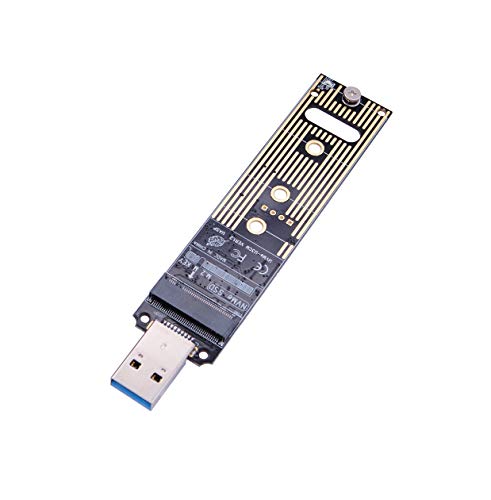
Designed for speed, this M.2 NVMe USB 3.1 Gen 2 adapter supports M-Key and M+B keys with PCIe NVMe drives. It promises up to 10 Gbps under ideal conditions and is positioned as a straightforward, high-performance solution for moving large files quickly. Best for: users who own NVMe M-Key drives and want a compact, fast external enclosure. Limitation: does not support SATA-based M.2 drives or B-Key-only configurations, which narrows compatibility for some older drives.
Sabrent USB 3.2 Type-C Tool-Free Enclosure

The Sabrent EC-SNVE enclosure focuses on tool-free installation and a slim, durable aluminum case with an ABS frame. It supports M.2 form factors that are NVMe or SATA in sizes 2242, 2260, and 2280. It’s ideal for travelers or students who want a compact, versatile option. Best for: users needing a portable, dual-protocol enclosure that can handle NVMe and SATA SSDs. Caution: SATA support is included, but double-check SSD compatibility if you rely on NVMe-only performance.
FIDECO M.2 NVMe Enclosure

FIDECO emphasizes a sandwich-style design that facilitates tool-free installation and efficient heat transfer through a secure, multi-layer setup. It supports M-Key and M+B Key NVMe SSDs in 2230–2280 sizes, with USB 3.2 Gen 2 10 Gbps speeds and UASP/TRIM functionality. Best for: users who want excellent cooling and easy swapping for different NVMe sizes. Limitation: does not support SATA-based M.2 SSDs, which may limit some users with mixed drive types.
Lemorele Aluminum M.2 NVMe Enclosure

Lynering–style reliability with a 10 Gbps USB 3.2 Gen2 Type-C connection, Lemorele targets NVMe PCIe M-Key SSDs across sizes 2230–2280. It emphasizes tool-free installation and TRIM/UASP support, focusing on stable, high-speed external NVMe operation. Best for: users who want a rugged, straightforward enclosure for frequent drive swapping. Limitation: only NVMe drives are supported; SATA drives are not compatible.
AMZPILOT M.2 NVMe & SATA to USB C Dock

AMZPILOT offers a docking approach that handles both NVMe and SATA NGFF M.2 SSDs, with support for M-Key, B+M Key, and varying sizes up to 2280. It provides 10 Gbps NVMe speeds and 6 Gbps SATA/NGFF through USB 3.1 Gen 2. This makes it a flexible choice for mixed-drive environments. Best for: users who need a single adapter to connect NVMe and SATA M.2 drives. Limitation: dual-protocol support can complicate driver and compatibility expectations on some systems.
Buying Guide: What to Consider When Choosing an M.2 to USB Adapter
- Drive type compatibility: Confirm NVMe vs SATA support. Most fast enclosures support NVMe (M-Key or B+M Key), but many do not support SATA-based M.2 drives. If you need SATA support, look for models marketed as NVMe/SATA or offering dual protocol compatibility.
- Key compatibility and sizes: Ensure the device supports M-key, B-key, or B+M Key as required. Check that 2230, 2242, 2260, and 2280 sizes are supported by your SSD. Larger drives may require more robust enclosures.
- Speed and protocol: Target USB 3.2 Gen 2 with NVMe for up to 10 Gbps in theory. Real-world speeds depend on the SSD, USB-C port, and host controller. USB 3.2 Gen 1 or USB 3.0 adapters will be slower but may offer price advantages.
- Tool-free installation: If you swap drives often, prioritize tool-free designs with secure buckles or snap mechanisms. This reduces downtime and risk of over-tightening.
- Cooling and thermal design: For NVMe drives under load, consider heatsinks or reinforced enclosures that promote better cooling to prevent throttling during long transfers.
- Cross-OS compatibility: Most enclosures support Windows, macOS, Linux, and Android. If you need mobile use with Android or iOS devices, verify compatibility and required adapters or file systems.
- Portability vs. durability: Aluminum or reinforced plastic cases offer better durability for travel. Lightweight options are easier to carry but may be less rugged.
FAQ
- What is the main difference between USB 3.2 Gen 2 and Gen 3.2?
Answer: Gen 2 refers to up to 10 Gbps transfer speeds. Gen 3.2 improves signaling efficiency but to achieve similar speeds you still need compatible hardware and cables. - Can I use an NVMe enclosure with a SATA M.2 SSD?
Answer: Not typically. NVMe enclosures rely on PCIe NVMe protocols; SATA-based M.2 drives require SATA-compatible enclosures or adapters. - Do I need a heatsink for my NVMe drive in an external enclosure?
Answer: Not always, but high-performance or sustained workloads can benefit from improved cooling to prevent thermal throttling. - Will these adapters work with Mac and Windows?
Answer: Most listed options advertise cross-OS compatibility, but you may need to format drives to appropriate file systems for each OS. - Is tool-free installation as reliable as tool-required?
Answer: Tool-free designs are convenient and generally reliable, especially for swapping drives, but ensure a secure fit to avoid disconnections during use. - Do these adapters require drivers?
Answer: In most cases, these are plug-and-play and require no extra drivers. Some systems may need minor platform-specific steps for formatting or USB-C settings.