Looking for an affordable 3D printer that still offers solid performance? This guide highlights five budget-friendly options that deliver reliable printing without breaking the bank. It’s ideal for hobbyists, students, educators, and makers who want to explore 3D printing with minimal upfront risk. Each option is evaluated for ease of use, speed, reliability, and best use case to help you decide which model fits your projects and skill level.
Summary table of selected products:
- FLASHFORGE Adventurer 5M: Auto leveling, ultra-fast coreXY design, high-temp capabilities — best for rapid prototyping and high-speed hobby projects.
- Creality Ender 3 V3 SE: High-speed printer with Sprite extruder and auto-leveling — best for beginners who want simple upgrades over time.
- Creality Ender 3 Series with Direct Drive: Reliable all-rounder with auto bed leveling and quiet operation — best for a steady, consistent printing experience.
- Portable 3D Printer (Generic): Ultra beginner-friendly, plug-and-play — best for absolute beginners and classroom demos.
- Longer LK5 Pro: Large build volume and strong stability — best for bigger projects and entry-level open-source enthusiasts.
FLASHFORGE Adventurer 5M 3D Printer

The FLASHFORGE Adventurer 5M is designed for fast, hassle-free printing with automatic bed leveling and a CoreXY architecture. This model is best for users who need high-speed prototyping and consistent first-layer adhesion. The auto-leveling feature reduces setup time and minimizes manual calibration, making it ideal for students, educators, and busy makers who want dependable prints with minimal tinkering.
- Best for rapid prototyping and small to mid-sized projects.
- One-click automatic printing with reliable bed leveling.
- Direct extruder capable of high-temp printing for versatile materials.
Key considerations: While the Adventurer 5M excels in speed and automation, enthusiasts should assess whether the build volume fits their typical projects and if the print surface remains consistent across varied filaments. A 3-second nozzle change and quick warm-up enhance workflow, but larger or more complex builds may require additional upgrades or a larger platform in future projects.
Creality Ender 3 V3 SE

The Ender 3 V3 SE brings faster printing to a budget-friendly package with a Sprite direct extruder and CR Touch auto-leveling. It’s well-suited for beginners who want reliable performance and a straightforward upgrade path. The V3 SE delivers higher speeds (up to 250 mm/s) while maintaining print quality, which helps reduce project turnaround times for school assignments or hobby builds.
- Best for beginners who want a simple upgrade path and faster prints.
- Sprite direct extruder improves filament handling and reduces slippage.
- CR Touch auto leveling simplifies setup and ensures consistent first layers.
Limitations: The V3 SE relies on a robust mechanical setup; users may eventually desire more expansion options or a larger enclosure for delicate models. Plan for occasional calibration checks to maintain peak performance as workloads increase.
Creality Ender 3 Series With Direct Drive
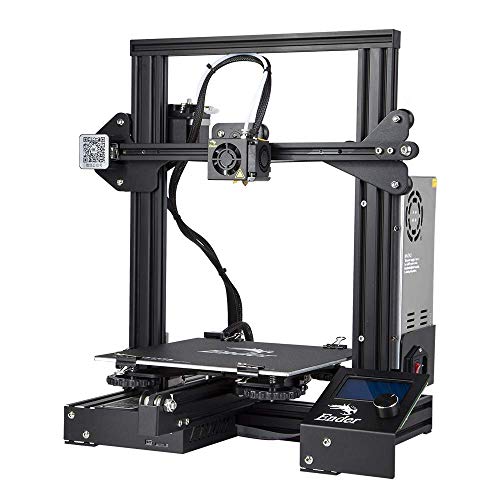
This Ender 3 variant emphasizes a direct-drive extruder and auto bed leveling for smoother, more reliable prints. It’s an accessible entry point for hobbyists who want dependable performance with less manual adjustment. The 220×220×270 mm build volume is a practical middle ground for small-to-medium projects and classroom demonstrations.
- Best for consistent, all-around printing without frequent manual fiddling.
- Direct drive extruder enhances compatibility with flexible filaments.
- Auto bed leveling reduces setup time and increases success on first layers.
Caveat: The Ender 3 series is popular for upgrades and mods; if you prefer a fully out-of-the-box experience, verify included features and consider a kit that matches your initial needs to avoid extra purchases right away.
Portable 3D Printer — Compact Model

This compact, beginner-friendly printer emphasizes ease of use and minimal setup. It ships ready-to-use with a removable build plate and basic compatibility with PLA and TPU. It’s ideal for classrooms, demonstrations, travel-friendly projects, and first-time users who want a straightforward introduction to 3D printing without a steep learning curve.
- Best for absolute beginners and quick-start demonstrations.
- Removable build plate for easier prints and fast cleanup.
- Includes starter filament and tools for immediate use.
Limitation: The small build volume (100x100x100 mm) may restrict larger or multi-part projects. It’s best suited for tiny models, prototypes, and learning exercises rather than production printing.
Creality Ender 3 / Pro / V2 Direct Drive Kit

This kit emphasizes upgrading older Ender 3 models with a direct drive extruder and Capricorn tubing for smoother extrusion and compatibility with a broader range of filaments. It’s best for hobbyists who own an Ender 3 and want to improve reliability, print quality, and ease of filament handling without purchasing a new machine.
- Best for upgrading existing Ender 3 systems for better control.
- Low-friction tubing and direct-drive upgrade improve extrusion performance.
- Widely compatible with common Ender 3 setups and filament types.
Note: This option assumes you already have an Ender 3 family printer and are comfortable performing upgrades. It is not a standalone beginner printer but a smart way to enhance an existing unit.
Longer LK5 Pro 3D Printer

The Longer LK5 Pro stands out with a large 11.8×11.8×15.7 inch build area and a stable triangular frame. This model is best for users who want a larger printing canvas at a budget-friendly price and value higher print stability for more ambitious, larger-scale projects. It’s particularly suitable for beginners who plan to scale up over time and explore bigger models.
- Best for users needing a larger build volume on a budget.
- Stable triangular frame reduces vibration and improves accuracy.
- Open-source-friendly motherboard and firmware support experimentation.
Limitation: A larger build volume may require more attentive maintenance and calibration to maintain precision across bigger prints. Ensure your workspace can accommodate the printer’s footprint and power needs.
Buying Guide
What should you consider when choosing a low-cost 3D printer?
- Print volume: Do you need small prototypes or larger models? Build volume directly affects what you can print without re-slicing or splitting parts.
- Bed leveling: Auto leveling helps beginners achieve reliable first layers. Manual leveling can work for more experienced users but adds setup time for new prints.
- Extruder type: Direct drive extruders handle flexible filaments better, while Bowden systems are common in budget printers and may suffice for rigid plastics.
- Print speed vs. quality: Higher speeds can reduce print quality if the machine isn’t tuned properly. Look for balanced specs and robust motion systems.
- Firmware and upgrade potential: Open-source boards and easy replacements support future enhancements and repairs.
- Ease of use: Quick-start guides, clear interfaces, and bundled filaments or tools improve the onboarding experience.
- Support and warranty: Budget printers vary in support quality. Check return policies and community resources for troubleshooting.
Frequently Asked Questions
- What is a low-end 3D printer best for?
Low-end 3D printers are best for beginners, students, and hobbyists who want an affordable entry point to learn basics, run simple projects, and test ideas before investing in higher-end equipment.
- Is auto bed leveling important for beginners?
Yes. Auto bed leveling reduces the time spent dialing in first layers and helps ensure consistent bed adhesion, which is especially helpful for new users who are learning print basics.
- Can I print with flexible filaments on budget machines?
Some budget printers with direct-drive extruders handle flexible filaments better, but overall printing with flexible materials may require upgrades or careful tuning.
- What build volume should I prioritize?
Choose build volume based on typical project size. Start with moderate sizes (about 100–220 mm in each dimension) and upgrade later if needed.
- Are larger budget printers ready out of the box?
Many larger-budget printers on a budget category require some assembly or initial calibration. Look for models with straightforward setup and good documentation.
- What maintenance should I expect?
Regular bed leveling checks, nozzle cleaning, and occasional extruder or belt adjustments help maintain print quality on budget machines.