Answering the question: which live streaming video cameras deliver reliable performance for different streaming needs? This guide highlights five strong options, covering solo vlogging, multi-angle shoots, and hands-free streaming. Ideal buyers include solo streamers, product presenters, fitness instructors, and small teams needing flexible setups. Below is a quick table of the chosen products to compare at a glance.
| Product | Brand | Type | Key Strength | Best For |
|---|---|---|---|---|
| 5K Video Camera Camcorder | FJFJOPK | 5K UHD Camcorder | 8x zoom, full-color night vision | Pro-style live streams and product showcases |
| EMEET PIXY Dual-Camera PTZ 4K | EMEET | Dual-Camera PTZ | AI tracking, fast focus 0.2s | Beauty demos, dynamic scenes |
| Mevo Start | Logitech G | Wireless Live Streaming | Smart app control, mobile streaming | On-the-go live events |
| EMEET PIXY Wireless 4K Dual-Lens | EMEET | Wireless Dual-Lens | AI tracking, gesture control | Hands-free multi-angle streams |
| AVKANS Go 4K Camera | AVKANS | 4K Wireless | Wide 90° angle, 9x zoom | Sports and live-action streaming |
5K Video Camera Camcorder With 8X Zoom

Product overview: UHD 5K video and 64MP photos with live streaming support. It includes remote control operation for hands-free broadcasting, preset focus points, and four optimized modes for different scenes. Best for professional-looking streams and product showcases in controlled environments. Notable features include 8X optical zoom with zone autofocus and a TOF laser assist for faster focusing in low light.
Who it’s best for: solo creators and small studios that need high-resolution output and reliable autofocus in varied lighting. The 64MP stills are a plus for content where image quality matters between streams. Caution: large file sizes may demand ample storage and bandwidth for real-time streaming; ensure compatible network conditions.
EMEET PIXY Dual-Camera PTZ 4K
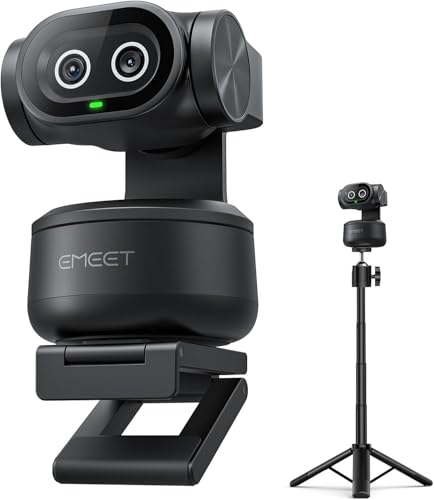
Product overview: A dual-camera AI-powered PTZ kit with PDAF focus, 1/2.55″ Sony sensor, and 310° pan/180° tilt. It tracks faces with high speed autofocus (0.2s) and supports gesture control for hands-free operation. The kit includes a tripod and enables precise framing in live streams or live commerce scenarios.
Who it’s best for: streamers who need fast, reliable tracking and the ability to switch angles without manual repositioning. Better for multi-angle presentations or beauty and fitness streams. Limitation: the dual-camera setup can be more complex to configure for beginners.
Mevo Start Wireless Live Streaming Camera

Product overview: 1080p HD live streaming with intelligent app control. It supports streaming from anywhere using Wi-Fi, Ethernet, or LTE and offers Auto-Director-like features via the companion app. It is designed for portability and straightforward setup for live events, conferences, and casual content creation.
Who it’s best for: creators who prioritize mobility and easy app-driven control. Choose this if you want to broadcast from multiple locations with minimal gear. Caution: 1080p, not 4K, which may be a consideration for ultra-high-definition streams.
EMEET PIXY Wireless 4K Dual-Lens

Product overview: A wireless dual-lens setup with automatic AI tracking and gesture control. It streams in 4K, supports multi-camera streaming with EMEET STUDIO, and allows direct streaming to multiple platforms. The dual-lens design improves tracking accuracy and framing for dynamic movements.
Who it’s best for: creators needing hands-free operation and freedom from cables for live sports or dynamic performances. Caution: wireless performance can depend on network stability; ensure a robust Wi-Fi or cellular link for best results.
AVKANS Go 4K Camera

Product overview: 4K wireless camera with a 90-degree wide-angle lens and 9X zoom. It supports multiple connection options including NDI, RTMP, RTMPS, SRT, HDMI, USB, and PoE. It suits streaming, recording, and live sports or home studio use. It can double as a USB webcam for quick setups.
Who it’s best for: sports and live-action streaming where a wide field of view plus strong zoom are beneficial. Limitation: Android compatibility is reported as not fully functional in some cases; verify device compatibility before purchase.
Buying Guide: How to Choose Your Live Streaming Camera
- Resolution vs. bandwidth. Higher resolutions deliver crisper images but require more upload bandwidth. If your internet limits live streams, prioritize 1080p or 4K with efficient encoding and adjustable output settings.
- Autofocus and AI tracking. For dynamic scenes, prioritize cameras with fast autofocus (0.2s or faster) and AI tracking to maintain subject framing without manual tweaks.
- Field of view and lens options. Wide-angle lenses are great for desk setups or group shots, while tele-zoom or multi-camera PTZ options help with alternative angles in a single stream.
- Wired vs. wireless. Wired connections offer stability; wireless setups provide mobility. Consider hybrid configurations where possible, especially for stationary home studios.
- Streaming platform compatibility. Ensure the device supports your primary platforms (YouTube, Twitch, Facebook Live, etc.) via RTMP, NDI, or native apps.
- Audio considerations. Built-in mics often need supplementary external mics for professional streams. Check mic quality and noise suppression features.
- Ease of use and setup time. If you’re new to streaming, choose devices with intuitive apps and clear presets to minimize configuration time.
- Storage and recording options. Some cameras support local recording to SD cards or external storage. Factor in your backup needs for offline editing or post-production.
What to Ask Before Buying
- Do you need 4K or is 1080p sufficient for your audience and platform?
- Will you stream from fixed locations or require portable setups?
- Is AI tracking essential for your content type (fitness, demos, talks) or is manual framing adequate?
- Do you require multi-camera angles in one stream, or is a single high-quality camera enough?
- What is your typical shooting environment (lighting, movement, indoor/outdoor) and how does the camera handle low light?
FAQ
- What is the difference between 4K and 1080p for live streaming? 4K provides more detail but requires higher bandwidth; 1080p is more broadly compatible and easier to stream reliably on average connections.
- Do these cameras work with common streaming platforms? Yes, most support RTMP or direct integration via companion apps for platforms like YouTube, Twitch, and Facebook Live.
- Is AI tracking necessary for product demos? It can help keep subjects centered and reduce manual panning, especially in dynamic scenes.
- Can I use these cameras as a USB webcam? Several models support USB webcam mode or can be used with streaming software via capture cards.
- What accessories should I consider? A stable tripod, external microphone, lighting, and a reliable network connection are key accessories for professional streams.
- How important is low-light performance? Low-light performance matters for indoor rooms or evening shoots; cameras with night-vision or strong ISO handling help maintain quality.