Finding a left-handed wireless mouse that fits your grip, posture, and work style can boost comfort and efficiency. This guide highlights top left-handed wireless mice designed for ergonomic support, reliable connectivity, and easy setup across Windows, macOS, and laptops. Each option emphasizes natural wrist alignment, precision, and responsive controls to help reduce strain during long work sessions.
| Product | Brand | Connectivity | Key Benefit |
|---|---|---|---|
| KUNSI Left Handed Mouse | KUNSI | 2.4G Wireless | Ergonomic vertical design for neutral handshake |
| Logitech Lift Left Vertical Ergonomic Mouse | Logitech | Wireless/Bluetooth | Compact fit with natural forearm posture |
| Lekvey Left Handed Ergonomic Mouse | Lekvey | 2.4G USB Receiver | Three DPI levels; quick navigation |
| Perixx Perimice-719L | Perixx | 2.4 GHz Wireless | Left-handed ergonomic vertical design |
| ELECOM EX-G Left Handed Trackball Mouse | ELECOM | 2.4 GHz USB Wireless | Trackball for reduced arm movement |
All five selections are designed to support left-handed users with ergonomic shapes, intuitive button layouts, and reliable wireless connections. They balance comfort and control for work, programming, design, and general computer use.
KUNSI Left Handed Ergonomic Wireless Mouse

The KUNSI left-handed ergonomic mouse is designed specifically for left-handed users, featuring a vertical orientation that promotes a neutral handshake position. This alignment helps reduce wrist strain during extended work. It uses a built-in 2.4GHz wireless connection with a reliable 10-meter working range and offers three adjustable DPI settings (800, 1200, 1600) to tailor sensitivity for precise cursor control. The thumb area and button layout are arranged for left-handed comfort, supporting MacBook, laptop, PC, and desktop setups.
Key features include: left-handed ergonomic vertical design, stable 2.4G wireless connection, and selectable DPI levels. It provides plug-and-play simplicity with no software required, making it suitable for users who value straightforward setup and consistent performance across different devices.
Logitech Lift Left Vertical Ergonomic Mouse

The Logitech Lift is designed to promote a natural forearm posture while resting the hand on a softly textured grip. It targets smaller to medium left hands, offering a compact yet supportive form with a snug thumb rest. The design encourages elevated wrist posture to reduce strain over long work sessions, and it includes multi-device compatibility through wireless or Bluetooth options. Quiet clicks and ergonomic shaping contribute to a comfortable all-day experience, suitable for office and home use.
Highlights include: vertical ergonomic design, left-handed suitability, and a focus on long-day comfort with thoughtful grip and posture support. Its versatility across devices makes it a flexible option for users who switch between laptops and desktops.
Lekvey Left Handed Ergonomic Wireless Mouse
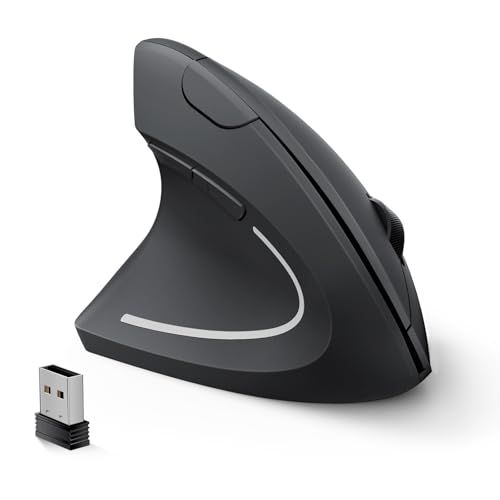
The Lekvey left-handed ergonomic vertical mouse emphasizes a natural neutral handshake posture to ease wrist and forearm strain. It provides a straightforward plug-and-play experience with a reliable USB receiver, delivering stable connectivity up to 10 meters. The device offers three DPI levels (1000, 1200, 1600) and forward/backward buttons for efficient web navigation. It’s designed to be comfortable for long sessions, whether at a desk or while traveling, and stores the USB receiver within the mouse body for convenience.
Notable aspects include: left-handed design, easy setup, three DPI settings, and forward/back buttons for improved navigation and productivity.
Perixx Perimice-719L Left Handed Wireless Vertical Mouse
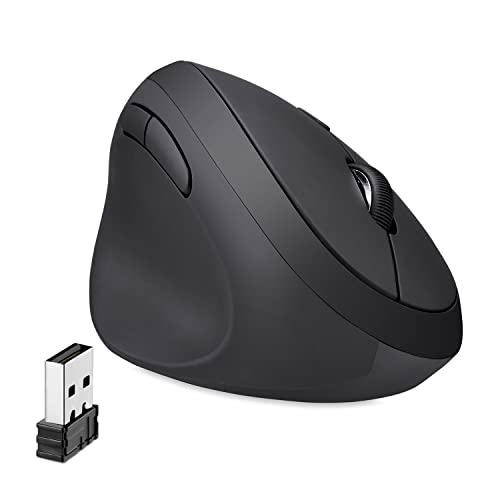
The Perixx Perimice-719L is a compact, left-handed vertical mouse ideal for small hands. It emphasizes an ergonomic vertical stance that reduces wrist strain and encourages a natural handshake position. Connectivity relies on a 2.4 GHz wireless receiver with a typical 10-meter range. A dedicated DPI switch enables quick changes among 800, 1200, and 1600 DPI, supporting both precise tasks and general navigation. It’s a plug-and-play device with a compact footprint for mobile work.
Key benefits include: left-handed vertical comfort, multiple DPI options, and a straightforward wireless setup for laptops and desktops.
ELECOM EX-G Left Handed Trackball Mouse

The ELECOM EX-G trackball mouse is a left-handed option that replaces traditional hand movement with a thumb-controlled trackball. This design minimizes arm and wrist motion, potentially reducing repetitive strain. It features six programmable buttons and a DPI range with selectable 750 and 1500, allowing quick adjustments for tasks ranging from web browsing to design. The wireless 2.4 GHz connection supports flexibility across workspaces and setups for left-handed users who prefer trackball input.
Considerations include: left-handed orientation, trackball ergonomics, programmable buttons, and DPI variations for precise control without relocating the entire arm.
Buying Guide
When choosing a left-handed wireless mouse, consider these key purchase factors to match your workflow and comfort needs:
- Ergonomic design and handedness: Look for vertical, curved, or trackball forms that align with a natural left-handed grip. Comfort shapes can reduce wrist and forearm strain after long sessions.
- Connectivity and compatibility: Verify 2.4 GHz wireless or Bluetooth options, plus compatibility with your devices (Windows, macOS, Linux, tablets). Ensure the receiver is easy to pair and that you can travel with it.
- DPI and precision: For tasks like design, gaming, or precise cursor control, choose a mouse with adjustable DPI (e.g., 800–1600 or higher) and responsive sensors.
- Buttons and navigation: Consider the number and placement of side, forward/back, and extra programmable buttons for your typical workflows (browsing, editing, coding).
- Battery life and charging: Rechargeable models reduce waste and downtime. Check whether the mouse supports quick-charging or USB-C charging for convenience.
- Portability vs. desktop use: Smaller mice are easier to travel with, but larger hands may benefit from more substantial builds. Evaluate your typical workspace size and mobility needs.
- Trackball vs. standard cursor: Trackballs can reduce arm movement but may require a learning curve. They suit users seeking minimized desk space and reduced repetitive motion.
- Software and customization: Some mice offer companion software for button mapping, sensitivity profiles, and trackball behavior. Determine whether you need advanced customization or plug-and-play simplicity.
To compare, map each option to your priorities: ergonomic alignment for left-handed use, simple setup, maximum portability, or advanced customization for professional tasks. The five selections above provide a cross-section of vertical, standard, and trackball designs, enabling an evidence-based choice for improved comfort and productivity.